Is Public Wi-Fi Safe in 2026? The Honest Threat Map
The FTC now says public Wi-Fi is usually safe. Here's what actually changed — and which threats still haven't gone away.
Back in 2014 everyone got the same advice — never connect to airport, cafe, or hotel Wi-Fi without a VPN. Twelve years later, the U.S. Federal Trade Commission's official consumer guidance page (last updated March 12, 2026) frames it the opposite way: "In the past, if you used a public Wi-Fi network to get online, your information was at risk. But things have changed. Most websites today use encryption to protect your information. Because of this widespread use of encryption, connecting through a public Wi-Fi network is usually safe." Same agency, same audience, opposite conclusion. So is public wifi safe now, or is the FTC being naive? The honest answer is in the middle — and the marketing-driven panic is the part that aged worst.
This post covers (1) why the 2014 threat model is mostly dead, (2) the threats that genuinely survived, (3) what WPA3 and OWE change at the network layer, (4) what VPNs actually do and don't, (5) official guidance from FBI, CISA, NSA, NIST, and FTC, and (6) a practical defense map ranked by effort-to-value. If you want to see what your own browser exposes before worrying about the network around it, our Browser Privacy Checker runs the diagnostics locally in your browser.
Why Is Public Wi-Fi Safer in 2026 Than It Was in 2014
The biggest shift is transport encryption becoming the default. On October 28, 2025, Google's Security Blog published HTTPS by default: web traffic moved from "around 30-45% in 2015" to "the 95-99% range around 2020," after which "progress has largely plateaued." Windows reaches 98%, and both Android and Mac "increase to over 99%." The median user now sees fewer than one HTTPS warning per week.
That kills the 2014 attack model. In the Firesheep era of roughly 2010–2013, anyone on the same network could sniff your unencrypted Gmail or Twitter session cookies. With 95–99% of traffic wrapped in TLS, page contents and auth tokens are encrypted end-to-end — the router operator can't read them, and the person at the next table can't either. Free automated certificates from Let's Encrypt made it possible — their 10th-anniversary post reports issuing "ten million certificates per day."
The strongest old attack against HTTPS was SSL stripping, demonstrated by Moxie Marlinspike at Black Hat DC 2009. The attacker silently kept a victim's session in plaintext while the server believed it was serving HTTPS. Marlinspike reported capturing 117 emails, 7 PayPal logins, and 16 credit card numbers in a 24-hour live demonstration during his talk — a figure that comes from his own slide deck.
The standardized defense is RFC 6797: HTTP Strict Transport Security (November 2012). A site sets Strict-Transport-Security: max-age=… and the browser auto-upgrades later visits. RFC 6797 admits the first-contact problem — "a determined attacker can mount an active attack, either by impersonating a user's DNS server or, in a wireless network, by spoofing network frames…" The HSTS preload list shipped in Chrome, Firefox, Safari, and Edge closes that gap by hard-coding HTTPS-only domains. hstspreload.org now states "While HSTS is recommended, HSTS preloading is not recommended" — modern browsers' HTTPS-First mode auto-upgrades every first request anyway, making preload submission largely redundant.
Mixed-content blocking closed the last side door. Chrome 79 onward auto-blocks mixed scripts and iframes; Firefox and Safari follow the same policy. As of Chrome 147 (April 2026), every navigation defaults to HTTPS-First. That stack — 95–99% HTTPS plus HSTS preload plus mixed-content blocking plus HTTPS-First default — is why the 2014-era "someone on the cafe network is sniffing your Facebook" scenario no longer functions.
Public Wi-Fi Threats That Still Exist in 2026
Old threats dying doesn't mean all threats died. Six public Wi-Fi attack vectors are still operational in 2026 — and the most dangerous ones aren't the ones the marketing copy talks about.
Evil twin hotspots
An attacker stands up a rogue access point mimicking a legitimate SSID. FBI IC3 PSA I-100620-PSA (October 6, 2020) flagged the hotel-telework version: "Criminals can also conduct an 'evil twin attack' by creating their own malicious network with a similar name to the hotel's network," noting that "hotel networks are often built favoring guest convenience over robust security practices." CISA describes the mechanism — the rogue AP broadcasts a stronger signal, devices auto-prefer it, and you've handed your traffic to the attacker. HTTPS still encrypts contents, but they're now positioned for DNS hijacking, captive portal phishing, or a fake-certificate install.
Defense: confirm the cafe or hotel's actual SSID with staff. If two networks named "Free_WiFi_Guest" appear, distrust both. Turn off auto-connect for known networks.
Captive portal MITM and phishing splash pages
Captive portals — the splash pages at hotels and airports that hijack your first HTTP request — are a legitimized man-in-the-middle by design. The standard is RFC 8908: Captive Portal API (September 2020), with RFC 8910 covering identification in DHCP. Malicious portals weaponize the same plumbing — fake splash pages that phish for credit cards or hotel room numbers, and prompts that ask you to "install a security certificate to use the Wi-Fi." Once a hostile root CA is installed on your device, the attacker can decrypt every HTTPS connection that follows.
Rules: never enter payment or password information inside a captive portal's mini-browser. Reject any "install this security certificate" prompt outright. If a portal genuinely needs payment, run it through a phone hotspot instead.
DNS hijacking on hostile networks
Default DNS is plaintext UDP 53. A hostile router can rewrite your responses and steer you to phishing sites. The standardized defense is RFC 8484: DNS Queries over HTTPS (DoH) (October 2018), aimed at "preventing on-path devices from interfering with DNS operations." Firefox enabled DoH by default for U.S. users in February 2020; Chrome auto-upgrades when your provider supports it. Your browser's DNS is already encrypted on most modern setups. The remaining gap is apps that bypass the browser — turn on system DoH or DoT in iOS 14+, Android 9+, macOS Sequoia, or Windows 11.
SNI metadata leakage and ECH
HTTPS encrypts page contents, but the TLS handshake's Server Name Indication field — which tells the server which hostname you want — has historically been plaintext. Wikipedia: "Server Name Indication payload is not encrypted, thus the hostname of the server the client tries to connect to is visible to a passive eavesdropper." The fix is Encrypted Client Hello, defined in RFC 9849 (Standards Track, March 2026), authored by E. Rescorla, K. Oku of Fastly, N. Sullivan, and C. A. Wood of Apple. Chromium 117 and Firefox 119 enable ECH by default; the catch is server-side support — sites behind major CDNs get it; smaller origins still leak SNI.
The EFF puts the bigger point bluntly in Surveillance Self-Defense: "HTTPS only protects the content of your communications, not the metadata." The combination that actually closes most metadata leakage on public networks is DoH plus ECH plus, where appropriate, a VPN.
KARMA-style auto-connect probe attacks
Your phone and laptop continuously broadcast probe requests — "is 'Starbucks_WiFi' here? is 'Home_Network' here?" The KARMA technique (Dino Dai Zovi and Shaun Macaulay, 2004 research, 2005 IEEE SMC IAW publication) listens for those probes and stands up a rogue AP that responds yes to any of them. Their original page puts it precisely: "if a client looks for 'linksys', it is 'linksys' to them (even while it may be 'tmobile' to someone else)." Your device auto-connects, and you're now in an evil-twin scenario. Defense: disable auto-connect, forget saved networks you no longer use, and never auto-join open networks. KARMA works best against open networks because WPA networks need a matching PSK.
Plaintext app traffic
Your browser handles HTTPS well on public Wi-Fi. Apps on your device might not. Apple's App Transport Security and Android 9's cleartextTraffic default-disabled push developers toward HTTPS, but both are opt-out — older apps, unmanaged IoT companions, and sketchy utilities can still ship plaintext API calls. Less a Wi-Fi problem than a device-hygiene problem: don't install untrusted apps, keep your OS current.
WPA3 and OWE — Public Wi-Fi Security at the Network Layer
WPA2-Personal — the password-protected setup at most cafes — has every user share a single PSK. An attacker who knows the password can capture another user's 4-way handshake and derive their session keys. KRACK (Mathy Vanhoef, 2017) exposed a nonce-reuse weakness on top of that, but the shared-PSK design is structurally weak. Wikipedia's WPA page: "WPA3 standard also replaces the pre-shared key (PSK) exchange with Simultaneous Authentication of Equals (SAE) exchange," and "in January 2018, the Wi-Fi Alliance announced WPA3 as a replacement to WPA2." SAE provides forward secrecy. By 2026 most new routers support WPA3 but default to mixed-mode WPA2/WPA3, leaving downgrade attacks possible — and Vanhoef's 2019 Dragonblood work flagged side-channel leaks in early SAE implementations.
Open networks got a separate upgrade in 2018 with Wi-Fi Alliance's Enhanced Open, which "provides protections against passive eavesdropping without requiring a password." The underlying standard is RFC 8110: Opportunistic Wireless Encryption (March 2017). Wikipedia's OWE page is honest about the limits: "OWE only protects against passive attacks," and "OWE does encryption, not authentication; Evil twin attack protection requires either WPA3-Personal or WPA3-Enterprise." Adoption in 2026 is still patchy — useful when you find it, not a solution you can rely on yet.
What VPNs Actually Do for Public Wi-Fi (and What They Don't)
The single biggest marketing fiction in this space is "turn on a VPN and your Wi-Fi is safe." The EFF takes that apart in Virtual(ly) Private Network: NordVPN's Breach and the Limitations of VPNs (November 2019): "VPNs cannot fully prevent surveillance or access from law enforcement, nor can they completely anonymize your identity," "you could still be subject to different kinds of tracking such as browser fingerprinting," and "VPNs cannot protect you from malicious attacks to a site's servers or their compromised networks."
What a VPN does: bypass the local network operator (useful at sketchy hotels), shift DNS and SNI metadata exposure away from the local ISP, and hide your IP from destination sites. What it doesn't: stop lawful requests directed at the VPN provider, prevent browser fingerprinting, fix a compromised destination site, block phishing or malware, or deliver true anonymity. The fundamental shift is one of trust — you stop trusting your ISP and start trusting your VPN provider. NordVPN's 2019 server breach demonstrated that risk in practice.
EFF's evaluation framing reduces to four practical questions about a provider — has its no-log policy been verified by a third-party audit, what jurisdiction is it incorporated in (Five/Nine/Fourteen Eyes members are subject to information-sharing agreements), is its infrastructure transparent, and was its post-incident disclosure honest. Most of the consumer VPNs flooding YouTube sponsorships fail one or more of those.
Official Public Wi-Fi Guidance from FBI, CISA, NSA, NIST, and FTC
U.S. agencies don't fully agree, and the disagreement is informative. Recommendations get more conservative as the audience moves from everyday consumer to national-security-system user.
The FBI IC3 PSA I-100620-PSA (October 6, 2020) targeted hotel teleworkers — confirm the hotel's network name with staff, prefer a phone hotspot, use a reputable VPN, verify the HTTPS lock. CISA's Securing Wireless Networks adds: verify the SSID with staff, disable file sharing on untrusted networks, watch for shoulder-surfing.
The NSA Cybersecurity Information Sheet (July 2021) is stricter because its audience is National Security System users — avoid public Wi-Fi entirely when possible, treat a VPN as mandatory if you connect, disable Wi-Fi/Bluetooth/NFC when not in use (neutralizing KARMA at the radio layer), and avoid public USB charging stations to prevent juice jacking. Over-conservative for cafe users, calibrated for journalists, executives, and frequent travelers. NIST SP 800-153 (February 2012) is aimed at organizations running WLANs, not end users.
The most consumer-current guidance is the FTC consumer page, updated March 12, 2026 — confirm HTTPS and the lock icon before submitting anything sensitive, don't enter sensitive data on sites you don't trust, never reuse passwords, log out when finished, and prefer official password-protected networks over open ones. Notably the FTC's tone is meaningfully softer on VPN recommendations than CISA or NSA — the right calibration for a post-HTTPS consumer landscape.
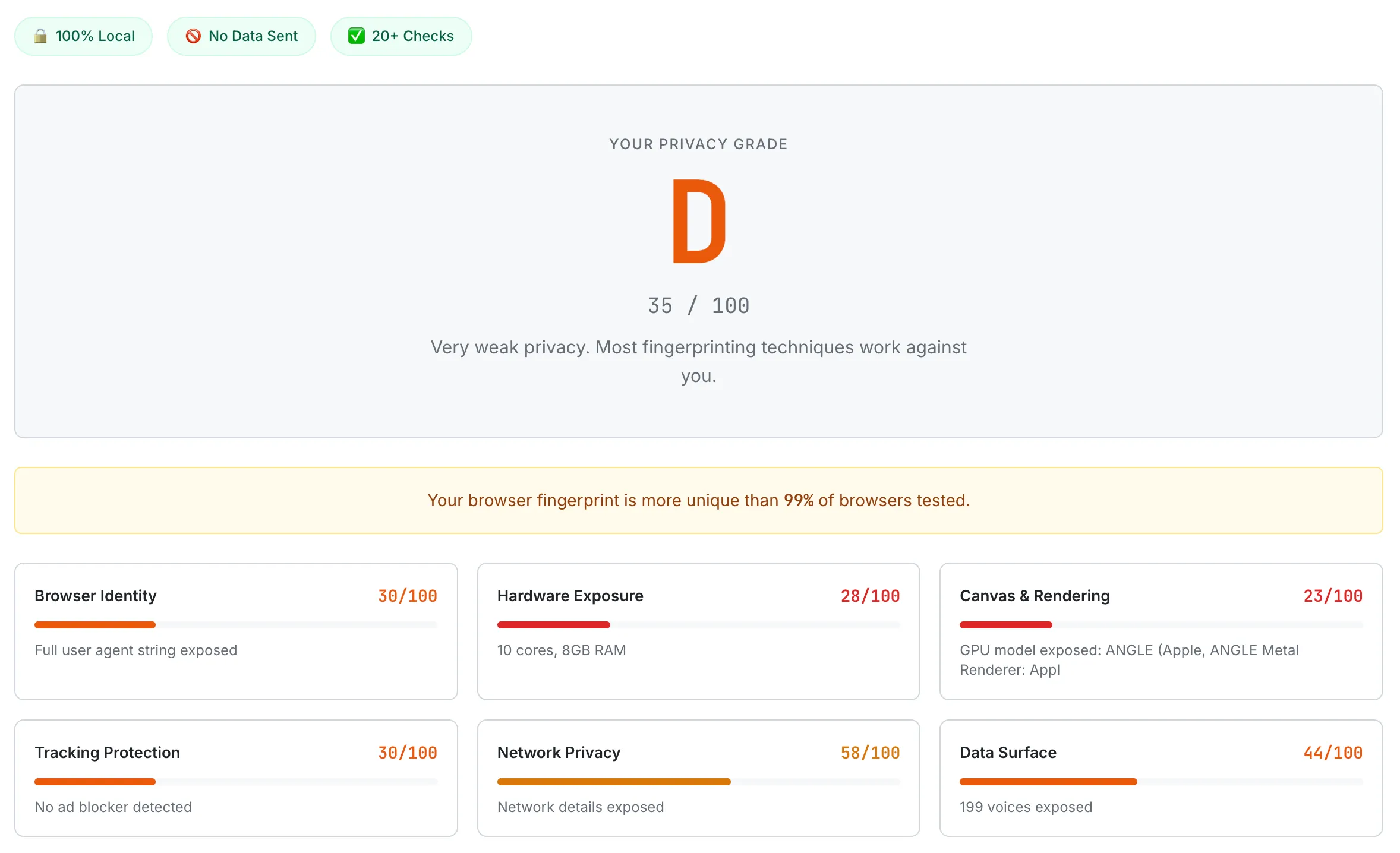
A default Chrome browser scoring D (35/100) — Network Privacy and Tracking Protection are the two lowest categories, both directly relevant to public Wi-Fi exposure.
Practical Public Wi-Fi Defense Map — Threats to Defenses by ROI
Pulling all of that into something you can use, ranked from "already on by default" to "only worth the effort if you have a serious threat model."
Tier 1 — automatic. Use a current browser (Chrome, Firefox, Safari all ship HSTS preload, mixed-content blocking, ECH where the server supports it, DoH where your provider supports it; Chrome 147 defaults to HTTPS-First on every navigation). Keep OS and apps updated so KRACK, FragAttacks, and Dragonblood patches actually reach your device. Turn off auto-connect for hotspots in your Wi-Fi settings. Forget saved networks you no longer use — every entry is a name your device probes for, and KARMA-style attacks live in that list.
Tier 2 — small effort, big value. Confirm the official SSID with staff at hotels and cafes. Prefer a phone hotspot (4G/5G) when you can — NSA's first-line recommendation, and unlike most security advice, it's the easy option. Never enter payment or personal data inside a captive portal mini-browser; if the portal needs a card, run it through your phone hotspot instead. Reject "install this security certificate" prompts outright. Disable file sharing, AirDrop, and network discovery on untrusted networks — mark the network as "Public" on Windows, enable the firewall on macOS.
Tier 3 — active hygiene worth the few minutes. Turn on system-level DoH or DoT (iOS 14+, Android 9+, macOS Sequoia, Windows 11 all support it natively). Use a VPN you've actually evaluated against EFF's four questions when you'll spend hours on a hotel network. Turn off Bluetooth and NFC when you aren't using them. Do banking and work email from a network you control when you can.
Tier 4 — high-threat-model only. Travel with a hardware security key (FIDO2) so phishing your password becomes useless. Use Tor Browser if you need real anonymity rather than just IP masking. Run WPA3 at home (you don't get to choose at the cafe).
The honest summary: "turn on a VPN" is not the answer to every threat. Each surviving threat has its own defense, and most of Tiers 1 and 2 are things modern software does for you already — the work on your side is mostly not turning protections off, refusing suspicious prompts, and never typing a credit card into a network you haven't verified. Strong, unique passwords are still the other half of the puzzle, because credential theft is unaffected by which network you're on. Before you worry about what cafe Wi-Fi might leak, see what your browser is already exposing on its own — SudoTool's Browser Privacy Checker measures your IP, User Agent, fingerprinting surface, and DNS-leak posture in real time, with a letter grade. Every test runs locally in your browser.
Public Wi-Fi Safety: Frequently Asked Questions
Is public Wi-Fi safe in 2026?
For everyday browsing, mostly yes — it is dramatically safer than it was in 2014. With 95–99% of web traffic now encrypted over HTTPS, plus HSTS preload, mixed-content blocking, and Chrome's HTTPS-First default, the classic "someone on the cafe network is sniffing your Facebook" attack no longer works, and the FTC itself now says public Wi-Fi is "usually safe." Six threats do genuinely survive — evil twin hotspots, malicious captive portals, DNS hijacking, SNI metadata leakage, KARMA-style auto-connect attacks, and plaintext app traffic — but each has a specific defense, and most modern protections are on by default.
Do I need a VPN on public Wi-Fi?
Not for the reasons the marketing implies. "Turn on a VPN and your Wi-Fi is safe" is the line the EFF directly debunks — a VPN does not stop tracking, fingerprinting, phishing, or malware. What it does do is bypass the local network operator and shift your DNS and SNI metadata away from the local ISP, which is genuinely useful on a sketchy hotel network. The trade-off is one of trust: you stop trusting your ISP and start trusting your VPN provider. Use one you have actually vetted — audited no-log policy, jurisdiction, transparent infrastructure — when you will spend hours on an untrusted network.
What public Wi-Fi threats still exist in 2026?
Six attack vectors are still operational: evil twin hotspots (a rogue access point mimicking a legitimate network name), malicious captive portals (fake splash pages that phish for card details or push a hostile security certificate), DNS hijacking on hostile networks, SNI metadata leakage (the hostname you visit can still leak unless ECH is supported on both ends), KARMA-style auto-connect probe attacks, and plaintext traffic from older apps. HTTPS still encrypts your page contents, so these are mostly about metadata, phishing, and tricking your device — not reading your passwords off the air.
Is it safe to do online banking on public Wi-Fi?
Generally yes, as long as you confirm the HTTPS lock before entering anything sensitive and you are on the network you think you are. The bigger risks are not interception but evil twins and captive-portal phishing — so verify the official network name with staff, never enter payment details inside a captive portal's mini-browser, and reject any "install this security certificate" prompt. When the stakes are high, the easiest strong defense is to use your phone's 4G/5G hotspot instead, which is the NSA's first-line recommendation.
How can I spot a fake (evil twin) Wi-Fi hotspot?
You often cannot tell by looking — an evil twin broadcasts a name almost identical to the real one, sometimes with a stronger signal so your device prefers it. Confirm the cafe or hotel's actual network name with staff before connecting. If two networks share the same name (for example, two "Free_WiFi_Guest" entries), distrust both. Turn off auto-connect, forget saved open networks you no longer use, and never auto-join open Wi-Fi — that saved-network list is exactly what KARMA-style attacks exploit.
This article is informational privacy education and not a substitute for professional security advice. Threat models vary — what's calibrated for an everyday cafe user differs significantly from a journalist, executive, or activist. Verify current behavior of your specific OS, browser, and any tools mentioned before relying on them in sensitive situations. The wireless threat landscape evolves; standards (RFC 9849 / ECH) and browser defaults change frequently. When the stakes are high, defer to your organization's security team or a licensed security professional.
- FBI IC3 — PSA I-100620-PSA: Cyber Criminals Could Exploit Hotel Wi-Fi (October 6, 2020)
- CISA — Securing Wireless Networks
- CISA — NSA Releases Guidance on Securing Wireless Devices While in Public (July 30, 2021)
- FTC Consumer Advice — Are Public Wi-Fi Networks Safe? What You Need To Know (last updated March 12, 2026)
- NIST — SP 800-153: Guidelines for Securing Wireless Local Area Networks (February 2012)
- IETF — RFC 6797: HTTP Strict Transport Security (HSTS) (Hodges/Jackson/Barth, November 2012)
- IETF — RFC 8484: DNS Queries over HTTPS (DoH) (October 2018)
- IETF — RFC 8908: Captive Portal API (September 2020)
- IETF — RFC 8910: Captive-Portal Identification in DHCP and Router Advertisements (RAs) (September 2020)
- IETF — RFC 8110: Opportunistic Wireless Encryption (Harkins/Kumari, March 2017)
- IETF — RFC 9849: TLS Encrypted Client Hello (Rescorla/Oku/Sullivan/Wood, March 2026, Standards Track)
- Google Security Blog — HTTPS by default (October 28, 2025)
- Let's Encrypt / ISRG — 10 Years of Let's Encrypt (December 9, 2025)
- W3Techs — Let's Encrypt SSL Certificate Authority (third-party market share)
- Chromium Blog — No More Mixed Messages About HTTPS (October 3, 2019)
- HSTS Preload List — hstspreload.org
- EFF Surveillance Self-Defense — Choosing the VPN That's Right for You
- EFF — Virtual(ly) Private Network: NordVPN's Breach (November 2019)
- Wi-Fi Alliance — Wi-Fi CERTIFIED Enhanced Open (June 5, 2018)
- Wikipedia — Server Name Indication
- Wikipedia — Wi-Fi Protected Access
- Wikipedia — Opportunistic Wireless Encryption
- Moxie Marlinspike — New Tricks for Defeating SSL in Practice (Black Hat DC 2009)
- Dai Zovi & Macaulay — KARMA Attack Tools (2004 research, 2005 IEEE SMC IAW publication)
- Vanhoef & Ronen — Dragonblood: Security Analysis of WPA3's SAE Handshake (2019)