How to Spot a Phishing Email in 2026
AI now writes flawless phishing copy. The "bad grammar" tell is dead. The honest 2026 map — what still works, what doesn't, and what to do when you're not sure.
This is an informational summary of how to spot a phishing email, drawn from FBI IC3 reports, APWG quarterly trends, CISA guidance, NCSC UK, Microsoft and Google security publications, and peer-reviewed and industry threat-intelligence research. It is not security advice and not a recommendation of any specific anti-phishing product or service. The recognition framework here is for individual readers; organizations with regulatory or compliance requirements should rely on a qualified security professional. If you have already disclosed credentials or transferred funds in response to a suspected phishing message, please contact your national cybercrime authority and a qualified security professional.
In January 2024, an employee at the Hong Kong office of the global engineering firm Arup transferred approximately USD 25 million to fraudsters after participating in a video conference call with what appeared to be the company's UK chief financial officer and several colleagues. The faces, voices, accents, mannerisms, and even internal company references were correct. The only thing wrong was that the employee was the only real person on the call — every other participant had been generated by a deepfake video synthesis tool. The same year, Ferrari, WPP, LastPass, and Wiz reportedly received similar deepfake CEO impersonation attempts; some were defeated when the targeted executive asked a verification question only the real CEO could have answered. This is the 2026 reality of phishing — not a "Nigerian prince" with broken English, but AI-fluent text and deepfake-assisted voice and video. Old rules like "watch for misspellings" no longer suffice. So how to spot a phishing email in this environment requires a refreshed framework, not the same checklist that worked in 2010.
This post walks through eight things — (1) phishing terminology and taxonomy (phishing, spear, whaling, BEC, smishing, vishing, quishing), (2) recent scale data (FBI IC3 2024, APWG 2025, Verizon DBIR), (3) modern phishing characteristics in 2024–2026 (AI, AitM proxies, quishing, deepfake), (4) recognition signals that still work, (5) signals that no longer work, (6) what to do when a message is suspicious, (7) what to do if you clicked or responded, and (8) a pre-click self-check.
How to spot a phishing email — terminology first
Phishing is the umbrella term for a social-engineering attack in which an adversary impersonates a trusted person or institution to extract credentials, money, or sensitive information. Specific variants worth knowing:
| Type | Definition |
|---|---|
| Phishing (broad) | Mass campaigns aimed at the general public |
| Spear phishing | Targeted at a specific individual or organization, personalized via LinkedIn or similar |
| Whaling | Targeting executives or high-value individuals; typically aims at wire transfers or strategic information |
| Smishing | SMS-based phishing |
| Vishing | Voice-call phishing, increasingly with deepfake-synthesized voices |
| Quishing | QR-code phishing — bypasses email URL filters and shifts the victim to an unmanaged mobile device |
| BEC (Business Email Compromise) | Distinct category — usually plain-text messages without links or attachments, exploiting trust to redirect wire transfers or invoice payments |
The FBI describes five BEC sub-types: Account Compromise, Attorney Impersonation, CEO Fraud, False Invoice Scheme, and Data Theft. By motivation, phishing splits into three rough buckets: credential phishing (account takeover), malware phishing (payload delivery), and payment fraud (BEC, wire-redirect attacks).
Scale and impact — what the recent data shows
FBI IC3 2024 Annual Report. The most-cited authoritative source for US cybercrime scale. In 2024, IC3 received 859,532 complaints with $16.6 billion in reported losses, a 33% year-over-year increase. Phishing/spoofing was the most-reported cybercrime category at 193,407 complaints. Business Email Compromise alone accounted for $2.77 billion in losses across 21,442 incidents. The IC3 also issued a public advisory cautioning that the IC3 portal URL itself is now spoofed in search results — type www.ic3.gov directly rather than clicking sponsored search results.
APWG (Anti-Phishing Working Group) quarterly trends.
| Quarter | Attacks observed | Note |
|---|---|---|
| Q1 2025 | 1,003,924 | Highest single quarter since Q2 2023 |
| Q2 2025 | 1,130,393 | Highest since Q2 2023; surpassed Q1 2025 |
| Q3 2025 | 892,494 | |
| Q4 2025 | 853,244 | Social Media and SaaS/Webmail tied as most-targeted sectors at 20.3% each |
Verizon DBIR 2025 (industry-analyst summaries; readers wanting the precise official percentages should consult the Verizon DBIR PDF directly): phishing is involved in approximately 15% of breaches, and the broader "human element" category — phishing plus pretexting plus errors plus misuse — is involved in approximately 60% of all confirmed breaches.
Provider-scale defenses. Google Workspace publishes that Gmail blocks "more than 99.9% of spam, phishing and malware" from reaching users with AI-powered filtering. Microsoft's 2024 Digital Defense Report reports more than 600 million identity attacks per day and approximately 7,000 password attacks per second, with password-based attacks comprising the overwhelming majority of identity-attack volume. The takeaway is twofold — most phishing is filtered before it reaches inboxes, but enough still gets through to keep phishing the most-reported cybercrime category, year after year.
Modern phishing in 2024–2026 — what changed
Four shifts worth understanding because they invalidate large parts of the older recognition checklist.
(a) AI-generated content has neutralized the "bad grammar" signal. A 2025 academic paper on phishing detection notes that "LLM generated emails are grammatically sound, contextually relevant, and linguistically natural," producing flawless grammar, appropriate tone, and cultural context, with detectors trained on traditional phishing characteristics often failing on LLM-generated copy. Some users now report suspecting "too perfect" phrasing as an AI tell — but this is a weak signal in mass campaigns and unhelpful in routine recognition.
(b) Adversary-in-the-Middle (AitM) phishing kits routinely bypass SMS and TOTP-based 2FA. Microsoft Security has described the pattern directly: "AiTM does not attempt to break MFA; it lets the victim complete MFA successfully, then steals the authentication proof... resulting in account takeover without any alarm bells." The attacker's reverse proxy sits between the user and the legitimate site, capturing both the password and the session cookie issued after a successful MFA challenge. Barracuda's January 2025 analysis describes Tycoon 2FA as the dominant Phishing-as-a-Service kit by observed PhaaS incident volume (roughly 89% per Barracuda's analysis); separate vendor research describes Tycoon 2FA pricing in the range of approximately $120 for 10 days of access. The structural defense against this category is FIDO2/WebAuthn (passkeys, hardware security keys) — see What Is Two-Factor Authentication? for the broader auth-tier comparison; CISA publicly designates FIDO/WebAuthn as the only widely available phishing-resistant MFA.
(c) QR-code phishing (quishing) is rising rapidly. QR-image-based phishing bypasses email URL filters that parse only text, and shifts the victim from a managed corporate desktop to an unmanaged mobile device. Vendor research from Keepnet describes QR-based phishing emails growing from approximately 47,000 in August 2025 to over 249,000 in November 2025 (vendor data, frame as such); Acronis security analysis describes the same shift to unmanaged mobile devices as a key reason filtering tools struggle. Barracuda has additionally documented "split" and "nested" QR codes designed specifically to evade scanner-based detection.
(d) Deepfake voice and video have entered routine vishing. The Arup case in Hong Kong (January 2024, publicly disclosed by Arup in May 2024) is the headline example — a $25 million wire transfer made after a deepfake-synthesized video conference. Eftsure's analysis covers attempted deepfake CEO scams against Ferrari, WPP, LastPass, and Wiz in 2024, some defeated by out-of-band verification questions. Group-IB has reported deepfake-enabled vishing attacks rising sharply in early 2025 (vendor research).
Recognition signals that still work
CISA's Recognize and Report Phishing guidance describes four general categories of warning signs — urgent or emotional language, requests for personal or financial information, suspicious links or attachments, and generic or unusual greetings — paraphrased from CISA's current public materials. The 2024–2026 environment has weakened some of those classic signals (greetings can now be personalized from leaked data, grammar can be flawless), but the structural ones — the request being asked of the recipient, the destination a link is pointing to, and the identity of the actual sender — remain reliable. The strongest recognition signals worth checking on every suspicious message:
| Signal | How to check |
|---|---|
| Sender's actual domain | Click on the display name to reveal the actual address — what comes after the @. The display name is trivial to spoof; the domain is harder. |
| Hovered URL versus link text | On desktop, hover over a link without clicking. The destination URL is shown by the browser. If it doesn't match the brand's real domain, do not click. |
| Subdomain stacking | paypal.com.attacker.io — the registered domain is attacker.io, not paypal.com. The dot makes them separate domains. |
| IDN / homograph characters | раypal.com contains a Cyrillic а that visually matches a Latin a. Browsers increasingly highlight these, but inspecting the URL still helps. |
| Shortened URLs | bit.ly, t.co, etc., hide the destination. From an unverified sender, a shortened URL is a reason to not click. |
| Unexpected attachment types | .html, .iso, .lnk, password-protected zip — uncommon in routine business email and disproportionately associated with malware delivery. |
| Urgency or threat language | "Your account will be suspended in 24 hours," "Legal action will follow," "Wire the funds today" — manufactured time pressure to short-circuit verification. |
| Unusual request | Gift cards, wire transfer changes, MFA codes, password resets, "security update" installs — these are the actual targets and the strongest single signal. |
| Out-of-band channel switch | "Reply on WhatsApp" or "call this number, not the one on the website" — common in IT-support impersonation and BEC. |
| Unexpected MFA push | If you didn't try to log in, a push approval request or MFA code request means someone else did. Deny and rotate the password. |
SPF, DKIM, and DMARC are email authentication standards that your provider checks automatically — the user does not need to read message headers. Most modern email clients display some kind of warning banner when a message fails authentication, and that banner is informative when present. For credential hygiene after a message has reached the recipient, see Are Password Managers Safe? — a password manager that won't autofill on a wrong domain is itself a useful anti-phishing layer, since it refuses to enter credentials on a fraudulent lookalike site.
Signals that no longer work reliably
| Old signal | Why it has weakened |
|---|---|
| Spelling and grammar errors | LLMs produce flawless multilingual copy on demand. "Too perfect" tone is a weak ancillary tell at best. |
| Generic "Dear Customer" greetings | Attackers personalize names, titles, and even colleagues' names from LinkedIn and breach data. Generic greetings can still appear in low-effort campaigns, but their absence is no longer evidence of legitimacy. |
| Email-only inspection | Modern attacks are multi-channel — email plus SMS plus a follow-up WhatsApp call. Inspecting only the email misses the larger pattern. |
| Brand logo presence | Logos are trivially copied. A correct logo is not evidence of legitimacy. |
| HTTPS padlock on the destination site | Phishing sites routinely have valid HTTPS certificates — free certificate authorities make this trivial. The padlock means encrypted, not trustworthy. |
| "It came from someone I know" | That account may itself have been compromised. BEC frequently runs from a real, compromised colleague or vendor account, not a spoofed one. |
The honest framing is this — CISA's classic four signs are still useful when present, but their absence is no longer evidence the message is real. The reliable shift is to evaluate the request itself rather than the surface polish.
What to do when a message is suspicious
The minimum behavioral rule has not changed:
- Don't click. Don't reply. Don't forward.
- Verify the sender via an independent channel. The phone number printed on the back of a payment card. The company's site reached by typing the URL directly. The colleague's number from your existing contact list, not from the suspicious message.
- On desktop, hover URLs to inspect destinations. Mobile clients usually require a long press to preview, and many users never do.
- Use the report-phishing button in your email client. Both Gmail and Outlook expose a one-click report; reporting trains the provider's filters and contributes to industrywide takedowns.
For broader reporting, the major channels worth knowing:
| Region or provider | Channel |
|---|---|
| Global industry coalition | APWG — forward to reportphishing@apwg.org (apwg.org/reportphishing) |
| United States — federal | FBI IC3 — ic3.gov (type the URL directly) |
| United States — federal | CISA Secure Our World — cisa.gov/secure-our-world/recognize-and-report-phishing |
| United Kingdom | NCSC SERS — forward to report@phishing.gov.uk (ncsc.gov.uk SERS) |
| SMS phishing (US carriers) | Forward the SMS to 7726 (SPAM) |
| Other regions | Your national cybercrime authority |
NCSC SERS, when launched in the UK in 2020, reportedly received over 5,000 suspicious-email submissions in its first 24 hours, leading to the takedown of 80+ malicious web campaigns. Reporting volume becomes takedown volume.
What to do if you clicked or responded
If a phishing message has already drawn a click or a reply, the published response sequence is roughly:
- Disconnect the device from the network if malware delivery is suspected — this prevents the malware from completing its download or from spreading laterally.
- From a different, uncompromised device, change the password on the affected account. Do not enter the new password on the device that may be infected.
- Enable two-factor authentication if it isn't already on, ideally a phishing-resistant FIDO2 method (passkey or hardware security key). Background in What Is Two-Factor Authentication?
- Check Have I Been Pwned for any prior credential exposure on the affected account. Detailed response workflow in Have I Been Pwned? What to Do If Your Email Was Leaked.
- Monitor financial accounts for unusual activity. For BEC-style wire fraud, contact the issuing bank immediately — recovery is possible only within a narrow window.
- Report to your national cybercrime authority (FBI IC3 in the US; Action Fraud / NCSC in the UK; equivalent in other countries).
The pre-click self-check
The most useful single artifact for individual readers — a small set of questions to ask before clicking or replying to any message that feels off:
- Did I expect this message right now, from this sender, about this topic?
- Does the sender's actual email address (not the display name) match the organization's real domain?
- If I hover the link on a computer, does the destination URL match the visible text and the brand's real domain?
- Is there pressure to act in minutes or hours, or fear of consequences if I don't?
- Is the request itself unusual — a wire transfer, gift cards, an MFA code, a password, a "security update" install?
- Could I verify this through an independent channel I already trust (a phone number on the card, a bookmarked site)?
- If there's an attachment, do I expect a file of this type from this sender?
- If it has a QR code, would I trust the same request as a plain link from this sender?
Multiple no or uncertain answers are a clear signal to not click and to verify out-of-band. Even a clean run of the eight questions still warrants caution on any login, payment, or credential request — type the URL yourself rather than clicking.
If you've already had a credential exposed in any breach (pre-existing or new), the fastest path to credential hygiene is rotating to long, unique, randomly-generated passwords stored in a password manager — and pairing them with a phishing-resistant second factor. The Password Generator tool runs entirely in your browser and supports passphrase mode (the format NIST and NCSC recommend for memorized master passwords).
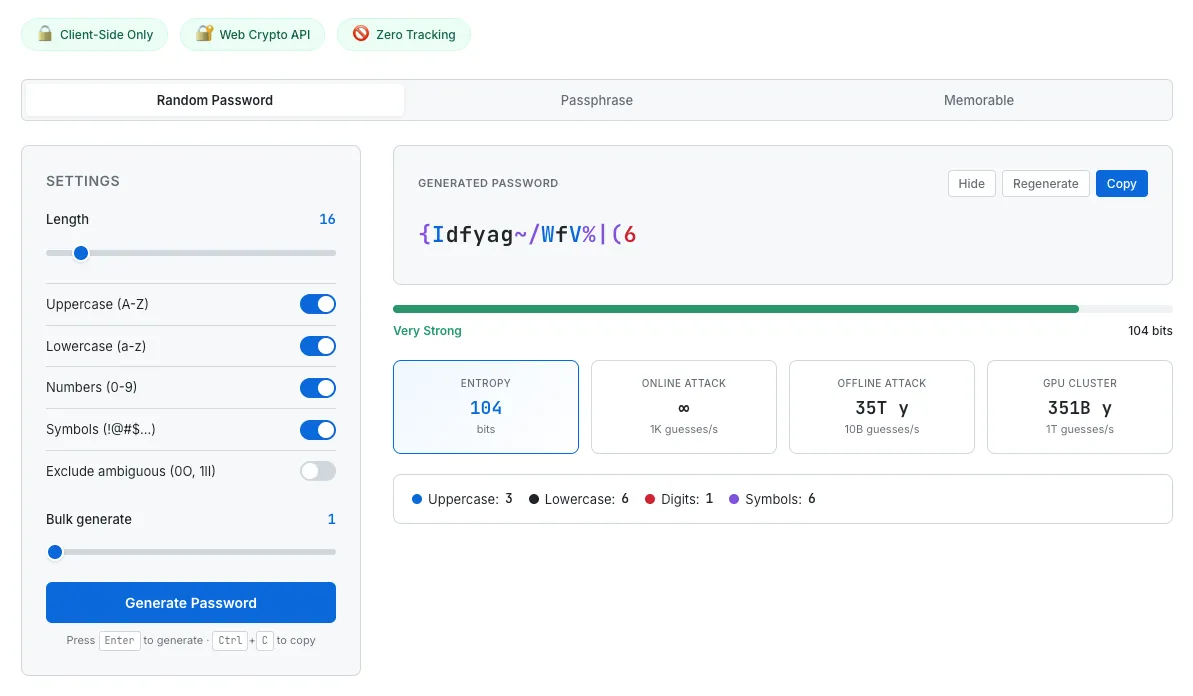
After a phishing exposure, rotate to long, unique, randomly-generated passwords stored in a manager. The Password Generator shows entropy and estimated crack time so the password's actual strength is visible, not just assumed.
Frequently Asked Questions
How do you spot a phishing email in 2026?
Modern phishing identification has shifted from what looks wrong to what is being asked. The reliable signals are: sender's actual domain (not display name), URL on hover versus link text, requests for unusual actions (gift cards, wire transfers, MFA codes, passwords), unexpected attachment types (.html, .iso, .lnk), urgency or threat language, and out-of-band channel switches. Spelling, grammar, and generic greetings have weakened as signals because LLMs produce flawless personalized copy.
Why doesn't bad grammar work as a phishing signal anymore?
Large language models produce grammatically flawless, culturally appropriate, contextually relevant text in any major language. Mass phishing campaigns now write like native copywriters. A 2025 academic phishing-detection paper described the gap directly: classical phishing detectors that rely on grammar and spelling features often fail on LLM-generated emails. Some users report that too-perfect phrasing now feels suspicious, but this is a weak ancillary tell at best.
Can a phishing email bypass two-factor authentication?
Yes — Adversary-in-the-Middle (AitM) phishing kits like Tycoon 2FA, EvilProxy, and Evilginx2 run a reverse proxy between the victim and the legitimate site, capturing both the password and the session cookie issued after a successful MFA challenge. Microsoft Security has published technical details. SMS and TOTP-based 2FA can be relayed through these kits. The structural defense is FIDO2/WebAuthn (passkeys, hardware security keys), which CISA designates as the only widely available phishing-resistant MFA — credentials are cryptographically bound to the legitimate domain and cannot be relayed.
What is quishing and why is it harder to detect?
Quishing is QR-code phishing. The malicious URL is embedded in an image rather than as a clickable link, which bypasses email filters that only parse text. Scanning the QR also shifts the victim from a managed corporate desktop to an unmanaged mobile device, where security controls are typically weaker. Vendor research (Keepnet) describes QR-based phishing emails growing from roughly 47,000 in August 2025 to over 249,000 in November 2025. Barracuda has also documented split and nested QR codes specifically designed to evade scanner-based defenses.
What's the most common type of phishing in 2024–2026?
Per the FBI IC3 2024 Annual Report, phishing/spoofing remained the most-reported cybercrime category, with 193,407 complaints. By dollar loss, Business Email Compromise (BEC) is one of the costliest at $2.77 billion across 21,442 incidents in 2024. APWG observed approximately 1.13 million phishing attacks in Q2 2025, the highest single quarter since Q2 2023.
What should I do if I clicked a phishing link?
The published response sequence: (1) disconnect the device from the network if malware delivery is suspected; (2) from a different uncompromised device, change the password on the affected account; (3) enable phishing-resistant 2FA (passkey or hardware key) if it isn't already on; (4) check Have I Been Pwned for credential exposure; (5) monitor financial accounts; (6) report to your national cybercrime authority. The companion guide on this site, Have I Been Pwned? What to Do If Your Email Was Leaked, covers a 7-day recovery timeline in detail.
Where do I report a phishing email?
The major channels: the report-phishing button in Gmail or Outlook (one-click); APWG via reportphishing@apwg.org; FBI IC3 at ic3.gov (type directly, do not click sponsored search results); CISA's Secure Our World page in the US; NCSC's SERS at report@phishing.gov.uk in the UK; SMS phishing forwarded to 7726 (SPAM) on US carriers; and your national cybercrime authority for other regions.
This guide summarizes published phishing data and recognition guidance from FBI IC3 reports, APWG quarterly trends, CISA, NCSC, Microsoft and Google security publications, and peer-reviewed and industry threat-intelligence research, current as of May 2026. Phishing tactics evolve rapidly — AI-fluent text, deepfake-assisted vishing, and AitM proxies have all entered routine criminal toolkits during the past two years. Recognition signal lists describe general patterns, not personalized predictions. Vendor-specific statistics from Barracuda, Keepnet, Group-IB, and similar sources reflect that vendor's observed traffic and may not generalize. None of this is security advice or a substitute for professional consultation. For organizations with regulatory or compliance requirements, please rely on a qualified security professional.