Are Password Managers Safe? What the Evidence Shows
NIST, CISA, NCSC, and EFF agree they're safer than reuse. The honest read — zero-knowledge architecture, KDF settings that decide vault fate, the LastPass 2022 lessons, and what password managers don't protect against.
This is an informational summary of password manager security drawn from government standards bodies (NIST, CISA, UK NCSC), security non-profit guidance (EFF), vendor security white papers, peer-reviewed research, and breach incident reports. It is not security advice and not a product recommendation. Architecture comparisons help readers reason about trade-offs by threat model — they do not designate any manager as "best." Individual situations and threat models vary widely; for high-stakes decisions consult a qualified security professional.
In August 2022, an attacker compromised the laptop of a software developer at LastPass and downloaded 14 of LastPass's source code repositories along with technical documentation and an encrypted SSE-C key. Four months later the company had to acknowledge a second, more serious incident — a senior DevOps engineer's personal computer was compromised through an unpatched Plex vulnerability, a keystroke logger captured the engineer's master password, and from there the attackers reached an internal vault holding further keys. On December 22, 2022, LastPass disclosed that customer vault backups had been exfiltrated. URLs in those vaults were stored in plaintext; usernames, passwords, and secure notes were encrypted. Some legacy accounts still had a Password-Based Key Derivation Function (PBKDF2) iteration count of 5,000 — far below the 100,100 default for newer accounts. By March 2025, Krebs on Security was reporting that federal investigators had linked the January 30, 2024 theft of approximately $150 million in cryptocurrency from Ripple co-founder Chris Larsen to the 2022 LastPass breach, with dozens of additional victims sharing one common factor: each had at one point stored their cryptocurrency seed phrase in the "Secure Notes" area of their LastPass account before the breaches. So are password managers safe?
The short answer. Yes — measurably safer than reusing passwords or storing credentials only in a browser — but not unconditionally. NIST, CISA, UK NCSC, and EFF all four consistently recommend password managers in their published guidance. Verizon's 2024 Data Breach Investigations Report found stolen credentials were the initial action in 24% of breaches and that credentials accounted for roughly 38% of compromised data types. SpyCloud's recaptured-credentials database showed over 74% of passwords had been reused across services. The case for password managers is the case against credential reuse, and that case is strong. The LastPass 2022 incident shows the limits — zero-knowledge architecture is not enough on its own; the master password's strength, the KDF's iteration count, the operator's incident response, and what gets stored in plaintext metadata all matter. Master-password phishing and infostealer malware on the user's device are not problems that password managers solve. The honest answer is "safer than reuse, with the LastPass caveat" — and the rest of this post walks through what each piece of that means.
This post walks through seven things — (1) how password managers actually work, (2) what zero-knowledge architecture promises and what it doesn't, (3) why KDF settings determine vault fate after a breach, (4) the LastPass 2022 case in detail and what it teaches, (5) the measurable safety advantage over reuse, (6) the four-body recommendation map (NIST/CISA/NCSC/EFF) and architecture comparison, and (7) what password managers do not protect against — and what additional layers cover those gaps.
How password managers actually work
The core cycle is simple. The user enters a master password. A Key Derivation Function — typically PBKDF2-SHA256 with hundreds of thousands of iterations, or Argon2id — stretches that password against a salt to produce a vault encryption key. That key is used to encrypt and decrypt the vault locally with AES-256, almost always in an authenticated mode (GCM or CBC plus HMAC). Only the encrypted vault is synchronized to the server. Browser extensions and apps autofill credentials by recognizing the URL of the login page and, in well-designed managers, refusing to autofill when the domain doesn't match.
The trust boundary that defines the whole model is straightforward: the server sees only ciphertext. AES-256-GCM is the current standard authenticated-encryption choice — it provides both confidentiality and integrity in a single operation. Bitwarden uses a variant model with AES-CBC plus HMAC, and the company's security white paper states it directly: "Master passwords and Stretched Master Keys are never stored on or transmitted to Bitwarden servers."
1Password articulates the underlying principle in its public security design documentation. The stated principles include both "1Password can best protect your secrets by not knowing them" and "It's impossible to lose, use, or abuse data one doesn't possess." Two separate sentences, both load-bearing for the zero-knowledge model.
Zero-knowledge architecture — what it promises, and what it doesn't
Zero-knowledge means the server never possesses the plaintext vault or any key that could decrypt it. What that buys you is: when the server is breached, the attacker gets ciphertext. What they then need is the user's master password — which, in a well-designed system, the server has never seen.
1Password's variant of zero-knowledge adds a second secret: a 128-bit Secret Key. The Security Design documentation describes the Secret Key as being "made up of a non-secret version setting, ('A3'), your non-secret Account ID, and a sequence of 26 randomly chosen characters." The Secret Key is generated client-side and never transmitted to 1Password's servers. Authentication is performed via the Secure Remote Password (SRP) protocol — 1Password documents that "1Password's account uses the SRP handshake protocol to authenticate without sending your account password or Secret Key over the internet." Result: even if the server is breached and vault ciphertext is exfiltrated, the attacker is missing two secrets, not just one.
Bitwarden's model uses a single master password (no separate Secret Key). The white paper states that "Your data remains end-to-end encrypted with your individual email and master password." This puts more weight on the master password's strength and the KDF's iteration count, since those alone stand between an exfiltrated vault and decryption.
LastPass also describes its architecture as zero-knowledge, stating that "the master password is never known to LastPass and is not stored or maintained by LastPass." The LastPass 2022 case shows what zero-knowledge does and does not protect against. It does protect the vault from server-side decryption — even after vault backups were exfiltrated, LastPass and outside analysts agreed the vaults were not centrally decryptable. What it does not do, on its own, is protect every individual vault — accounts with weak master passwords plus low KDF iteration counts could be cracked offline once the ciphertext was in attacker hands. Zero-knowledge is necessary but not sufficient.
KDF settings — the single variable that decides vault fate after a breach
If a vault file is exfiltrated, whether it stays safe depends almost entirely on (a) how strong the master password is and (b) how many KDF iterations stretch that password before producing the vault key. Wladimir Palant, who has documented the LastPass case extensively, published a cost table that makes this concrete. The table assumes a 50-bit-entropy master password and shows GPU-cluster brute-force cost:
| PBKDF2 iterations | Guessing time | Cost (GPU cluster) |
|---|---|---|
| 100,100 | ~200 years | ~$1,500,000 |
| 5,000 | ~10 years | ~$75,000 |
| 500 | ~1 year | ~$7,500 |
| 1 | ~17 hours | ~$15 |
The 100,100-vs-5,000 difference is not 20× — it's the difference between $1.5M and $75K to crack one specific vault. For most attackers, $1.5M to crack one consumer's vault is not worth it. For $75K, it might be — especially if the vault is known to contain cryptocurrency seed phrases.
Modern recommendations are higher. Bitwarden's current default is "PBKDF2 with 600,000 iteration rounds to stretch your master password with a salt of your username (email)." Bitwarden also offers Argon2id as an alternative — "Argon2, the winner of the 2015 Password Hashing Competition, is available as an alternative to PBKDF2." Argon2id is memory-hard, which makes GPU brute-force more expensive at the same calibration than PBKDF2. OWASP's 2025 password storage guidance similarly recommends PBKDF2-SHA256 at 600,000 iterations or Argon2id with calibrated memory parameters.
The LastPass iteration history is the cautionary tale. Per LastPass's own documentation, the default went from 1 iteration to 500 to 5,000 (February 2013) to 100,100 (February 2018) to 600,000 (recommended 2023). Critically, raising the default did not automatically upgrade existing users' settings — accounts created before the default change kept their old iteration count until either the user manually updated or LastPass forced an upgrade after the breach. This is exactly the gap that left some 2022-vintage exfiltrated vaults vulnerable to offline cracking.
The LastPass 2022 case — what happened, and what it teaches
The LastPass incident is the closest thing to a controlled experiment in password manager threat modeling. It is well-documented from multiple angles: LastPass's own status updates, Wikipedia's incident article, Wladimir Palant's analyses on Almost Secure, Krebs on Security's reporting, and a 2025 academic case study from Gentles, Fields, Goodman, and Bhunia at Miami University in Ohio (arXiv:2502.04287, "Breaking the Vault: A Case Study of the 2022 LastPass Data Breach").
Stage 1 (August 8–11, 2022). An attacker compromised a LastPass software developer's laptop and exfiltrated 14 source code repositories, technical documentation, and an encrypted SSE-C (server-side encryption with customer-provided keys) key. LastPass initially announced no customer vault data had been accessed.
Stage 2 (August through October 2022). Using information from the first breach, the attackers compromised a senior DevOps engineer's personal computer through an unpatched Plex vulnerability. A keystroke logger captured the engineer's master password, and the attackers used those credentials to access an internal vault holding additional keys, eventually reaching customer vault backups.
December 22, 2022 disclosure. LastPass acknowledged that backups of customer vault data had been exfiltrated. The vaults stored URLs in plaintext (a metadata leak that helped attackers prioritize targets), with usernames, passwords, and secure notes encrypted. LastPass stated that twelve-character minimum master passwords had been required since 2018 and that 100,100 PBKDF2 iterations was the default. The connection between the August and December incidents was not formally acknowledged until February 27, 2023.
Regulatory and legal aftermath. The UK Information Commissioner's Office issued a £1,228,283 (~£1.23M) fine on November 20, 2025. A US class-action settlement of approximately $24.5M was reached in February 2026, of which $16M was earmarked for cryptocurrency-theft losses.
Linked cryptocurrency thefts. Krebs on Security reported in March 2025 that federal investigators had connected the January 30, 2024 theft of approximately $150 million in cryptocurrency from Ripple co-founder Chris Larsen to the LastPass breach. Krebs reported dozens of additional victims with significant losses; the common factor was that each had stored cryptocurrency seed phrases in the "Secure Notes" area of their LastPass account before 2022. A separate Krebs piece in September 2023 documented an earlier $3.4M theft from a victim with an 8-character master password — the precise scenario the iteration-count cost table predicts.
What the case teaches:
- Zero-knowledge architecture protects the vault from server-side decryption, but offline brute-force becomes the threat once vault ciphertext is in attacker hands.
- KDF iteration count is the single most important variable for offline-attack resistance. Legacy accounts on 5,000 iterations were dramatically more vulnerable than modern accounts on 100,100+.
- Plaintext metadata (URLs in LastPass's case) is a real risk because it lets attackers prioritize which vaults are worth attacking.
- Operator security matters as much as cryptography. The Stage-2 breach exploited an unpatched personal-machine vulnerability of a single engineer.
- Slow disclosure is its own harm — the four-month gap and the further delay before linking the two stages worsened victim outcomes.
Bitwarden and 1Password comparison context. As of May 2026, Bitwarden has not had a confirmed customer-vault exfiltration. There was a May 2024 incident in which an attacker accessed customer metadata (email addresses and display names) but the encrypted password vault was not affected. There was also an April 2026 supply-chain incident affecting the Bitwarden CLI npm package, which Bitwarden investigated and reported finding no evidence of end-user vault data accessed or at risk. 1Password has had no public disclosed vault-exfiltration incident; the Secret Key adds a second secret that must be obtained even if vault ciphertext is somehow exfiltrated. None of this means these architectures are unconditionally safe — disclosure timing and unknown-unknowns apply to every operator. It does mean the LastPass case is, so far, an outlier in the modern password-manager landscape.
The measurable safety advantage over reuse
The case for password managers is, in practice, the case against credential reuse. The numbers are the most useful place to start.
Verizon's 2024 Data Breach Investigations Report (DBIR) — drawing on tens of thousands of incidents — reports that "the use of stolen credentials led the pack as the initial action in 24% of breaches" and that credentials remained the most common type of compromised data, accounting for approximately 38% across the analyzed dataset. Stolen credentials accounted for 77% of Basic Web Application Attacks. SpyCloud's analysis of the same period reported that "over 74% of passwords found in our recaptured database were reused" — meaning the same password had been compromised in two or more separate breaches.
The mechanism behind these numbers is credential stuffing. When a password is exposed in one breach, attackers use that pair against many other services on the assumption that the user reused it — and per SpyCloud's data, three out of four times they're right. A password manager breaks this pipeline by making each site's password unique and random, with no cognitive cost to the user.
Browser-native password managers (Chrome's built-in manager, Apple Keychain, Firefox's Lockwise) sit somewhere between reuse and dedicated managers. They are dramatically better than reuse — they enable unique passwords with the same UX as reuse — but they have a different threat-model profile. Infostealer malware (Lumma, RedLine, StealC, and others) specifically targets browser-stored credentials, session cookies, and autofill data. Threat-intel reporting from multiple vendors describes infostealers as a major and growing 2024–2025 concern, with billions of credentials extracted per year. Browser-native storage is generally not zero-knowledge, which means OS-level malware that reaches the browser process can extract credentials more directly than from a separately encrypted vault.
The trade-off is real but not symmetric. The right framing in the published guidance is consistent: dedicated password managers with zero-knowledge architecture are the strongest option, browser-native managers are still better than reuse, and reuse is the worst option in the data.
The four-body recommendation map and architecture comparison
Four major bodies make consistent recommendations on password managers. Each frames the recommendation slightly differently, which is useful for getting a complete picture.
NIST SP 800-63B (Digital Identity Guidelines). NIST's guidance enables password manager use by requiring that systems support paste functionality. The standard states: "Verifiers SHOULD permit claimants to use 'paste' functionality when entering a memorized secret. This facilitates the use of password managers, which are widely used and in many cases increase the likelihood that users will choose stronger memorized secrets." The framing is permissive and enabling rather than directly prescriptive — but the clear effect is that NIST treats password managers as a positive force for secret strength.
CISA (Cybersecurity and Infrastructure Security Agency). CISA's consumer-facing "Use Strong Passwords" guidance is direct: "CISA recommends creating long, random, unique passwords with a password manager for safer accounts."
UK NCSC (National Cyber Security Centre). NCSC's published guidance on password managers describes the value plainly: "A password manager stores passwords safely for you, meaning that you can have unique passwords for each service as you won't need to remember them." NCSC also recommends a longer-term move to passkeys, stating that "Passkeys should now be consumers' first choice of login across all digital services."
EFF Surveillance Self-Defense. EFF's framing is about adoption: "The best password manager is the one you'll use." EFF separately recommends evaluating any candidate manager on whether it supports two-factor authentication and end-to-end encryption.
The consistent pattern across all four — government, civil society, US, and UK — is that password managers are recommended as a baseline protection, with passkeys treated as the longer-term direction.
Architecture comparison (informational, not "best" designation).
| Manager | Storage model | KDF default | Two-factor secret | Open source | Key trade-off |
|---|---|---|---|---|---|
| 1Password | Cloud sync, zero-knowledge | PBKDF2 + 4096-bit SRP | Yes — 128-bit Secret Key + master password | No (proprietary, externally audited) | Strongest defense if vault exfiltrated; Secret Key recovery loss = vault loss |
| Bitwarden | Cloud sync (or self-host), zero-knowledge | PBKDF2 600,000 (Argon2id optional) | No (master password only) | Yes (server + clients) | Single-secret model — master strength is decisive |
| LastPass (post-2022) | Cloud sync, zero-knowledge | PBKDF2 600,000 (forced upgrade in 2023) | No | No | Disclosure-delay history; legacy iteration counts; rebuilding trust |
| Browser-native (Chrome / Firefox / Apple Keychain) | OS-integrated | OS-dependent | Some (Apple Keychain end-to-end with iCloud Keychain) | Mostly closed | Tight UX; infostealer malware top target |
| KeePassXC | Local file (.kdbx) | Argon2d default; AES-KDF optional | No (master / key file / hardware) | Yes (GPL) | No cloud risk; user-managed sync/backup; learning curve |
None of these is "best" in the abstract — each fits a different threat model and operational constraint. KeePassXC removes cloud risk entirely at the cost of putting sync and backup on the user. 1Password adds defense-in-depth via the Secret Key at the cost of an extra recovery dependency. Bitwarden offers self-hosting and full open-source for users who want that, with master-password strength carrying more weight. LastPass post-2022 has rebuilt its KDF defaults aggressively but carries a trust-rebuild cost that each user has to weigh individually.
What password managers do not protect against
The honest threat-model framing is essential. Password managers cover a specific set of risks well; they do not cover others, and those others need separate layers.
Password managers do protect against:
- Password reuse and credential stuffing (the largest single cause of credential-based breaches per DBIR data).
- Weak password choice (the manager generates strong, random unique passwords).
- Some phishing — managers refuse to autofill on a domain that doesn't match the registered one, which catches many fake login pages (though not if the user manually copy-pastes).
- Server-side breaches at the manager itself (when zero-knowledge is intact and KDF is strong).
Password managers do NOT protect against:
- Master-password phishing — a fake vault unlock page can capture the master password just like any other phishing page.
- Local malware, keyloggers, infostealers — once the user's device is compromised, an unlocked vault is exposed in memory and the master can be captured at input time.
- Compromised endpoints — root-level OS access defeats most user-space encryption.
- Account-recovery weaknesses — SMS-based recovery and emergency-access flows can introduce social-engineering attack surfaces.
- Sync-infrastructure flaws — TLS issues, server-side bugs, supply-chain compromises (the April 2026 Bitwarden CLI npm incident is a recent example, even where vault data was not affected).
Hardware security keys (FIDO2 / WebAuthn) sit on a separate, orthogonal layer. They are phishing-resistant by design — credentials are cryptographically bound to the legitimate domain, so an attacker cannot relay them through a phishing page. Google has reported zero account takeovers among employees using hardware security keys, and Microsoft has reported that hardware-key-backed sign-in has blocked all observed automated bot attacks against the affected accounts. The mitigation literature consistently recommends combining a strong manager with hardware keys for the master account when threat model warrants.
The mitigation list the literature converges on:
- Long, unique passphrase as the master password (NIST favors length over complexity rules).
- Never reuse the master password anywhere else.
- Two-factor authentication on the password manager itself.
- Hardware security key for the manager's master account when feasible.
- Modern KDF settings — Argon2id when available, otherwise PBKDF2 at 600,000+ iterations.
- Endpoint hygiene — OS and browser updates, restrict untrusted apps and extensions (the main infostealer entry vector).
- Monitor breach notifications — Have I Been Pwned and any vault-health features the manager offers.
- Long-term direction: gradual transition to passkeys, per NCSC's published recommendation.
For breach-side credential hygiene specifically, see Have I Been Pwned? What to Do If Your Email Was Leaked. For the master-password strength side, see Why Strong Passwords Matter: A Complete Guide to Online Security. And on the broader privacy stack including browser-side surfaces, see Is Incognito Mode Private? What the Vendor Docs Say (and What They Don't).
If you'd like to generate the kind of unique, high-entropy passwords that make password-manager use safe in practice, the Password Generator tool produces cryptographically secure random passwords with adjustable length and character sets, plus a passphrase mode. Everything runs in your browser; nothing is sent to any server.
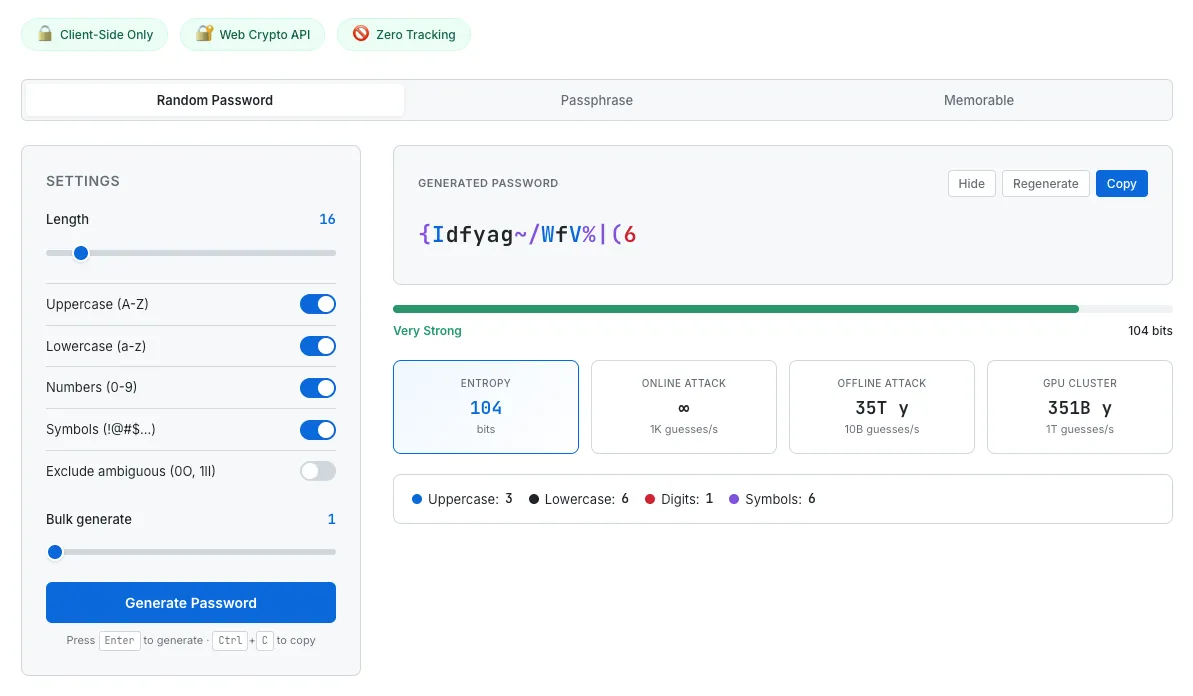
Strong, unique passwords are what make password manager use measurably safer than reuse. The generator shows entropy and estimated crack times so the password's actual strength is visible, not just assumed.
Common questions about password manager safety
Are password managers really safer than just using the same password everywhere?
Substantially, yes. Verizon's 2024 DBIR data shows stolen credentials drove 24% of breach initial access and 77% of basic web application attacks. SpyCloud's data shows 74% of passwords in their recaptured-credentials database had been reused across services. A password manager removes reuse as a vulnerability, which addresses the single largest identified vector in the DBIR data. Four major standards bodies — NIST, CISA, UK NCSC, and EFF — all recommend password manager use for this reason.
What happens if my password manager gets hacked? Won't the attacker get all my passwords?
The LastPass 2022 case is the most-studied example. Even though customer vault backups were exfiltrated, vaults were not centrally decryptable — that is what zero-knowledge architecture buys you. Vaults that did get cracked were predominantly accounts with weak master passwords combined with low KDF iteration counts (5,000 in some legacy LastPass accounts). With a strong master password (12+ characters, ideally a long passphrase, never reused) and modern KDF settings (PBKDF2 600,000+ or Argon2id), a vault file in attacker hands is computationally expensive to crack — Palant's cost table puts the GPU brute-force cost in the millions of dollars per vault for a 50-bit-entropy password at 100,100 PBKDF2 iterations.
Is Bitwarden safer than LastPass?
As of May 2026, Bitwarden has not had a confirmed customer-vault exfiltration, while LastPass had the December 2022 disclosure. Bitwarden's current default KDF is PBKDF2 at 600,000 iterations with optional Argon2id. The LastPass 2022 case demonstrated that legacy default settings carrying forward (5,000 iterations on older accounts) was a real failure mode. None of this means Bitwarden is unconditionally safer in some absolute sense — disclosure timing and unknown-unknowns apply to every operator — but the public incident record at the vault-exfiltration level is different between the two. Architecture comparison plus operator track record is what most security writers use to evaluate, not a single "best" designation.
Is 1Password's Secret Key worth the extra complexity?
The Secret Key is a 128-bit secret generated client-side that combines with the master password in 1Password's encryption. It adds defense-in-depth: even if the vault is exfiltrated and the master password is weak, the attacker also needs the Secret Key, which the server has never seen. The trade-off is recovery — if the Secret Key is lost (device wipe, no backup), the vault is unrecoverable. For users with disciplined backup practice, the trade-off is favorable for security; for users who frequently lose devices and don't back up, the trade-off may favor a simpler model.
What about browser-built-in password managers — are they safe enough?
They are dramatically better than reusing passwords (they enable unique passwords with the same UX as reuse), and Apple Keychain in particular implements end-to-end encryption with iCloud Keychain. The trade-off is that browser-native storage is the top target for infostealer malware (Lumma, RedLine, StealC, and others), which specifically extracts saved credentials, session cookies, and autofill data from browsers. NCSC's published guidance treats browser-native managers as a reasonable choice for many users; EFF's guidance urges evaluating end-to-end encryption and audit history when comparing options. Most security-focused users move to a dedicated zero-knowledge manager once they outgrow the browser-native solution.
Should I use a password manager or just memorize strong passwords?
Memorization at scale doesn't work in practice — the average person needs unique passwords for many dozens of accounts, and human memory does not reliably hold that many distinct, high-entropy strings. The result for memorization-only users is, statistically, reuse — exactly the pattern the DBIR data shows is the largest vulnerability. The published guidance from all four major standards bodies treats password manager use as the more secure default for general users.
Are passkeys going to replace password managers?
Long-term, the direction is toward passkeys (FIDO2 / WebAuthn credentials bound cryptographically to a domain). UK NCSC has stated that passkeys should be consumers' first choice of login across digital services. In the medium term — current 2026 — passkeys are still rolling out across services and password managers themselves are increasingly storing and syncing passkeys alongside passwords. The realistic transition is gradual, with password managers serving both as the password store and increasingly as the passkey store as adoption grows.
This guide summarizes published guidance from NIST, CISA, UK NCSC, and EFF, vendor security white papers from 1Password, Bitwarden, and LastPass, peer-reviewed academic security literature, and breach incident reports from journalists and law enforcement, current as of May 2026. Password manager security is an active field — KDF defaults change, breach disclosures continue, and threat-model considerations shift. Architecture comparisons are informational, not endorsements; no manager is designated "best." Individual threat models vary significantly. None of this is security advice or a substitute for an evaluation by a qualified security professional. If your situation involves regulatory compliance, high-stakes credential management, or specific organizational requirements, please consult an appropriate professional.