Why Strong Passwords Matter: A Complete Guide to Online Security
Your password is often the first thing standing between a hacker and your entire digital life. Here's what you need to know to protect yourself.
According to the Verizon Data Breach Investigations Report, about 68% of confirmed data breaches involve a human element — phishing, stolen credentials, or simple mistakes. Compromised credentials alone account for nearly one in three breaches. These numbers have barely changed in a decade. Despite every warning, every headline about massive hacks, and every security expert urging people to use strong passwords — weak and reused passwords remain the single easiest way into your accounts.
This isn't a story about careless people. It's a story about a system that makes the wrong thing easy and the right thing inconvenient. Most people know their passwords should be stronger. They just don't understand how passwords get cracked, why length matters more than complexity, or what actually makes one strong password different from a weak one.
This guide will explain all of that — in plain English, with real numbers. By the end, you'll understand exactly how to create strong passwords and why it matters more than ever.
How Hackers Crack Passwords — And Why Strong Passwords Stop Them
Before you can understand what makes a strong password, you need to understand how passwords get cracked. Hackers don't sit in a dark room typing guesses into a login page. They use automated tools, leaked databases, and computing power that would have been unimaginable a decade ago. Here are the most common methods.
Brute-force attacks try every possible combination of characters until the right one is found. A 6-character password using only lowercase letters has about 308 million possible combinations. That sounds like a lot — until you realize a modern GPU can try billions of combinations per second. A password like abc123 would be cracked in under a second.
Dictionary attacks are a smarter version of brute force. Instead of trying every combination, attackers try common words, phrases, and known passwords first. Tools like Hashcat and John the Ripper come loaded with dictionaries containing millions of the most commonly used passwords. If your password is a real word — even with a number tacked on the end — it's in one of these lists.
Credential stuffing is where leaked passwords from one site are tried on other sites. When a major service gets hacked and millions of username-password pairs are leaked, attackers don't just use them on that one service. They try those same credentials on Gmail, Facebook, Amazon, banking sites — everywhere. If you reuse the same password across multiple sites, one breach compromises all of them.
Phishing doesn't crack your password at all — it tricks you into giving it away. A fake login page that looks identical to your bank's website, an urgent email claiming your account has been compromised — these social engineering attacks bypass password strength entirely. No matter how complex your password is, it's useless if you type it into a fake page.
Rainbow table attacks use precomputed tables of password hashes to reverse-engineer passwords. If a service stores passwords as unsalted hashes (a poor security practice that still exists), an attacker with a rainbow table can look up the matching password almost instantly. Modern services should use salted hashing algorithms like bcrypt or Argon2, but not all do.
Infostealer malware is an increasingly common threat that bypasses password strength entirely. Malware like RedLine, Raccoon, or Vidar silently infects your device — often through a malicious download or email attachment — and extracts saved passwords directly from your browser, password manager, or system keychain. Once harvested, these credentials are sold in bulk on dark web marketplaces. No amount of password complexity protects you if malware is reading passwords straight from your device. This is why keeping your operating system and browser up to date, avoiding suspicious downloads, and using antivirus software matters just as much as choosing a strong password.
What Makes a Password Strong (And What Doesn't)
For years, we've been told that a strong password looks something like P@ssw0rd! — a mix of uppercase, lowercase, numbers, and symbols. This advice is outdated and, in many cases, counterproductive. The National Institute of Standards and Technology (NIST) updated their password guidelines to reflect what security researchers have known for years: length matters far more than complexity.
Here's why. The strength of a password comes from the number of possible combinations an attacker would need to try. This is measured in entropy, expressed in bits. The formula is simple:
Entropy = Length × log₂(Pool Size)
The pool size is the number of possible characters. Lowercase letters give you 26. Add uppercase and you get 52. Add digits and you reach 62. Add symbols and it's roughly 95. But look what happens when you increase length instead:
| Password | Length | Pool Size | Entropy (bits) | Crack Time (10B guesses/s)* |
|---|---|---|---|---|
P@ss1 |
5 | 95 | 33 bits | < 1 second |
P@ssw0rd! |
9 | 95 | 59 bits | ~18 years |
tmvk qbrl sofa pixy |
4 words | 7,776 | 52 bits | ~14 years |
xK#9mQ!pL2@nR4vW |
16 | 95 | 105 bits | ~trillions of years |
* Crack times assume 10 billion guesses per second (a single modern GPU cracking salted hashes). Actual times vary dramatically depending on the hashing algorithm — fast hashes like MD5 crack orders of magnitude faster, while bcrypt or Argon2 are far slower to attack.
A 16-character random password has far more entropy than a 9-character password with every character type. Length wins. This is exactly why passphrases — strings of random words — have become the recommended approach for passwords you need to remember. A 4-word passphrase from a 7,776-word list already provides over 50 bits of entropy, and a 6-word passphrase reaches about 77 bits — enough to resist even well-funded offline attacks.
What doesn't make a password strong? Predictable substitutions. Replacing 'a' with '@', 'e' with '3', or 'o' with '0' feels clever, but attackers know these patterns. Every cracking dictionary includes these substitutions. P@$$w0rd is barely more secure than password.
The Most Common Password Mistakes
Even security-aware people make these mistakes. Understanding them is the first step to avoiding them.
1. Reusing passwords across sites. This is the single most dangerous habit. According to a Security.org study, roughly two-thirds of internet users reuse passwords across multiple accounts. When one service gets breached — and breaches happen constantly — every account sharing that password becomes vulnerable. Credential stuffing attacks exploit exactly this behavior.
2. Using short passwords. Every character you add to a password multiplies the number of possible combinations exponentially. An 8-character password with all character types has about 6.6 quadrillion (6.6 × 10¹⁵) combinations. A 16-character password with the same character types has about 4.4 × 10³¹ combinations — that's roughly 6.6 quadrillion times harder to crack. Double the length, exponentially more security.
3. Using personal information. Your dog's name, your birthday, your street address, your anniversary — all of this information is often publicly available on social media. Attackers routinely build targeted word lists from a victim's online presence. A password like fluffy2019 might feel personal and unique to you, but it's trivially guessable to someone who spent five minutes on your Facebook profile.
4. Following predictable patterns. Capital letter at the start, numbers at the end, exclamation mark as the final character — these are the three most common password patterns. When a site requires "at least one uppercase letter, one number, and one symbol," most people do exactly the same thing: Password1!. Attackers know this and try these patterns first.
5. Never changing compromised passwords. After a breach is announced, most people don't change their passwords. Even when a service notifies you directly that your account was part of a data breach, the majority of users ignore it. Major breach compilations like Collection #1-5 (2.2 billion credentials) and the 2024 "Mother of All Breaches" (26 billion records) have made stolen passwords widely available to attackers. You can check if your credentials have been exposed using Have I Been Pwned — a free service that tracks public data breaches.
Password Best Practices: What Experts Actually Recommend
Modern password security advice has shifted significantly from what was taught even five years ago. Here's what security experts and organizations like NIST, CISA, and the EFF actually recommend today.
Use a password manager. This is the single most impactful change you can make. A password manager generates, stores, and auto-fills unique, strong passwords for every account. You only need to remember one master password. Popular options include Bitwarden (free and open-source), 1Password, and KeePass. With a password manager, every site gets a unique 16+ character random password, and you never have to memorize or type any of them.
Make passwords long — at least 16 characters. If you're using a password manager, set your default password length to 16 characters or longer with all character types enabled. For passwords you need to remember (like your master password), use a passphrase of 4–5 random words. A passphrase like correct-horse-battery-staple is both easy to remember and extremely strong.
Enable two-factor authentication (2FA) everywhere. A strong password is your first line of defense. Two-factor authentication is your second. Even if an attacker gets your password, they can't access your account without the second factor — usually a code from an authenticator app or a hardware security key. Enable 2FA on every account that supports it, especially email, banking, and social media. Prefer authenticator apps (like Google Authenticator or Authy) over SMS codes, as SMS is vulnerable to SIM-swapping attacks.
Never reuse passwords. Every account should have a unique password. This is practically impossible to manage by memory alone, which is why a password manager is essential. If you're not ready for a password manager, at minimum ensure your most critical accounts — email, banking, and any account that can reset other passwords — have unique passwords.
Don't change passwords on a schedule. The old advice of changing passwords every 90 days is no longer recommended by NIST. Forced rotation leads to weaker passwords (people increment numbers: Password1, Password2, Password3). Instead, change a password only when you have a specific reason to — like a known breach or suspected compromise.
Random Passwords vs. Passphrases: Which Should You Use?
There are two fundamentally different approaches to creating strong passwords, and each has a clear use case.
Random passwords like xK#9mQ!pL2@nR4vW pack the maximum entropy per character. A 16-character random password with all character types provides about 105 bits of entropy. At one trillion guesses per second, cracking it would take longer than the age of the universe. The downside is obvious: you can't memorize it. Random passwords are ideal when stored in a password manager.
Passphrases like correct-horse-battery-staple use random words instead of random characters. Each word from a standard 7,776-word list (like the EFF Diceware list) contributes about 12.9 bits of entropy. A 4-word passphrase gives you about 51 bits — enough for most online accounts. A 6-word passphrase gives you about 77 bits — enough to resist even offline attacks. The advantage is that passphrases are dramatically easier to memorize. They're ideal for master passwords, device PINs, and any situation where you need to type from memory.
Memorable passwords use pronounceable syllable patterns (like bopiketa or taluvimo) that are easy to say and remember. They have lower entropy per character, but they're useful for Wi-Fi passwords, guest credentials, or any situation where you need to communicate a password verbally.
The right choice depends on context. For most accounts, use random passwords stored in a manager. For your master password, use a passphrase. For shared or verbal passwords, use a memorable pattern. The SudoTool Password Generator supports all three modes, so you can pick the right type for each situation.
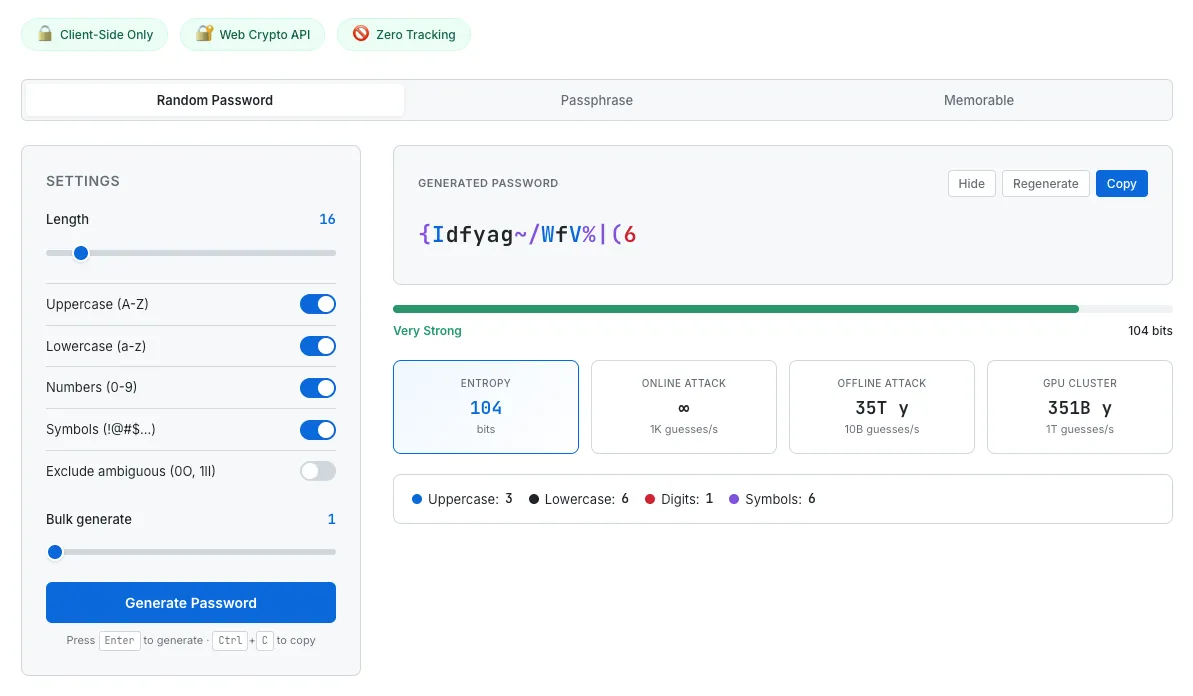
SudoTool's Password Generator lets you choose between random, passphrase, and memorable modes — each with real-time entropy and crack time analysis.
How to Check If Your Passwords Have Been Compromised
Even if you follow every best practice, your passwords can still be exposed through no fault of your own. When a company suffers a data breach, millions of credentials end up in databases that circulate among attackers. Here's how to find out if you're affected.
Check Have I Been Pwned. This free service, created by security researcher Troy Hunt, tracks publicly known data breaches. Enter your email address and it'll show you every known breach that included your credentials. The database now tracks billions of breached accounts across hundreds of data breaches — and continues to grow as new incidents are disclosed.
Use your browser's built-in password checkup. Chrome, Firefox, and Safari all offer features that check your saved passwords against known breach databases and flag any that need changing. Google's Password Checkup and Apple's Security Recommendations scan automatically and alert you to compromised, reused, or weak passwords.
If a password is compromised, change it immediately — and change it on every site where you used the same password. This is another reason why password reuse is so dangerous: one breach can mean dozens of compromised accounts.
The Future: Passkeys and Passwordless Authentication
While strong passwords remain essential today, the industry is moving toward a future where passwords may not be needed at all. Passkeys — based on the FIDO2/WebAuthn standard — are a new form of authentication that replaces passwords with cryptographic key pairs stored on your device.
Here's how they work: when you create an account on a site that supports passkeys, your device generates a unique key pair. The private key stays on your device (protected by your fingerprint, face scan, or device PIN), while the public key is sent to the website. When you log in, the site sends a challenge that only your private key can answer. No password is ever transmitted, stored, or typed — which means there's nothing to phish, nothing to leak in a data breach, and nothing to crack with brute force.
Major platforms have already adopted passkeys. Apple, Google, and Microsoft all support them natively across their operating systems and browsers. Services like Amazon, GitHub, PayPal, and many others now offer passkey login. As adoption grows, passkeys will likely become the default authentication method for most online accounts.
That said, passwords aren't going away overnight. Many services still don't support passkeys, and situations like shared accounts, legacy systems, and offline access still require traditional passwords. The best approach right now is to enable passkeys wherever available while continuing to use strong, unique passwords (stored in a password manager) for everything else.
Frequently Asked Questions
How long should my password be?
At least 16 characters for random passwords, or at least 4 random words for passphrases. Longer is always better. Modern security guidance from NIST recommends supporting passwords up to 64 characters — take advantage of that length.
Are passphrases really more secure than complex passwords?
A passphrase of 4–5 random words is typically more secure than a short complex password, and far easier to remember. The key word is "random" — the words must be chosen randomly, not picked to form a meaningful phrase. "I love my dog" is weak. "correct-horse-battery-staple" is strong.
Should I write my passwords down?
Writing passwords on paper is actually more secure than reusing the same password everywhere — a physical note can't be hacked remotely. That said, a password manager is a better solution. If you do write passwords down, keep the paper in a secure location and never label which account each password belongs to.
Is two-factor authentication enough to protect a weak password?
2FA significantly improves security, but it doesn't make a weak password safe. Some 2FA methods (like SMS) can be bypassed through SIM-swapping attacks. The strongest approach is a strong password combined with an authenticator app or hardware key.
How often should I change my passwords?
Only when there's a reason to — such as a known breach, suspected unauthorized access, or if you shared the password with someone who no longer needs it. NIST specifically advises against mandatory periodic password changes, as they lead to weaker passwords over time.
Are browser password managers safe?
Built-in browser password managers (Chrome, Firefox, Safari) are far better than reusing passwords or using weak ones. For most people, they're a perfectly reasonable choice. Dedicated password managers like Bitwarden or 1Password offer additional features like cross-browser support, secure sharing, and emergency access.
What are passkeys, and should I use them?
Passkeys are a passwordless login method based on the FIDO2 standard. They use cryptographic key pairs stored on your device, authenticated by your fingerprint or face scan. Passkeys are phishing-resistant and more secure than passwords. Enable them wherever available — but keep strong passwords for services that don't support passkeys yet.
Take Control of Your Password Security Today
Password security isn't complicated once you understand the fundamentals. Use long, unique passwords for every account. Store them in a password manager. Enable two-factor authentication. And check whether your existing passwords have been compromised.
You don't need to overhaul everything at once. Start with your most important accounts — email, banking, and any account that can reset other accounts. Generate a strong unique password for each one, save it in a manager, and enable 2FA. That single action puts you ahead of the vast majority of internet users.
If you need a strong password right now, our Password Generator creates cryptographically secure passwords, passphrases, and memorable passwords — with real-time entropy analysis so you can see exactly how strong each one is. No signup, no server, no tracking. Just open it and generate.
You might also be interested in how and why we built this password generator — a behind-the-scenes look at the design decisions, entropy calculations, and security considerations that went into the tool.