Why I Built a Password Generator When Hundreds Already Exist
The problem wasn't generating a random string. It was understanding why that string is strong — and picking the right type for the situation.
Search "password generator" and you'll find hundreds of them. Every security company has one. Every browser has one built in. There's no shortage of tools that spit out a random string of characters and call it a day.
But here's the thing — almost all of them follow the same pattern. You click a button, a string like x7#kQ9!mZ appears, and somewhere underneath it says "Strong." That's it. No explanation of what "strong" actually means. No numbers. No context. Just trust us, it's strong.
That always bothered me.
The Problem With Every Password Generator I Tried
I went through a dozen password generators before deciding to build my own. They all had the same issues.
The first problem is no real information. How secure is this password, exactly? The best you get is a colored bar — red, yellow, green — with no indication of what it actually measures. How many bits of entropy does it have? How long would it take a modern GPU to crack it? Almost none of them answer these questions. You're expected to look at a green bar and feel safe.
The second problem is one mode fits all. A password you store in a password manager is fundamentally different from one you need to memorize. And both are different from one you need to read aloud over the phone. A random string like x7#kQ9!mZ is great for a password manager — you'll never type it. But try memorizing it for a master password, or telling it to someone for a Wi-Fi login. It doesn't work. Most generators only offer the random string. No passphrases, no pronounceable options.
The third problem is trust. This is a tool that generates passwords — arguably the most sensitive data you handle online. Yet most of these sites are covered in ads, trackers, and third-party scripts. Is the password I just generated being sent to a server? Is an ad network script logging it? Most sites don't even address the question. For a password generator, that silence is uncomfortable.
And the fourth, smaller but annoying — sign-up walls. More sites than you'd expect ask you to create an account before generating a password. The irony of creating an account to create a password writes itself.
What I Actually Wanted in a Password Generator
After hitting the same frustrations enough times, I decided to build my own. Here's what I wanted:
- Three modes — a fully random password, a word-based passphrase, and a pronounceable memorable password. Different situations call for different types.
- Real-time entropy analysis — the moment a password is generated, show the entropy in bits, a strength rating, and estimated crack times for three different attack scenarios.
- Fully client-side — no data sent to any server, ever. The entire generation logic runs in the browser.
- No sign-up — open the page and start generating immediately.
Why Three Modes Matter
Not all passwords are created equal. Where you use a password determines what form it should take.
Random Password mode is the classic approach. It mixes uppercase, lowercase, digits, and symbols into a completely random string. If you're storing it in a password manager, this is the best option — it packs the most entropy per character. A 16-character random password with all character types has roughly 105 bits of entropy. At a trillion guesses per second, that would take billions of years to crack.
Passphrase mode is inspired by the Diceware method. It picks random words from the EFF's 7,776-word list and chains them together — something like "correct-horse-battery-staple." Four words alone give you about 51 bits of entropy, and adding capitalization plus a number pushes it higher. The key advantage is that you can actually remember it. This makes passphrases ideal for master passwords — the one password you have to type from memory.
Memorable mode generates pronounceable strings using consonant-vowel syllable patterns — things like "bopiketa" or "taluvimo." The entropy per character is lower than pure random, but these are dramatically easier to say out loud or recall from memory. They're perfect for Wi-Fi passwords you share verbally, guest account credentials, or any situation where a password manager isn't an option.
Showing Entropy Instead of a Colored Bar
This is the part I spent the most time on. When the Password Generator creates a password, four metrics appear instantly:
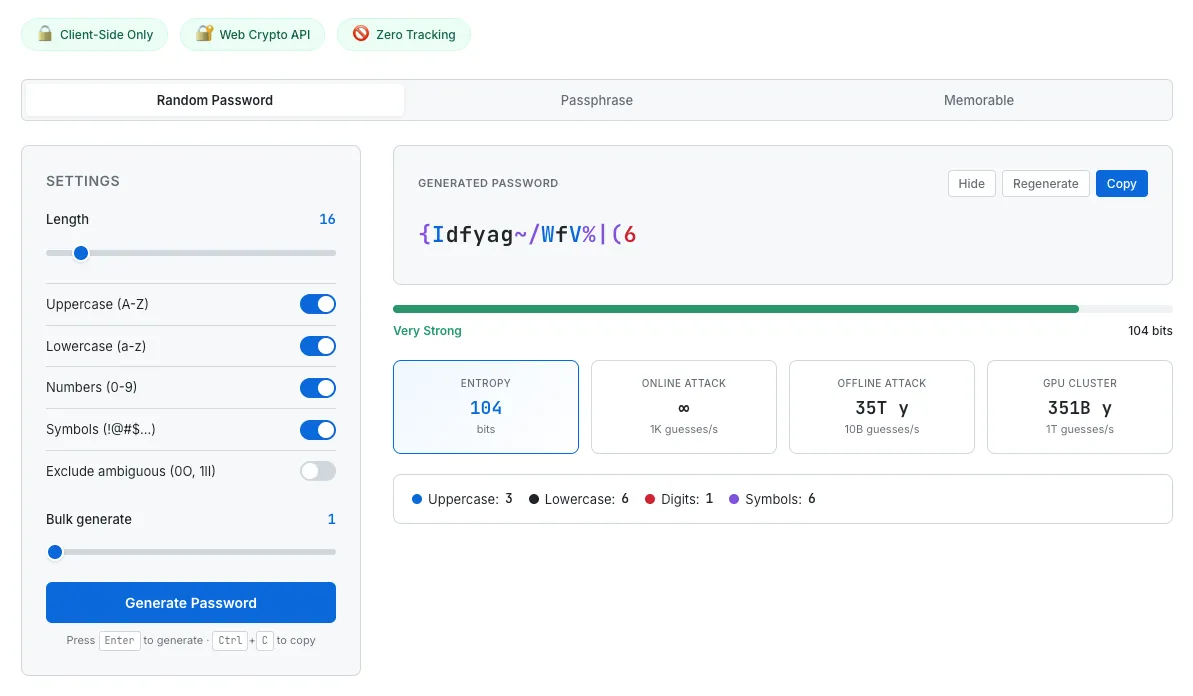
A 16-character random password with real-time entropy analysis and crack time estimates across three attack scenarios.
Entropy (bits) quantifies the password's randomness. Higher is better. It's calculated as the length multiplied by the log-base-2 of the character pool size — a direct measure of how many possible combinations exist.
Strength rating maps entropy to five human-readable levels: Weak, Fair, Good, Strong, and Excellent.
Crack time estimates show how long a brute-force attack would take under three scenarios: an online attack at 1,000 guesses per second (a rate-limited web login), an offline attack at 10 billion guesses per second (a single modern GPU cracking hashes), and a GPU cluster at 1 trillion guesses per second (a well-funded adversary). Seeing "35 trillion years" next to "offline attack" tells you something concrete. A green bar doesn't.
Warnings flag patterns that weaken the password — repeated characters, sequential runs, or other issues that reduce effective entropy.
The password itself is color-coded: uppercase letters in blue, digits in red, symbols in purple, lowercase in black. It's not decorative — it lets you see the composition at a glance. When you adjust the length slider or toggle character types, all four metrics update in real time. You can watch the entropy drop as you shorten the password from 16 to 8 characters. That immediate feedback makes the relationship between settings and security tangible in a way that a static "strong" label never can.
No Server, No External API
This tool doesn't call a single external endpoint. The random numbers used for password generation come from the browser's Web Crypto API (crypto.getRandomValues) — a cryptographically secure random number generator. Not Math.random(), which is predictable and unsuitable for security purposes.
The 7,776-word EFF list used for passphrases is embedded directly in the HTML file. It's not fetched from anywhere. You could disconnect from the internet entirely and this tool would still work.
Generated passwords are not stored anywhere. They're not sent to a server. They're not saved to localStorage. I considered adding a history feature to keep track of recently generated passwords, but for data this sensitive, I deliberately left it out. Refresh the page and everything is gone. That felt like the right call.
It's the same philosophy behind every tool on SudoTool. The QR Code Generator processes your data locally. The Investment Growth Simulator runs all its calculations in the browser. No data leaves your device. For a tool that generates passwords, that's not a nice-to-have — it's a requirement.
What's Still Missing
There are a few features I'd like to add.
First, a password strength checker. Right now the tool only analyzes passwords it generates. Being able to paste in a password you're already using and see its entropy, crack time, and any weaknesses would make it more useful as an everyday security tool.
Second, bulk generation. Sometimes you need to create passwords for multiple accounts at once — ten, twenty at a time — and download them as a CSV. The UI already has a bulk slider, but export options would make it more practical for IT administrators or anyone setting up multiple accounts.
Third, multilingual passphrases. The current word list is English-only. Adding Korean, Spanish, or other language word lists would make passphrases easier to remember for non-English speakers — which is most of the world.
Try It
Password generators are everywhere. But what I wanted wasn't just a tool that produces random strings — it was a tool that shows you why a password is secure. Seeing the entropy, checking the crack times, choosing the right mode for the situation — that process is how you actually start to understand password security, not by trusting a colored bar.
No sign-up. No server. No ads. Just open your browser.
I'd suggest starting in Random mode and dragging the length slider down to 8 characters. Watch the entropy drop and the crack times shrink. Then push it back to 16. That moment when the numbers change is when short passwords stop being an abstract risk and start feeling real.