Why I Built a Free QR Code Generator When "Free" Ones Already Exist
Custom colors? Pay. Logo? Pay. SVG download? Pay. I got tired of "free" tools that lock everything useful behind a paywall.
A friend who runs a small café asked me for a favor. She wanted a QR code for her Wi-Fi password so customers could just scan and connect instead of asking her to repeat the password ten times a day. Simple enough, I thought. "You can make one online for free."
Then I actually tried to make one for her. It wasn't simple at all.
The Reality of "Free" QR Code Generators
Search "QR code generator" and dozens of results come up. Most of them lead with "Free QR Code Generator" in big letters. In practice, here's what "free" actually means.
Basic only. Generating a plain black-and-white QR code is free. But change the colors to match your brand? That's a paid feature. Add a logo in the center? Paid. Download as SVG instead of a low-resolution PNG? Paid. Increase the resolution? Paid. The free tier gives you the bare minimum — everything actually useful is locked behind a subscription.
Sign-up required. Many sites won't even generate a QR code until you create an account. You hand over your email address, and in return you get a QR code and a flood of marketing emails. For something that should take five seconds, that's a lot of friction.
Ads everywhere. Free services need revenue, and I understand that. But when the entire page is covered in ads, it's hard to tell where the tool ends and the ads begin. Clicking what looks like a download button and landing on an ad — we've all been there.
And the biggest issue — data privacy. Most QR code generators render the code on their server. That means whatever you type — a URL, a Wi-Fi password, an email address — gets sent to someone else's server. When the whole point is creating a QR code for your Wi-Fi password, having that password travel through an external server feels backwards.
What I Actually Wanted in a QR Code Generator
My friend's request turned into a project. If I was going to build one, I wanted to do it right.
- Actually free — color customization, logo upload, SVG download, high-resolution PNG. Every feature, no paywall.
- Multiple QR types — not just URLs, but text, Wi-Fi, email, phone, and SMS.
- Full customization — foreground and background colors, dot styles, corner styles, and logo placement.
- 100% browser-based — no data sent to any server. Your Wi-Fi password, your personal URL, your email address — none of it leaves your device.
- No sign-up — open the page and start creating immediately.
Six QR Types, Not Just URLs
When people think "QR code," they usually think of a URL. But QR codes can encode much more than that.
URL is the default. Paste a web address, scan the code, the page opens. Business cards, posters, product packaging — the most common use case.
Text stores plain text. Useful for short notes, one-time codes, or any message you want someone to scan and read.
Wi-Fi is the one that started this whole project. Enter your network name, password, and encryption type, and the generator encodes it in the standard WIFI:T:WPA;S:MyNetwork;P:mypassword;; format. When someone scans it, their phone connects to the Wi-Fi automatically — no typing, no spelling out the password letter by letter. Cafés, hotels, offices, Airbnbs — it's useful anywhere you share a network with guests.
Email opens a pre-filled compose window with the recipient, subject, and body already set. Handy for customer feedback forms, event RSVPs, or support contact codes.
Phone opens the dialer with the number pre-filled. SMS opens the messaging app with a draft ready to send. Both are useful for customer support numbers, reservation confirmations, or quick-response marketing materials.
All six types use standard encoding formats recognized by every major QR code reader. No proprietary format, no special app needed — just a phone camera.
Customization That's Actually Free
This is where most "free" generators draw the line. Everything below is free in the QR Code Generator, with no account required.
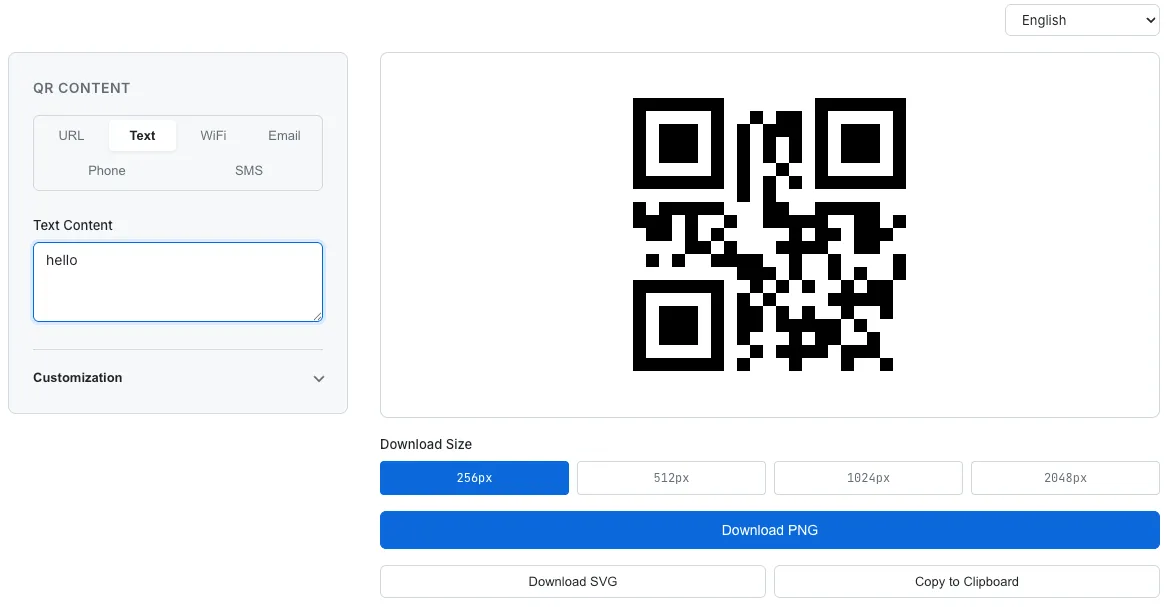
Generating a QR code with six content types, customization options, and multiple download formats — all free.
Colors. Pick any foreground and background color. Match your brand, your storefront signage, or just make it look less boring than default black-on-white. Enter a HEX code directly or use the color picker. The only rule is contrast — a light foreground on a light background won't scan. That's physics, not a paywall.
Dot styles. Six options: Square, Dots, Rounded, Extra Rounded, Classy, and Classy Rounded. Changing the dot style alone transforms the entire look of a QR code. A rounded-dot QR code on a restaurant menu feels completely different from a sharp-square one on a shipping label.
Corner styles. Three variations that combine with dot styles to create dozens of possible design combinations.
Logo upload. This is probably the most requested "premium" feature on other platforms. Upload a logo or icon, and it's placed at the center of the QR code. When a logo is added, the error correction level automatically increases to H (30% recovery), ensuring the code stays scannable even with the logo covering part of it. It turns a generic QR code into a branded one — and it costs nothing.
Download options. PNG at four resolutions (256px, 512px, 1024px, 2048px) and SVG for infinite scalability. You can also copy the QR code directly to your clipboard. No watermark, no "upgrade to remove branding" nonsense.
Eight Languages, Because QR Codes Are Global
One thing I cared about was making the interface accessible beyond English speakers. The tool supports eight languages: English, Korean, Japanese, Chinese, Thai, Vietnamese, Indonesian, and Portuguese.
QR codes are used everywhere — by street vendors in Bangkok, restaurants in Tokyo, cafés in São Paulo. Forcing everyone through an English-only interface is an unnecessary barrier. The language selector sits at the top of the page, and switching it instantly translates every button, label, and placeholder. The QR code itself, of course, is language-agnostic — it encodes data, not language.
Nothing Leaves Your Browser
I want to be explicit about this because it matters. This tool does not use a server to generate QR codes. The entire rendering logic runs in JavaScript, in your browser.
The URL you paste, the Wi-Fi password you enter, the email address you type — none of it is transmitted anywhere. You could disconnect from the internet after loading the page and the tool would still work. (You do need internet to load it the first time, obviously.)
Downloads work the same way. The PNG and SVG files are generated locally and saved directly to your device. They don't pass through a server. The logo you upload isn't sent anywhere either — it's read into browser memory and composited into the QR code right there on your machine.
This is the same approach behind every tool on SudoTool. The Password Generator uses the Web Crypto API without ever sending a password to a server. The Investment Growth Simulator runs all its math in the browser. When you're putting personal data into a tool — especially something like a Wi-Fi password — knowing it never leaves your device isn't a bonus feature. It's the baseline.
What's Still Missing
There are a few things I'd like to add.
First, vCard (contact) QR codes. A QR code that contains your name, phone number, email, and company info — scan it and it saves directly to the phone's contacts. Useful for networking events where paper business cards feel outdated.
Second, bulk generation. Event tickets, product labels, inventory tags — situations where you need dozens or hundreds of unique QR codes. Upload a CSV, generate one QR code per row, download them all as a ZIP. That would make the tool useful for small businesses and event organizers, not just individuals.
Third, a QR code scanner. Right now the tool only generates codes. Adding a camera-based scanner on the same page — scan any QR code and see what's encoded — would make it a complete two-way tool.
Try It
Every time I searched for a QR code generator, I ran into the same thing — "free" in the headline, paywalls in the features. Custom colors locked. Logos locked. SVG locked. I built this because the bar for "free" should mean all features are free, not just the most basic one. It surprised me how few tools actually clear that bar.
No sign-up. No paywall. No ads. Just open your browser.
I'd suggest trying the Wi-Fi tab first. Enter your home or office network details, generate the code, and print it out. Stick it on the fridge or near the router. Once you do, you'll wonder why you didn't do it sooner — no more spelling out passwords one character at a time.