Is Incognito Mode Private? What the Vendor Docs Say (and What They Don't)
Browser vendors themselves describe a narrow promise: local-state clearing. ISPs, networks, websites, and fingerprinters still see you. The honest map of what incognito does — and doesn't.
This is an informational summary of what browser vendor documentation, peer-reviewed academic studies, and court records describe about private/incognito browsing. It is not security advice. The studies cited describe technical surfaces and population-level user misconceptions — not personalized predictions, and individual privacy needs vary with threat model. If you have specific privacy or legal compliance concerns, please consult an appropriate professional.
In 2018, Wu, Gavazzi, Williams and colleagues at the University of Chicago and Northeastern surveyed 460 participants about what private browsing actually does. The most striking single finding: 56.3% of participants believed that even while signed into a Google account, their search queries would not be saved while in private mode. Another 27% believed private mode protected against viruses and malware. Many didn't realize ISPs, employers, or government could track activity during private browsing. The study was a quiet preview of a much larger reckoning — one that ended in 2024 with Google agreeing to a settlement of Brown v. Google LLC valued at over $5 billion (no monetary payment to class members; the value reflects required data deletion and disclosure changes), in which plaintiffs alleged Google had continued to track Incognito users via Google Analytics, Google Ad Manager, and various plugins. So is incognito mode private? The honest answer requires walking through what incognito actually does, what it doesn't, and what threat model it was ever designed for.
This post walks through seven things — (1) what incognito actually clears, (2) what visibility surfaces it does not hide, (3) why fingerprinting works the same in incognito, (4) cookie and storage behavior across browsers, (5) Chrome/Firefox/Safari/Edge/Brave compared, (6) common myths versus the technical reality, and (7) a threat-model decision matrix for whether incognito is enough for what you're trying to do.
What incognito mode actually does — local-state clearing
Every major browser shares the same baseline. Closing all incognito or private windows clears that session's history, cookies, cache, form/autofill entries, and the downloads list (the downloaded files themselves remain on disk). Bookmarks created during the session and any new passwords saved to the underlying profile typically persist. The phrasing in vendor documentation varies, but the effect is consistent.
Chrome (Google support). Google's official Chrome help describes Incognito sessions as ending when all Incognito windows close, after which Chrome doesn't retain site data or a record of the sites visited. Files downloaded persist on the device until deleted. Third-party cookies are blocked by default in Incognito mode.
Firefox (Mozilla support). Firefox's documentation describes cookies as "temporarily held in memory and discarded at the end of your private session." Cleared at window close: history, cookies, cache, search bar entries, form input, downloads list. Preserved: new bookmarks and any passwords saved during the session.
Safari (Apple support). Apple's documentation describes Private Browsing as not saving the details of browsing or sharing visited websites with other Apple devices. Cleared: AutoFill information, recent search history, download history, cookies, and iCloud-synced open tabs.
Edge (Microsoft support). Edge InPrivate clears "browsing history, cookies, and site data, as well as passwords, addresses, and form data when you close all InPrivate windows." Searches are not associated with a Microsoft account. Favorites and downloaded files persist.
One detail that catches almost every user: per-window scope is the standard. All tabs inside a single incognito window share the same cookie jar — open a fresh incognito window to truly start a separate session. Bookmarks and downloaded files always persist; this is documented behavior, not a flaw.
What incognito does not hide — visibility surfaces
This is the part most users get wrong, and the part the vendor docs themselves are surprisingly clear about.
Chrome's official help page states it directly: "Websites you visit, including Google sites, and organizations that manage your network, like your school, employer, or internet service provider, may be able to observe your activity in Incognito." Firefox's documentation echoes this: "Your Internet service provider, employer, or the sites themselves can still gather information about pages you visit. Private Browsing does not make you anonymous on the Internet."
Incognito clears the local traces of a session, but it doesn't reach the data sites and brokers already hold about you. Removing that requires a separate workflow — our how to delete your data online guide covers the GDPR / CCPA opt-out path for what incognito can never undo.
The full picture, by surface:
| Surface | What it sees in incognito |
|---|---|
| ISP | Connection target IPs, DNS queries (unless DoH/DoT enabled), SNI hostname (unless ECH enabled), traffic timing & volume |
| Network admin (school / employer / public WiFi) | Same as ISP, plus often TLS interception via managed root certificates on managed devices |
| Visited site | Your IP, User-Agent, all browser-exposed data, browser fingerprint, anything you submit, plus any signed-in identity |
| Search engine when signed in | Full search query, time, results clicked — saved to your account |
| Operating system / device | Files downloaded persist, hibernation/swap may contain page contents, OS-level network logs if any |
The DNS and SNI side is worth dwelling on. Even with HTTPS, the Server Name Indication (SNI) field in the TLS ClientHello is sent in plaintext by default — meaning network observers can identify which website a client is accessing, even though the page contents are encrypted. Encrypted Client Hello (ECH) is the proposed fix, supported by Cloudflare and increasingly by browsers, but as of 2026 it is still being rolled out and is not universally available (Cloudflare on ECH). Without ECH, an ISP knows which sites you visit even though they cannot read the page contents.
Browser fingerprinting works the same in incognito
Browser fingerprinting identifies users without cookies. It combines what the browser exposes — Canvas API output, WebGL renderer string, AudioContext characteristics, font enumeration, screen resolution, timezone, navigator properties, installed plugins — into a near-unique identifier. Incognito does not change any of these surfaces.
EFF's 2010 Panopticlick study (Eckersley) measured roughly half a million distinct browsers and found "84% had unique configurations." Among browsers with Flash or Java installed, "94% were unique." Only 1% of those with plugins had fingerprints seen more than twice. The study's broader point — your browser leaks enough information that you can be tracked across sessions without any cookie ever being set — has only been reinforced since.
Laperdrix, Rudametkin, and Baudry's 2016 IEEE Security & Privacy paper, "Beauty and the Beast: Diverting modern web browsers to build unique browser fingerprints," collected 118,934 fingerprints across 17 attributes. The authors wrote that "innovations in HTML5 provide access to highly discriminating attributes, notably with the use of the Canvas API," and that browser fingerprinting "is as effective on mobile devices as it is on desktops and laptops." The paper later received the CNIL-INRIA European Privacy Protection award.
Mowery and Shacham's 2012 paper on canvas alone (294 Mechanical Turk participants) measured "an experimental entropy of 5.7 bits" — meaning the canvas signal alone narrowed identification to roughly one in 50. By 2014, Acar and colleagues' "The Web Never Forgets" study reported that approximately 5% of the top 100,000 websites used canvas fingerprinting in production.
EFF's Cover Your Tracks project states the position bluntly: "Google's Chrome browser does not provide protection against trackers or fingerprinters in Incognito Mode." Only browsers with explicit anti-fingerprinting — Tor Browser, Brave Shields with randomization, Firefox's privacy.resistFingerprinting preference, Safari's advanced tracking protection — actively defend, and even those defenses are imperfect against persistent adversaries. For more on what your browser leaks across sessions, see What Your Browser Reveals About You: A Guide to Digital Fingerprinting.
Cookies and storage in incognito — what is and isn't cleared
During an incognito session, cookies internally work normally — a cookie set by a site is sent back when other tabs in the same window visit that site. This means in-session cross-site tracking still works: visit five sites in one incognito window with an ad network's third-party cookies enabled, and that ad network can stitch your activity across all five. Closing the window clears cookies, localStorage, IndexedDB, the cache, and most service-worker storage.
Default tracking protection in private modes varies sharply across browsers. Chrome Incognito blocks third-party cookies by default (since 2020). Firefox Private Browsing enabled Total Cookie Protection by default in Firefox 89, released June 1, 2021 — Mozilla's announcement describes it as "each website you visit is given a separate cookie jar that keeps cookies confined to that site" (Mozilla Security blog). Safari's Intelligent Tracking Prevention goes further — WebKit's documentation describes it as "by default blocks all third-party cookies. There are no exceptions to this blocking," with additional features including downgraded third-party referrers, blocked third-party HSTS headers, link-decoration detection, 7-day script-storage caps, and CNAME/IP cloaking detection (WebKit Tracking Prevention).
Privacy Sandbox status (2026). Google's plan to deprecate third-party cookies in Chrome went through several reversals. By April 2025, Google announced it would not introduce a separate consent prompt for third-party cookies in Chrome (Privacy Sandbox: next steps). On October 17, 2025, Google announced retirement of a large set of Privacy Sandbox technologies, focusing on a smaller set of features (Update on Privacy Sandbox plans). The practical state in 2026: Chrome's third-party cookies remain enabled by default in normal browsing; Incognito blocks them in-session as before.
Browser comparison — Chrome / Firefox / Safari / Edge / Brave
The defaults matter as much as the underlying technology. Here is the practical comparison:
| Feature | Chrome Incognito | Firefox Private | Safari Private | Edge InPrivate | Brave Private (+ Tor) |
|---|---|---|---|---|---|
| Local history / cookies / cache cleared at close | Yes | Yes | Yes | Yes | Yes |
| Bookmarks / downloaded files preserved | Yes | Yes | Yes | Yes | Yes |
| 3rd-party cookies blocked by default | Yes (since 2020) | Yes (Total Cookie Protection, 2021-06+) | Yes (ITP, 2017+) | Yes (Tracking Prevention; level varies by version) | Yes (Shields default) |
| Cross-site cookie partitioning | Per-session in Incognito | Yes (Total Cookie Protection) | Yes (ITP partitioning) | Yes (Tracking Prevention) | Yes (Shields) |
| Anti-fingerprinting | Minimal | Moderate (ETP, Resist Fingerprinting pref) | Moderate-strong (advanced tracking & fingerprinting protection) | Minimal-moderate | Strong (randomized fingerprint via Shields) |
| Tor / onion routing built in | No | No | No | No | Yes (Brave Private with Tor — see caveat below) |
Important Brave + Tor caveat. Brave's "Private Window with Tor" routes traffic through Tor relays for IP-level anonymity, but it is not the same as the standalone Tor Browser. Brave's own help documentation warns that "Private Window with Tor" windows do not include all the additional protections offered by Tor Browser — for instance, the deeper anti-fingerprinting patches and operational defaults that ship with Tor Browser are not all present in Brave. If true anonymity is the goal, the standalone Tor Browser is the more accurate tool.
Myth versus reality — what the surveys keep finding
The Wu et al. 2018 WWW paper, "Your Secrets Are Safe: How Browsers' Explanations Impact Misconceptions About Private Browsing Mode," compared 13 different disclosure statements from six popular browsers (Chrome desktop, Chrome mobile, Firefox, Safari, Edge, Opera, plus a control). The 460 participants were each shown one disclosure and asked what private mode protected. Common misconceptions documented in the paper: that private mode would prevent geolocation, protect from malware, eliminate advertisements, and prevent tracking by visited websites and network providers. Of the 13 disclosures tested, only those from desktop and mobile Chrome — with their bullet-list "what it does / does not do" format — produced significantly more correct responses than the control statement.
The University of Chicago's coverage of the same study reports that 27% of participants mistakenly believed private mode offered protection against viruses and malware, and that many didn't realize ISPs, employers, or government could track activity during private browsing.
The most useful framing is to pair each common myth with the technical reality:
| Myth | Reality |
|---|---|
| "My ISP can't see what I do in incognito." | False. ISP sees DNS queries (unless DoH on), SNI hostnames (unless ECH on), connection IPs, and traffic timing. |
| "Websites can't track me in incognito." | False. Fingerprinting works identically. IP is still visible. Same-session cookies still work for in-session cross-site stitching. |
| "Incognito is anonymous browsing." | False. It is local-history-clearing browsing. Anonymity needs Tor or similar. |
| "My employer/school can't see what I'm browsing on their WiFi." | Almost always false on managed networks. They typically have TLS-intercept proxies and managed device certificates. |
| "Google won't save my searches if I'm in Incognito." | False if you're signed into a Google account in that Incognito window — the 56.3% misconception in Wu 2018. |
| "Incognito will protect me from malware." | False. Private mode has no effect on malware delivery — the 27% misconception in Wu 2018. |
Brown v. Google LLC (2024). The class-action lawsuit, filed in 2020 in the Northern District of California, alleged Google "continued to track, collect, and identify browsing data from users of Incognito Mode" via Google Analytics, Google Ad Manager, and various plugins, and that Google had used "private browsing detection bits" — internal flags indicating a user was in Incognito. In April 2024, Google agreed to a settlement valued at over $5 billion (with no monetary payment to class members; the value reflects the required deletion of "billions of records" of Incognito browsing data, changes to Incognito disclosures, and a default that lets Incognito users block third-party cookies for five years). Important framing: this was a settlement of plaintiffs' allegations, not a judicial finding of liability against Google.
Threat-model decision matrix — is incognito enough?
The most useful way to think about incognito is not "is it private" in the abstract, but what are you trying to hide, from whom? Different threat models call for different tools.
| Threat | Incognito alone enough? | Why / why not |
|---|---|---|
| Family member or housemate uses my laptop | Effective | Local clearing works as designed |
| Avoiding personalized search results / ad personalization | Partially effective | Cookies cleared, but IP and fingerprint still readable |
| ISP sees what sites I visit | Not effective | DNS, SNI, destination IP all visible; need DoH+ECH+VPN/Tor |
| Employer monitoring on a corporate network | Not effective | Managed networks typically have TLS-intercept proxies |
| Cross-site advertiser tracking | Effective for cookies, not for fingerprinting | Same-browser fingerprint = same identity across sites |
| Search engine logging (signed in) | Not effective | Account-level logging is unaffected |
| Logging into two accounts on the same site | Effective | Per-window cookie isolation enables this directly |
| Malware or phishing protection | Not effective | Out of scope of private browsing |
| Government surveillance or strong adversary | Not effective | Need Tor Browser plus operational discipline |
The honest framing of privacy as a stack:
- Don't leave traces on a shared computer: incognito alone is sufficient.
- Prevent in-session cross-site tracking: Firefox / Safari / Brave private mode have stronger defaults than Chrome.
- Prevent cross-session ad/analytics tracking: anti-tracking browser (Brave or Firefox strict ETP) plus extensions like uBlock Origin.
- Prevent fingerprinting: Tor Browser is strongest; Brave provides randomization; Firefox supports
privacy.resistFingerprinting. - Hide your IP from websites: VPN or Tor (note that VPN moves trust from ISP to VPN provider rather than removing it).
- Hide DNS / SNI from ISP: DoH/DoT plus ECH where available.
- Anonymity from a powerful adversary: Tor Browser with operational discipline.
Each layer has trade-offs — Tor is slow, VPNs move rather than eliminate trust, anti-fingerprinting can break websites. The point of this map is to match the tool to the threat, not to oversell incognito or under-use it.
If you'd like to see what your current browser actually exposes — fingerprinting surfaces, tracker visibility, third-party cookie behavior — the Browser Privacy Checker runs roughly 20 checks in your browser and produces a letter-grade summary you can share or screenshot.
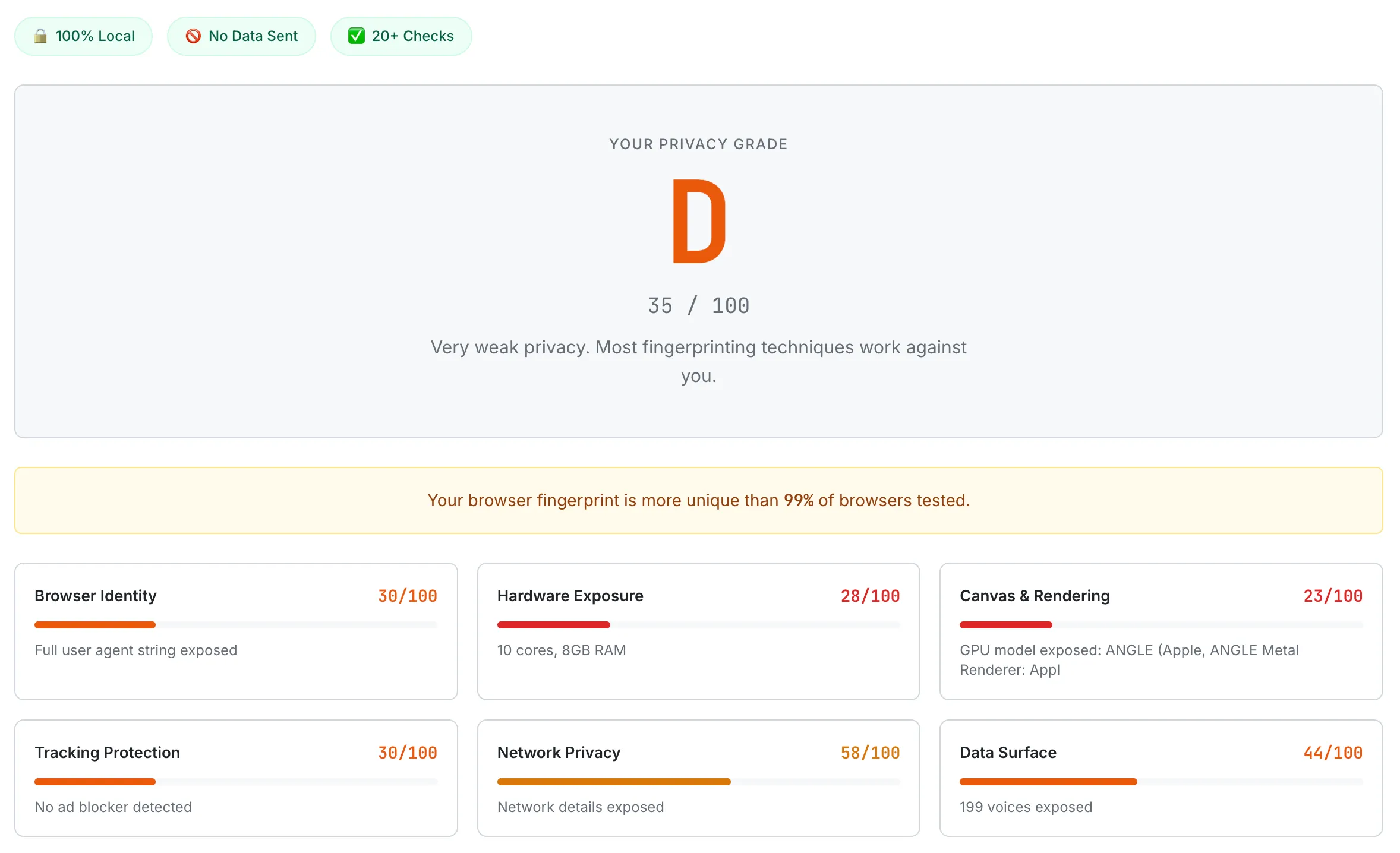
The Browser Privacy Checker shows what your browser exposes across roughly 20 fingerprinting and tracking surfaces. Incognito mode does not change most of these — testing in incognito and normal mode usually produces nearly identical reports.
Frequently Asked Questions
Does incognito hide me from my ISP?
No. Both Chrome's and Firefox's official documentation explicitly say ISPs can still observe activity in incognito. ISPs see your DNS queries (unless you have DNS-over-HTTPS or DNS-over-TLS enabled), the SNI hostname for each connection (unless Encrypted Client Hello is active end-to-end), and the destination IP addresses of every connection. Hiding from an ISP requires DNS encryption plus SNI encryption plus ideally a VPN or Tor.
Can my employer see what I browse on the company WiFi in incognito?
On a managed corporate or school network, almost always yes. Many enterprise networks use TLS-intercepting proxies that decrypt and re-encrypt HTTPS traffic, and managed devices typically trust the corporate root certificate that makes this transparent to the browser. Incognito does nothing to defeat this layer — the network sees the same thing whether you're in incognito or not.
Does incognito prevent websites from tracking me?
Only partially. Same-session cookies still work, so a tracker present on multiple sites in the same incognito window can stitch your activity across them. Browser fingerprinting (canvas, WebGL, fonts, audio context) works essentially the same in incognito as in normal browsing — Eckersley 2010 found 84% of browsers were uniquely identifiable via fingerprinting, and that finding has only been reinforced by later studies. Incognito clears state at window close but doesn't change what your browser leaks while it's open.
Will Google save my searches in incognito?
If you're signed into a Google account in that incognito window, yes. The 2018 Wu et al. study found that 56.3% of participants believed Google would not save searches under those conditions — which is the most documented misconception about private browsing. To prevent search-engine logging at the account level, you need to either not sign in or use a search engine that doesn't log searches at all.
Is Brave's "Private Window with Tor" the same as Tor Browser?
No. Brave's Tor mode routes traffic through the Tor network for IP anonymity, but it does not include all the additional protections that ship with Tor Browser — particularly the deeper anti-fingerprinting patches, operational defaults, and security-vs-usability trade-offs that the Tor Project maintains. For genuine anonymity needs, the standalone Tor Browser is the accurate tool, not Brave's private window.
What is incognito mode actually good for?
Several real, documented use cases: not leaving traces on a shared or public computer; logging into two different accounts at the same site at the same time (per-window cookie isolation enables this directly); bypassing personalized search results, recommendations, or pricing; testing a website without your existing cookies; and casual avoidance of personalization algorithms. These are real benefits for specific threat models — they just don't generalize to "the network," "the ISP," "the website," or "an advertiser using fingerprinting."
For more on browser-side privacy specifically, see What Your Browser Reveals About You: A Guide to Digital Fingerprinting. If credential-side privacy is the concern — what to do when an account is part of a breach — see Have I Been Pwned? What to Do If Your Email Was Leaked. And for the password-manager side of the privacy stack, see Are Password Managers Safe? What the Evidence Shows.
This guide summarizes browser vendor documentation, peer-reviewed academic research on web tracking and user misconceptions, and public court filings — current as of May 2026. Browser tracking-prevention defaults change frequently (especially around Privacy Sandbox), and individual browser versions may behave differently. Threat models also vary by individual situation. None of this is security advice or legal advice or a substitute for professional consultation. If you have specific concerns about regulatory compliance, surveillance, or sensitive personal threat models, please consult an appropriate professional.