How Websites Track You: A Complete Guide to Web Tracking in 2026
Cookies are just one of eleven different tracking mechanisms watching you right now. Here's the full map — and what you can actually do about it.
You turned on incognito. You cleared your cookies. And yet the running shoes you searched for yesterday keep chasing you across Instagram ads. How is that possible? The answer: cookies are just one technique in a much larger ecosystem. As of 2026, eleven different mechanisms can track you simultaneously across the web — and most people only know about one of them. This is how websites track you, mechanism by mechanism, and which ones you can actually do something about.
gclid and fbclid, (4) browser fingerprinting (Canvas, WebGL, audio, fonts), (5) IP address plus geolocation databases, (6) localStorage / ETag / supercookies, (7) mobile device IDs (IDFA on iOS, AAID on Android), (8) email open pixels, (9) cross-device identity graphs, (10) third-party scripts (analytics, ad pixels, session replay), and (11) server-side tracking plus your ISP's visibility. Blocking cookies alone leaves the other ten in place. Safari and Firefox now block far more by default, but in April 2025 Google decided to keep third-party cookies in Chrome, so the largest browser still allows the most invasive form by default.
This guide walks through all eleven categories — what each one is, how it works, who uses it, and whether you can control it. Browser fingerprinting gets a brief overview here because it has its own deep dive in our browser fingerprint privacy guide. At the end you'll find a practical reduction checklist and a FAQ. If you want to see what your own browser exposes right now, run our Browser Privacy Checker — it executes 20+ fingerprinting tests in your browser and gives you a privacy letter grade.
Why Web Tracking Is Bigger Than Cookies
Cookies are the public face of web tracking — the thing GDPR consent banners trained everyone to recognize. But they're one tool in a larger toolkit. Safari has blocked all cross-site cookies by default since March 2020. Firefox enabled Total Cookie Protection by default in June 2022. The advertising ecosystem's tracking capability survived both shifts, because the other ten mechanisms keep working. Apple's WebKit team described the dynamic plainly when shipping ITP 2.3 in 2019: "Since ITP 2.2, several trackers have announced their move from first-party cookies to alternate first-party storage such as LocalStorage." Trackers move to new vectors as old ones close. Catching up means knowing the whole map.
1. Cookies (First-Party and Third-Party)
What cookies actually are
Cookies are defined by the IETF in RFC 6265 (April 2011). A site stores small name-value pairs in your browser, and those values get sent back automatically on every subsequent request to the same domain. First-party cookies are set by the domain you actually visited — they keep you logged in, hold your shopping cart, and remember your preferences. Third-party cookies are the problem. RFC 6265 itself describes the mechanism:
"In rendering an HTML document, a user agent often requests resources from other servers (such as advertising networks). These third-party servers can use cookies to track the user even if the user never visits the server directly."
An ad network or embedded widget sets a cookie on its own domain. The same network is embedded on hundreds of sites. It now sees the same user across every site that includes it — that's cross-site tracking.
What each browser does by default in 2026
| Browser | Default for third-party cookies (2026) | Since |
|---|---|---|
| Safari | Blocked across the board | March 24, 2020 |
| Firefox | Total Cookie Protection (per-site cookie jar) | June 14, 2022 |
| Chrome | Allowed by default (deprecation cancelled) | Since launch; reaffirmed April 22, 2025 |
In WebKit's words: "Cookies for cross-site resources are now blocked by default across the board." Mozilla's Total Cookie Protection uses a separate "cookie jar" for each site you visit, so a tracker dropped on Site A can't read its own cookie on Site B.
Chrome is the outlier. Originally Google planned to deprecate third-party cookies in Chrome alongside its Privacy Sandbox proposals. On April 22, 2025, Anthony Chavez (VP, Privacy Sandbox) reversed course: "We've made the decision to maintain our current approach to offering users third-party cookie choice in Chrome, and will not be rolling out a new standalone prompt for third-party cookies." With Chrome holding roughly 65% of global browser share, third-party cookie tracking remains widespread on the web by default in 2026.
2. Tracking Pixels and Web Beacons
A tracking pixel — also called a web beacon, pixel tag, 1×1 GIF, or spy pixel — is an invisible image embedded in a page or email that loads from a tracker's server. The mechanism is described on Wikipedia's Web beacon page:
"When a user opens the page or email where such an image is embedded, they might not see the image, but their web browser or email reader automatically downloads the image, requiring the user's computer to send a request to the host company's server."
The downloaded image is invisible — "The image could be as small as a single pixel (a 'tracking pixel') and could have the same colour as the background, or be completely transparent" — but the request itself carries identifying data: "The identifying information provided by the user's computer typically includes its IP address, the time the request was made, the type of web browser or email reader that made the request, and the existence of cookies previously sent by the host server."
Pixels work without JavaScript (it's just an <img> tag), so blocking JavaScript-based trackers doesn't stop them. They also don't require cookies — Wikipedia: "The process of email-tracking does not require cookies, which makes it difficult to block without affecting user experience."
Common instances: Meta Pixel (Facebook ad attribution and audience building, embedded on millions of sites), Google Tag Manager / GA4 pixels, and email open pixels from senders like Mailchimp, SendGrid, and HubSpot inserting an invisible 1×1 GIF into every email they send.
3. URL Parameters and Link Decoration
UTM parameters — the legitimate kind
The ?utm_source=...&utm_medium=...&utm_campaign=... tags you see at the end of marketing URLs are UTM parameters (Urchin Tracking Module). Google Analytics' official documentation defines five standard ones: utm_source, utm_medium, utm_campaign, utm_term, and utm_content. (GA4 added three more — utm_id, utm_source_platform, and utm_creative_format.) UTMs themselves don't track users across sites — they're referrer labels that tell a site where its traffic came from.
Click IDs — the cross-site identifiers
A different kind of URL parameter does identify users: gclid (Google Click ID), fbclid (Facebook Click ID), msclkid (Microsoft). When you click an ad and land on a site, the URL looks like https://retailer.com/?gclid=ABC123XYZ. The retailer stores that ID in its own first-party cookie and reports it back to Google when you make a purchase, completing the conversion attribution. This works even when third-party cookies are blocked, because the ID rides in the URL itself.
Apple's WebKit team named the pattern when shipping ITP 2.3 on September 23, 2019: "Unfortunately, we see continued abuse of link decoration, so ITP 2.3 takes two new steps to combat this." Starting with iOS 17 (fall 2023), Safari took the next step: Link Tracking Protection automatically strips known click IDs from URLs in Safari Private Browsing, Mail, and Messages. Apple's June 5, 2023 WWDC announcement:
"Some websites add extra information to their URLs in order to track users across other websites. Now this information will be removed from the links users share in Messages and Mail, and the links will still work as expected. This information will also be removed from links in Safari Private Browsing."
UTM parameters are preserved as legitimate attribution. iOS 18 keeps the same behavior.
4. Browser Fingerprinting (Brief)
Browser fingerprinting combines dozens of attributes your browser exposes through standard web APIs — User Agent, screen size, GPU model, installed fonts, Canvas rendering quirks, WebGL renderer, audio processing variations, timezone, language list — into a single identifier that's unique to your specific browser-and-hardware setup. It works without cookies. Clearing your cookies doesn't change it.
The 2014 Princeton paper "The Web Never Forgets" by Acar et al. reported the first measurement: "Canvas fingerprinting, a recently developed form of browser fingerprinting, has not previously been reported in the wild; their results show that over 5% of the top 100,000 websites employ it." That's just one vector. When you add up all the fingerprinting vectors a modern browser exposes, EFF's Cover Your Tracks data finds about 83.6% of browsers are uniquely identifiable.
The deep mechanics — how Canvas and WebGL fingerprinting work pixel-level, the entropy math that makes combinations unique, the WebRTC IP-leak problem, and which browsers defend best — are covered in our browser fingerprint privacy guide.
5. IP-Based Tracking
Every HTTP request includes the client's IP address — that's protocol-level baseline, since the server has to know where to send the response. Servers log IPs by default. From there, a few standard tools turn an IP into something more identifying:
- IP-to-geolocation databases (MaxMind GeoIP, IP2Location) map the IP to a country, region, often a city.
- ASN databases identify the ISP, the company, or the data center the IP belongs to. B2B sales-intelligence tools like Clearbit and ZoomInfo use this to infer "someone from Company X visited our site."
- IP reputation databases (Cloudflare Threat Intelligence and others) flag IPs known to belong to VPN or Tor exit nodes.
IP alone is a weak identifier — it's shared across NAT (everyone in your home, your coffee shop, your office) and it changes with DHCP leases. But combined with cookies, fingerprinting, or a login session, it sharpens substantially. For the WebRTC trick that leaks your real IP even when you're on a VPN, see the WebRTC section of our browser fingerprint privacy guide.
6. Local Storage, ETag, and Supercookies
When users started clearing cookies, trackers started backing the same identifier up in other browser storage so they could regenerate the cookie on the next visit. This pattern is called an evercookie or supercookie. Acar et al.'s 2014 paper measured it in the wild and identified the storage vectors used:
- HTTP cookies (the obvious one)
- HTML5
localStorageandsessionStorage - HTML5
IndexedDB— which Acar et al. were the first to detect being used as an evercookie vector in the wild - HTTP ETag headers — the server sends a unique string in
ETag: "abc123", the browser caches it, and the browser sends it back on every subsequent request asIf-None-Match. ETags can hold over 81,000 bits — easily enough for a tracking ID - HSTS supercookies — encoding a binary identifier into HSTS state across multiple subdomains (Sam Greenhalgh demonstrated this in 2015)
- The browser cache itself
- Favicon cache (Jonas Strehle's 2021 demo; Chromium has since patched it)
Acar et al.'s key contribution: "the first automated study of evercookies and respawning, and the discovery of a new evercookie vector, IndexedDB." The defense is harder than for cookies — clearing cookies alone leaves all of the above intact. You need to clear cache and storage too, and even then trackers can re-establish the link via fingerprinting.
7. Mobile Device IDs (IDFA, AAID, and Apple ATT)
Phones have OS-level advertising identifiers — IDFA (Identifier for Advertisers) on iOS, AAID (Android Advertising ID) on Android. Each is unique to the device. Apps use them for cross-app tracking: "this user saw an ad in App A, installed App B, made a purchase in App C."
Apple App Tracking Transparency (ATT)
On April 26, 2021 (iOS 14.5), Apple introduced the App Tracking Transparency framework. Any app that wants to read the IDFA or perform cross-app tracking must first show a system prompt: "Allow [App Name] to track your activity across other companies' apps and websites?" If the user taps "Ask App Not to Track," the IDFA is returned to the app as all-zeros (00000000-0000-0000-0000-000000000000) and IDFA-based tracking is functionally disabled.
Real-world opt-in rates
Singular's 2024 ATT analysis shows the trend: Q4 2023: 18.9% opt-in. Q1 2024: 15.9%. Q2 2024: 13.85% globally across all verticals. Roughly 86% of iOS users do not grant tracking permission — meaning IDFA-based cross-app tracking is functionally dead for the majority of iOS users. The advertising ecosystem has shifted toward SKAdNetwork (Apple's privacy-preserving attribution API) and toward fingerprinting and probabilistic matching for the rest. Android's Privacy Sandbox initiative is heading in a similar direction, but the timeline keeps slipping — as of 2026, AAID is still active.
8. Email Tracking and Apple Mail Privacy Protection
Open pixels and click trackers
Marketing emails embed an invisible 1×1 GIF: <img src="https://tracker.example/open?id=USER123">. When you open the email and your client auto-loads images (most do, by default), the sender's server logs an "open" event along with your IP, User Agent, and timestamp. Every link in the email also typically goes through a redirect: https://tracker.example/click?id=USER123&url=.... The tracker logs your click before bouncing you to the real URL. You only see the destination.
Apple Mail Privacy Protection (MPP)
iOS 15 (released September 20, 2021) shipped Mail Privacy Protection, announced at WWDC on June 7, 2021. Apple's framing:
"In the Mail app, Mail Privacy Protection stops senders from using invisible pixels to collect information about the user. The new feature helps users prevent senders from knowing when they open an email, and masks their IP address so it can't be linked to other online activity or used to determine their location."
The mechanism, from Apple's official MPP page: Mail "downloads remote content in the background by default — regardless of whether you engage with the email" and "routes all remote content downloaded by Mail through two separate relays operated by different entities." The result is that open pixels fire on every delivered email regardless of whether you opened it (so the "open" metric is meaningless), and the request appears to come from an Apple relay IP rather than from you.
Apple doesn't publish adoption stats for MPP, but various email-marketing vendors estimate it's enabled for 60% or more of Apple Mail subscribers. Gmail caches images through its own proxy, which masks your IP but still allows open detection. Outlook and most other clients still auto-download by default.
9. Cross-Device Identity Resolution
The same person uses a phone, a laptop, a work computer, and maybe a smart TV — each with different IPs, different cookies, different fingerprints. Advertisers want to know they're all one person. The industry calls this identity resolution, and companies like LiveRamp run the identity graphs that do the matching.
There are two approaches. Deterministic matching uses observed signals like hashed email or phone numbers from logged-in sessions. LiveRamp's documentation:
"Deterministic matching (as opposed to probabilistic matching) relies on observed data (e.g., device to PII linkages) to tie devices to individuals or household groups."
And: "LiveRamp's graph was tested by comScore to have an industry leading 95%-98.9% precision (depending on quality of sample data)."
Probabilistic matching uses statistical signals — IP, geolocation patterns, time-of-day usage — to estimate "this phone and this laptop are probably the same person." LiveRamp:
"A type of matching that relies on models to tie devices to individuals, households, or other groups. Associations between devices are not observed directly (unlike deterministic matching) but are inferred from mathematical models that evaluate the probability of one or more devices belonging to a given individual, household, or belonging to another group (e.g., geography-based)."
Major vendors include LiveRamp (RampID), The Trade Desk's Unified ID 2.0 (hashed-email based), Drawbridge and Tapad (probabilistic specialists), and Acxiom and Experian (combining offline purchase data with online identity).
10. Third-Party Scripts (Analytics, Ad Pixels, Session Replay)
Sites embed JavaScript hosted on other domains. That script runs in your browser and sends page-load and interaction data back to its own server. The Princeton CITP study "Online Tracking: A 1-million-site Measurement and Analysis" by Englehardt and Narayanan (CCS 2016) crawled the top 1 million sites with their open-source OpenWPM tool. Their summary:
"Their findings include multiple sophisticated fingerprinting techniques never before measured in the wild."
Top third-party trackers — Google Analytics, DoubleClick, Facebook Connect/Pixel, comScore, Twitter — were ubiquitous across the web's most-visited sites. The common categories you'll encounter:
- Analytics: Google Analytics 4, Adobe Analytics, Mixpanel, Heap, Plausible (privacy-friendly)
- Ad pixels: Meta Pixel, TikTok Pixel, LinkedIn Insight Tag
- Session replay: Hotjar, FullStory, LogRocket, Microsoft Clarity — these record your mouse movement, clicks, scroll depth, and even form input as you type, then let the site replay the session. Controversial because of the obvious risk of capturing sensitive data
- Tag managers: Google Tag Manager, Segment, Tealium
A content blocker like uBlock Origin can block these scripts at the browser level. The next category is the workaround.
11. Server-Side Tracking and Your ISP
Server-side analytics. When users started installing ad blockers, sites moved their tracking off the user's browser entirely. Server-side Google Tag Manager containers, Segment server APIs, and custom backend integrations send the same data to Google or Facebook, but the request originates from the website's own server rather than from the visitor's browser. There is nothing for a client-side ad blocker to block. This pattern took off in 2022–2024 as ITP, Total Cookie Protection, and uBlock Origin reached mass adoption.
ISP visibility. Your ISP carries every byte of your traffic. HTTPS encrypts the page contents, but several signals still leak:
- DNS queries. Unless you've configured DNS over HTTPS (DoH) or DNS over TLS (DoT), your ISP sees every domain you visit, in cleartext
- TLS Server Name Indication (SNI). The SNI field of your TLS handshake reveals the hostname unless your browser supports Encrypted Client Hello (ECH) and the server has it configured
- Traffic patterns. Volume, timing, and connection metadata can reveal what kind of activity is happening even when contents are encrypted
In the United States, the FCC's 2017 repeal of broadband privacy rules made it legal for ISPs in many states to sell browsing history. The EU's GDPR and ePrivacy framework treat the same data more strictly.
How to Actually Reduce Your Exposure
Blocking all eleven mechanisms is unrealistic. Reducing 80% of the surface area is realistic. Roughly in priority order:
- Switch to a privacy-focused browser. Firefox (with Strict Enhanced Tracking Protection) or Brave block cross-site cookies, known fingerprinting scripts, Canvas/WebGL noise injection, and WebRTC IP leaks by default. Tor Browser is the strongest if you can tolerate the speed cost — every Tor user looks identical.
- If you stay on Chrome, install uBlock Origin. Important caveat: Chrome's Manifest V3 transition (full enforcement landed in mid-2025) restricted Chrome to uBlock Origin Lite, which has a smaller filter set and less aggressive cosmetic filtering than the Firefox version. The full uBlock Origin still works on Firefox. If content blocking matters to you, that alone is a reason to switch browsers.
- iOS 15+ users: turn on Settings → Mail → Mail Privacy Protection. And in Settings → Privacy & Security → Tracking, leave "Allow Apps to Request to Track" off — this blanket-denies the ATT prompt for every app.
- Block third-party cookies. Safari and Firefox do it by default. Chrome users can opt in: Settings → Privacy and Security → Third-party cookies → Block.
- Use a VPN to address the IP-tracking and ISP-visibility layer. After connecting, test for WebRTC leaks (covered in our fingerprint guide) — VPNs don't always plug that hole.
- DNS-level filtering (NextDNS, Pi-hole, AdGuard DNS) blocks tracker domains for every device on your network at once, including IoT devices that don't support browser extensions.
- Disable email image auto-download. In Gmail, Outlook, and most clients there's a setting to require manual approval before loading remote images. MPP is a better solution if you're on Apple Mail.
- Measure your fingerprint. After making changes, verify they actually reduced your exposure. Run our Browser Privacy Checker, or use Cover Your Tracks (EFF) or AmIUnique.
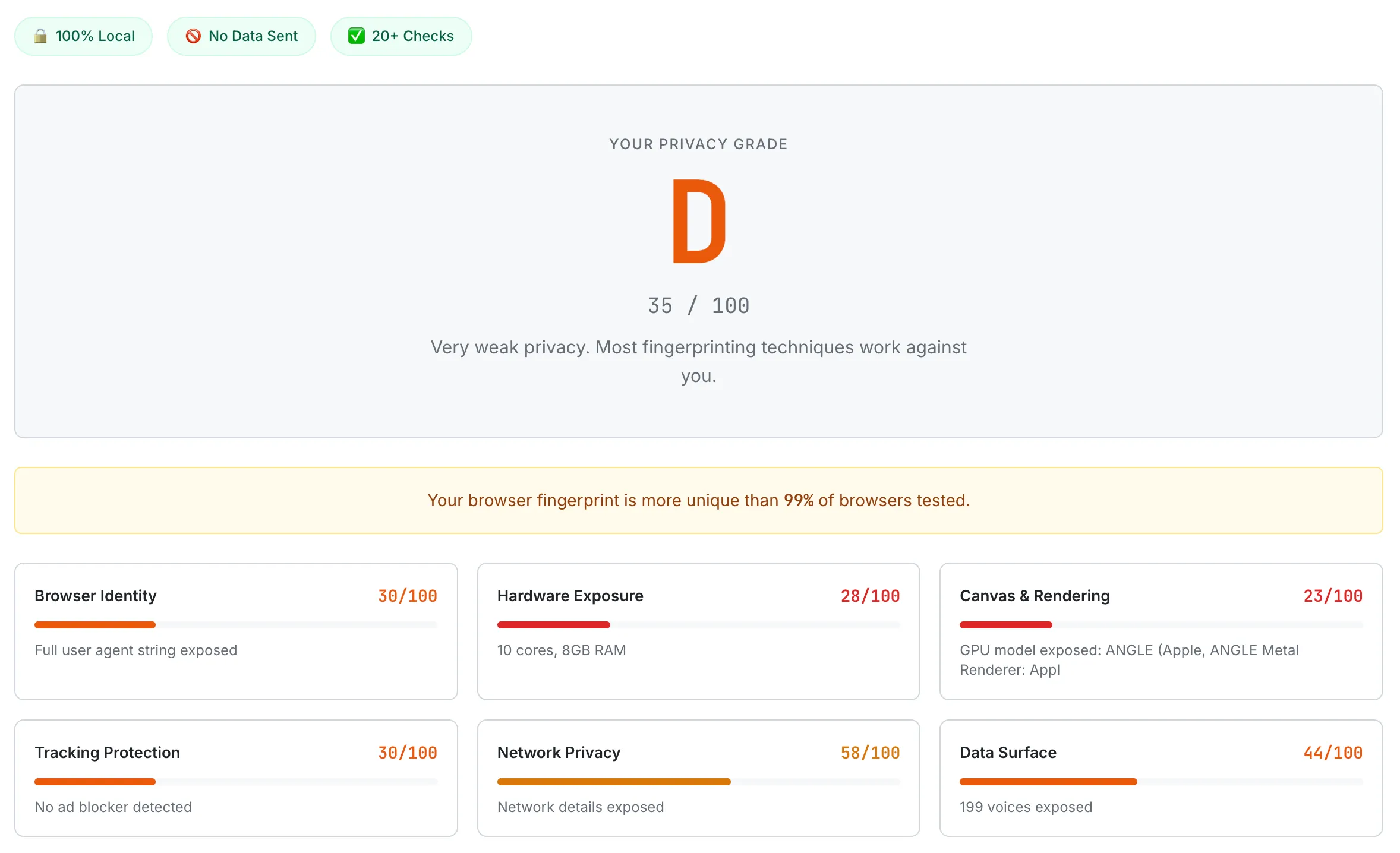
A default Chrome browser scoring D (35/100) on the Browser Privacy Checker — Canvas & Rendering scores the lowest at 23/100, with the GPU model fully exposed through WebGL.
If you have a serious threat model — journalist, activist, whistleblower — Tor Browser is the right answer. For everyone else, Firefox + uBlock Origin + a VPN gets you most of the way against most of the eleven mechanisms.
Frequently Asked Questions
If I block cookies, am I safe from tracking?
No. Cookies are one of eleven-plus tracking mechanisms. Even with all cookies blocked, sites still track you via tracking pixels (1×1 image requests), URL parameters (gclid/fbclid in shared links), browser fingerprinting (Canvas/WebGL/font enumeration), IP-based geolocation, ETag and cache abuse, and your ISP's visibility into DNS queries. To meaningfully reduce tracking you need defense across multiple categories — privacy browser plus content blocker plus VPN plus DNS filter.
Does incognito or private browsing prevent tracking?
Mostly no. Private browsing prevents your local browser from saving history and cookies between sessions, but your IP, browser fingerprint, and any tracking pixels that fire still send identifying data to remote servers. Sites can still track your activity within that session. Private browsing helps with shared-computer scenarios (a roommate can't see your history) — not with online tracking.
Why does Chrome still allow third-party cookies in 2026 when Safari and Firefox block them?
On April 22, 2025 Google announced that Chrome would not roll out the planned third-party cookie deprecation. Their official position is that users can manage their own preference in Privacy and Security settings. Critics note this preserves Google's existing advertising data position relative to competitors. As of 2026, Chrome (~65% of global browser share) still allows third-party cookies by default, while Safari has blocked them since March 2020 and Firefox since June 2022 (Total Cookie Protection).
Does a VPN stop tracking?
A VPN hides your real IP from websites, which removes one of the eleven tracking categories. It does not affect cookies, fingerprinting, tracking pixels, URL parameters, mobile device IDs, or third-party scripts. Also, WebRTC can leak your real IP even while you're on a VPN — see our browser fingerprint privacy guide for the WebRTC section. Use a VPN for the IP and ISP layer, and combine it with a privacy browser and content blocker for the rest.
How does Apple's App Tracking Transparency work?
Since iOS 14.5 (April 26, 2021), every iOS app that wants to perform cross-app tracking using your IDFA must show a system prompt: "Allow [App Name] to track your activity across other companies' apps and websites?" If you tap "Ask App Not to Track," the IDFA is returned to the app as all-zeros and cross-app tracking via IDFA is disabled. According to Singular's 2024 quarterly data, the global opt-in rate was about 14% in Q2 2024 — meaning roughly 86% of iOS users do not grant tracking permission.
What is link decoration (gclid, fbclid)?
When you click a Google ad and land on a site, the URL often looks like https://retailer.com/?gclid=ABC123XYZ. The gclid is a Google Click ID — a unique identifier that lets the destination site tell Google's conversion tracking "this visitor clicked the ad." It works even when third-party cookies are blocked because the ID travels in the URL itself rather than in a cookie. Per Apple's June 5, 2023 announcement, iOS 17+ Safari Private Browsing, Mail, and Messages automatically strip these click IDs. UTM parameters like utm_source are preserved as legitimate referrer attribution.
Can I see what trackers are running on a site?
Yes. Browser dev tools (Network tab in Chrome / Firefox / Safari) show every external request a page makes. Extensions like uBlock Origin show a counter of blocked trackers per site. Privacy Badger (EFF) shows tracker domains and what they're attempting. To see what your own browser exposes — Canvas fingerprint, WebGL renderer, fonts, audio — use a tool like our Browser Privacy Checker, Cover Your Tracks (EFF), or AmIUnique.
The web tracking ecosystem changes quickly — vendor policies, browser default settings, and tracking techniques all evolve. Verify current behavior before relying on any specific control for sensitive situations. Tracking-prevention tools also have trade-offs (some break legitimate site features); test changes one at a time and confirm with a measurement tool.
- IETF — RFC 6265: HTTP State Management Mechanism (April 2011)
- WebKit blog — Full Third-Party Cookie Blocking and More (March 24, 2020)
- Mozilla — Total Cookie Protection by Default Worldwide (June 14, 2022)
- Google Privacy Sandbox — Next steps for Privacy Sandbox and tracking protections in Chrome (April 22, 2025)
- WebKit blog — Intelligent Tracking Prevention 2.3 (John Wilander, September 23, 2019)
- Apple Newsroom — iOS 17 Link Tracking Protection announcement (June 5, 2023)
- Wikipedia — Web beacon
- Google Analytics — Collect campaign data with custom URLs (UTM)
- Acar et al. 2014 CCS — The Web Never Forgets: Persistent Tracking Mechanisms in the Wild
- Englehardt & Narayanan 2016 CCS — Online Tracking: A 1-million-site Measurement and Analysis
- Apple Developer — User Privacy and Data Use (ATT framework)
- Apple Newsroom — Mail Privacy Protection announcement (June 7, 2021)
- Apple Legal — Mail Privacy Protection
- Singular — ATT Opt-in Rates 2024
- LiveRamp Connect — Deterministic Matching
- LiveRamp Connect — Probabilistic Matching