What Is End-to-End Encryption? A Plain-English Guide for 2026
What that little “end-to-end encrypted” label on WhatsApp actually means — and what it doesn’t.
You open a WhatsApp chat and a small grey line above the messages reads “Messages and calls are end-to-end encrypted.” Sounds reassuring. But what does that actually mean — and what does it not mean? In 2026, what is end-to-end encryption is no longer a niche cryptography question. The FBI still calls it “warrant-proof encryption.” The European Parliament voted in March to let the EU’s voluntary Chat Control scanning regime expire, while a separate mandatory-scanning regulation grinds through trilogue negotiations. The UK’s Online Safety Act §121 lets Ofcom order messaging companies to scan messages — on hold until it becomes “technically feasible.”
This guide walks through what end-to-end encryption actually means and how it differs from TLS, how the major messengers really implement it (Signal, WhatsApp, iMessage, Telegram, Google Messages RCS, Zoom), forward secrecy, what E2EE does not protect you from, the 2026 policy landscape, and five common myths. At the end I’ll show you how to check whether the messengers you use are actually end-to-end encrypted — and why a strong device-unlock password is the last line of defense for every E2EE system.
What End-to-End Encryption Actually Means
The cleanest definition comes from the U.S. National Institute of Standards and Technology. NIST’s CSRC glossary (citing CNSSI 4009-2015 and NIST SP 800-12 Rev. 1) defines end-to-end encryption as:
“Communications encryption in which data is encrypted when being passed through a network, but routing information remains visible.”
Two things are packed into that one sentence. First, the content is encrypted — nobody on the path (the messaging company, your ISP, a government, a man-in-the-middle attacker) sees plaintext. Second, the routing information is visible. Who messaged whom, when, from which IP — that metadata leaks. The honest framing is built into the official definition.
Here’s the layperson translation. With E2EE, only the two devices — sender’s phone and recipient’s phone — hold the keys to the message. The messaging company’s servers act like a mail carrier: they ferry sealed envelopes around, but they can’t open them. They technically can’t — not as a matter of policy, but because cryptography forces it. The company can’t change its mind one day and start reading messages. It doesn’t have the keys.
The Electronic Frontier Foundation’s issue page on E2EE frames this as a shift in control:
“End-to-end encryption protects what we say and what we store in a way that gives users—not companies or governments—control over data.”
That ownership shift — from server-controlled to user-controlled — is what every policy fight in this article is really about.
E2EE vs TLS vs Encryption at Rest — Three Layers, One Confusion
“My data is encrypted” is meaningless on its own. Which layer the encryption sits at decides everything. Three layers get conflated, and they protect very different things.
Encryption in transit (TLS / HTTPS). This is the lock icon in your address bar. TLS protects the wire between your browser and a server — nothing more. When you log into Gmail, TLS keeps Comcast and the coffee-shop Wi-Fi from reading the page. But the moment your traffic reaches Google’s edge, it’s decrypted, because Google needs plaintext to index your inbox for search, run anti-spam, and serve ads. Google Cloud’s own documentation describes the scope plainly: encryption in transit protects data “if communications are intercepted while data moves between the end user and Google Cloud or between two services.” Moving. Once it stops moving and gets read, plaintext.
In practice it’s often weaker. Inside a company’s infrastructure, TLS is usually terminated at a load balancer, and the traffic from there to backend services flows as plain HTTP.
Encryption at rest. This protects data sitting on disk — if someone steals a backup tape or a server drive, they get ciphertext. But the service itself holds the keys and decrypts on every legitimate request. Google can advertise “all data encrypted at rest” while Gmail’s full-text search still works, because if search works, plaintext is being produced somewhere.
End-to-end encryption. Protects data from one user’s device all the way to the other user’s device. The server only ever sees ciphertext and does not hold the key. Combine the layers: Gmail, Outlook, and Yahoo Mail use TLS in transit plus encryption at rest — the company can read your content. Signal, WhatsApp, iMessage, and a handful of others use E2EE — the company cannot. Saying “Gmail is encrypted” doesn’t mean what most people think it means.
How Major Messengers Actually Implement E2EE
The same two-word label hides very different engineering. Here’s the survey, ordered roughly by share of users.
The Signal Protocol — the de facto standard
Most modern E2EE messaging is built on the Signal Protocol, designed by Moxie Marlinspike and Trevor Perrin. Two specs do the heavy lifting. X3DH (Extended Triple Diffie-Hellman) sets up the initial shared secret between two parties:
“X3DH establishes a shared secret key between two parties who mutually authenticate each other based on public keys. X3DH provides forward secrecy and cryptographic deniability.”
Critically, X3DH works even when the other party is offline:
“X3DH is designed for asynchronous settings where one user (‘Bob’) is offline but has published some information to a server.”
Once two parties share a secret, the Double Ratchet spec handles the ongoing conversation. Every message gets a fresh key derived from the previous one, providing forward security and post-compromise security. The KDF (key-derivation function) chain section spells out the property:
“Forward security: Output keys from the past appear random to an adversary who learns the KDF key at some point in time.”
Plain-English version: yesterday’s session keys can’t be reconstructed from today’s, so an attacker who steals today’s key can’t read yesterday’s messages. Signal Protocol now powers Signal, WhatsApp (since 2016), Google Messages RCS (1:1 since 2021, groups since 2023), and Facebook Messenger (default rolled out across 2023–2024). It is, in practice, the industry standard for serious E2EE.
WhatsApp’s Encryption Overview Technical White Paper (first published April 4, 2016) is unambiguous:
“All WhatsApp messages are sent with the same Signal protocol outlined above.”
Their Help Center summarises the user-facing guarantee:
“End-to-end encryption ensures only you and the person you’re communicating with can read or listen to what is sent, and nobody in between, not even WhatsApp.”
Texts, voice and video calls, and group chats are all E2EE by default. The major caveat is backups. iCloud and Google Drive backups of WhatsApp messages were historically not end-to-end encrypted. Meta announced an opt-in E2E backup feature on September 10, 2021 (rolled out in October), but it’s off by default — you have to set a 64-digit key or a password to turn it on. Without that, your full chat history sits in iCloud or Google Drive in a form the cloud provider can hand over under lawful process. Metadata is the other caveat: Meta cannot read your message content, but it collects who-talked-to-whom, timestamps, IPs, and contact-sync data, all of which feed into the Facebook and Instagram advertising graph.
iMessage and iCloud Advanced Data Protection
Apple’s iMessage Security Overview:
“Apple doesn’t store message content or attachments, which are all secured with end-to-end encryption so that no one but the sender and receiver can access them.”
Apple Security Research’s PQ3 announcement (February 21, 2024) places iMessage in historical context:
“When iMessage launched in 2011, it was the first widely available messaging app to provide end-to-end encryption by default.”
From iOS 17.4 / macOS 14.4 onwards, iMessage layers in PQ3 — a post-quantum hybrid combining classical Elliptic Curve cryptography with the Kyber post-quantum key-encapsulation mechanism. Apple’s framing:
“PQ3 is the first messaging protocol to reach what we call Level 3 security — providing protocol protections that surpass those in all other widely deployed messaging apps.”
iCloud Advanced Data Protection (ADP), launched on December 7, 2022, is opt-in. Turn it on and a much wider set of iCloud data — iCloud Backup, Photos, Notes, Voice Memos, and the rest — becomes end-to-end encrypted. The list was 23 categories at launch and is now 25 categories with the addition of Freeform and Journal data. Apple itself stops holding the keys. ADP also has a candid carve-out:
“Because of the need to interoperate with the global email, contacts, and calendar systems, iCloud Calendar, Contacts, and Mail aren’t end-to-end encrypted.”
iCloud Mail, Calendar, and Contacts stay on the Gmail-style model — TLS plus at-rest, with Apple able to read the data. ADP is powerful but selective.
Telegram — Cloud Chats are NOT end-to-end encrypted
This is the most common myth in this whole space, so it deserves a slow read. Telegram’s own FAQ states the architecture directly:
“Server-client encryption is used in Cloud Chats (private and group chats), Secret Chats use an additional layer of client-client encryption.”
“Secret chats are not part of the Telegram cloud and can only be accessed on their devices of origin.”
“All messages in secret chats use end-to-end encryption. This means only you and the recipient can read those messages — nobody else can decipher them, including us here at Telegram.”
Translated: Telegram’s default chats — both 1:1 cloud chats and every group chat — use server-client encryption. Telegram’s servers hold the keys and can decrypt messages. That’s what enables multi-device sync, cloud backup, and full-text search — and it also means Telegram (or a government with a lawful order) can read them. Only Secret Chats are end-to-end encrypted, and Secret Chats are opt-in, 1:1 only, tied to a single device pair, not synced, and not searchable. Almost nobody uses them. If you actually need E2EE on Telegram, you have to start a Secret Chat explicitly.
Google Messages / RCS
From Google Messages’ Help Center:
“RCS conversations between Google Messages users default to end-to-end encryption.”
“no one, including Google and third parties, can read eligible messages as they travel between your phone and the phone you message.”
Google rolled out RCS E2EE for 1:1 chats in June 2021 and for group chats in August 2023, both built on the Signal Protocol. The harder problem has been cross-platform RCS E2EE between iPhone and Android. On March 14, 2025, the GSMA published RCS Universal Profile 3.0, which adopts the IETF’s Messaging Layer Security (MLS) protocol as the basis for cross-platform E2EE. Apple began testing it in iOS 26.4 developer betas in February 2026 — beta 1 (Feb 16) was iPhone-only and very limited; beta 2 (Feb 23) added iPhone-to-Android E2EE RCS for testers. The feature was unstable through the beta cycle and didn’t ship in the iOS 26.4 final release — Apple deferred it to a “future iOS 26 software update.” As of May 2026, cross-platform E2EE RCS exists in testing and standards but isn’t broadly available in production.
Zoom
After security criticism in early 2020, Zoom shipped the first phase of E2EE on October 26, 2020 for meetings of up to 200 participants. E2EE is opt-in per meeting, and turning it on disables cloud recording, live transcription, phone dial-in, and 1:1 in-meeting chat. Default Zoom calls remain server-side encrypted — Zoom (and, with a lawful order, a government) can hear them.
Forward Secrecy — What If Today’s Key Leaks?
End-to-end encryption is much stronger when paired with forward secrecy (sometimes “perfect forward secrecy”). The IETF’s RFC 9325 (November 2022) puts it precisely:
“Forward secrecy (sometimes called ‘perfect forward secrecy’) prevents the recovery of information that was encrypted with older session keys, thus limiting how far back in time data can be decrypted when an attack is successful.”
Plain-English: even if your long-term private key leaks today, an attacker who saved yesterday’s ciphertext still can’t decrypt it — yesterday’s session key existed only ephemerally and can’t be recomputed from the long-term key. Wikipedia compresses it: “Forward secrecy protects past sessions against future compromises of keys or passwords.”
Why this matters: well-resourced attackers can hoover up encrypted traffic now and store it — the “store now, decrypt later” model — betting they’ll get the key later. Forward secrecy nullifies that bet. Combined with post-quantum keys (Apple’s PQ3), it also blunts the “harvest now, decrypt with a quantum computer later” threat. The Signal Double Ratchet, TLS 1.3 (where it’s required), and WireGuard all bake it in.
What End-to-End Encryption Does NOT Protect You From
This section is the most important one in the post. The short-answer box at the top hinted at it; here’s the full version. Mass-market framing of E2EE often stops at “the company can’t read your messages,” and that’s only half the picture.
Endpoint compromise — the biggest hole
E2EE protects messages in transit. Once a message arrives at your device and is decrypted, it’s ordinary plaintext sitting in your phone’s memory. If the device itself is compromised — nation-state spyware like NSO Group’s Pegasus, common malware, screen-readers, physical access plus a known unlock — E2EE is bypassed. Attackers grab keystrokes before encryption and read plaintext after decryption. Wikipedia’s summary of Pegasus is blunt:
“Once installed, Pegasus has been reported to be able to run arbitrary code, extract contacts, call logs, messages, photos, web browsing history, settings, as well as gather information from apps including but not limited to communications apps iMessage, Gmail, Viber, Facebook, WhatsApp, Telegram, and Skype.”
iMessage, WhatsApp, Telegram — all named, all “encrypted” messengers. Spyware reads plaintext from inside the device, after the messenger has decrypted it. E2EE protects the wire; it does not protect a compromised operating system. For journalists, activists, and lawyers handling privileged material, the framing that matters most is: an E2EE messenger is necessary, not sufficient. Device-level security has to hold first.
Metadata — content hidden, existence not
Recall the NIST definition: “routing information remains visible.” Even when content is unreadable, who you messaged, when, from which IP, on which device, and which group you’re in can all leak. Metadata posture varies sharply: Signal stores only your phone number (Sealed Sender even hides who sent a message); WhatsApp collects who-talks-to-whom, timestamps, IPs, device info, and contact sync; Apple holds the routing metadata iMessage needs and publishes Transparency Reports on government requests; Telegram stores Cloud Chat content on its own servers plus all the metadata that implies. For surveillance work, metadata is often enough — mapping a journalist’s sources or charting an activist network doesn’t require reading content.
Backups — the easiest place for plaintext to leak
Even if a messenger is E2EE, your messages can leak through backups that aren’t. The common patterns:
- WhatsApp + iCloud or Google Drive backup (default): the backup is not E2EE unless you opted in to E2E backups (added September 10, 2021, off by default). Without that, Apple or Google can hand the backup to a government under lawful process — recovering your full chat history.
- iMessage + iCloud Backup with ADP off: iMessages stored in iCloud Backup are encrypted with keys Apple holds. Apple can read them.
- iMessage + iCloud Backup with ADP on: Apple cannot read them.
- Signal: no cloud backup at all — only local backups that you manage yourself.
This is the single most common gap users miss. “I use WhatsApp, so I’m fine” can be undone by an iCloud backup setting they never touched. Telegram founder Pavel Durov used a public statement in April 2026 to attack exactly this point — arguing that many WhatsApp users have plaintext-equivalent chat history sitting in cloud backups. Durov runs a competing platform, but the mechanism is real.
Lawful access via device unlock
If a government seizes your device and either compels you to unlock it or unlocks it themselves, E2EE is moot — they read every plaintext message. Whether you can be compelled to give up a passcode varies by jurisdiction. In the United States, the Fifth Amendment analysis is unsettled and case-specific. The UK Investigatory Powers Act 2016, Schedule 4, allows compelled decryption with criminal penalties for refusal. Device unlock is an E2EE bypass, which is why a strong unlock password is the last line of defense for everything in this article.
Trust on First Use and key verification
Signal, WhatsApp, and iMessage use a trust on first use (TOFU) model: your client fetches the other party’s public key from the messenger’s servers and trusts it. If those servers were compromised or coerced into handing back an attacker’s key, a man-in-the-middle attack becomes possible. The defence is to compare a safety number out of band. Signal uses a 60-digit number and QR code; iMessage added Contact Key Verification in iOS 17.2; WhatsApp shows a per-chat security code. Signal’s guidance: “Verification of safety numbers is a good security practice for sensitive communication.” Almost no one verifies. For ordinary use that’s usually fine; for nation-state threat models it’s a real gap.
Screenshots and group additions
E2EE protects transmission. Once your recipient has plaintext, they can screenshot, record, or forward it. Group chats add another surface: a malicious server can in theory inject a new “group member” that secretly receives all subsequent messages — the 2018 NDSS paper by Rösler et al. demonstrated this against early WhatsApp groups, and Signal’s group v2 added server-side enforcement to mitigate. E2EE doesn’t change the social layer of who’s in the room.
The 2026 Policy Landscape — Government vs E2EE
This section moves fastest. Here’s where things stand in May 2026.
EU Chat Control / CSAR
On May 11, 2022, the European Commission proposed the Regulation to Prevent and Combat Child Sexual Abuse (CSAR), often called Chat Control. Its most controversial provision was mandatory client-side scanning — checking messages for known CSAM hashes on the user’s device, before encryption. EFF, Mozilla, Signal, WhatsApp, Apple, and many cryptographers opposed it, on the basis that scanning hooks are surveillance infrastructure regardless of intent.
Two negotiations have to be tracked separately. Chat Control 1.0 is a 2021 ePrivacy derogation that let providers voluntarily scan for CSAM. CSAR (Chat Control 2.0) is the new regulation with mandatory scanning. For 1.0: in November 2025 the EU Council removed the mandatory-scanning requirement from its negotiating position — “the Council agreed on its position, which removed the requirement that forces providers to scan messages on their services.” Then on March 26, 2026, the European Parliament voted 311–228 to reject extending the voluntary detection derogation. The voluntary scanning authority expired on April 3, 2026.
CSAR (Chat Control 2.0) remains in trilogue negotiations — the third trilogue is scheduled for May 4, 2026, with the presumed final round on June 29, 2026 and formal adoption expected in July if political agreement holds. The honest state: voluntary scanning has expired, mandatory scanning is still being negotiated, and the outcome is uncertain. Headlines saying “the EU is going to ban encryption” aren’t quite right; neither are headlines saying the fight is over. EFF’s general framing:
“Maintaining strong encryption—in which only the intended recipient of a message can see the message—isn’t an extreme or ‘absolutist’ position. It’s a position that privacy- and security-enhancing technology should work properly, and shouldn’t be broken by design.”
UK Online Safety Act §121 — the “spy clause”
The UK’s Online Safety Act 2023 received Royal Assent on October 26, 2023. The provision relevant to E2EE is Section 121, which lets Ofcom order a service to use “accredited technology” to detect terrorism or CSEA content. Section 122 sits alongside it as a procedural requirement: Ofcom has to obtain a skilled person’s report before issuing a §121 notice. Together they form the legal hook the UK government would use to compel scanning of E2EE services. WhatsApp and Signal both said they’d withdraw from the UK rather than comply. Apple weighed in via a June 27, 2023 BBC statement:
“End-to-end encryption is a critical capability that protects the privacy of journalists, human rights activists, and diplomats. ... The Online Safety Bill poses a serious threat to this protection, and could put UK citizens at greater risk.”
The UK government, under industry pressure, said §121 wouldn’t be enforced until it was “technically feasible.” The power exists in law but is shelved. Ofcom guidance is expected in spring 2026.
FBI “Going Dark” — the U.S. position
FBI Director Christopher Wray (in office 2017–January 2025) consistently used the phrase “warrant-proof encryption,” including in his December 5, 2023 Senate Judiciary Committee testimony. After the July 2024 attempted assassination of Donald Trump, Wray told congressional briefings that the FBI struggled to access content on Thomas Matthew Crooks’s encrypted messaging apps. The critique from groups like EFF and the Center for Democracy & Technology has been consistent: “going dark” understates how much law enforcement actually has access to — metadata, cloud backups, device seizures plus unlock, third-party data — what EFF has called “the golden age of surveillance.” Wray’s term ended in January 2025; the Patel-led FBI’s 2026 position on E2EE has been less prominently messaged in public — expect this section to age, but the core debate hasn’t changed.
Apple’s 2021 NCMEC scanning, then retreat
In August 2021, Apple announced it would scan iCloud-uploaded photos against NCMEC’s CSAM hash database on the device — client-side scanning. Security researchers, EFF, Edward Snowden, and some Apple staff pushed back hard. Apple delayed in September, removed references in December, and on December 7, 2022 said: “We have further decided to not move forward with our previously proposed CSAM detection tool for iCloud Photos.” The same announcement launched iCloud Advanced Data Protection — instead of adding a scanning hook, Apple shipped more E2EE. That’s the industry direction; the EU and UK proposals push the other way. The 2026 policy fight is between those two directions.
Five Common Myths About E2EE
Myth 1 — “Telegram is end-to-end encrypted by default”
False. Default cloud chats — both 1:1 and every group chat — are server-client encrypted, with Telegram holding the keys. Only Secret Chats are E2EE, and they’re opt-in, 1:1 only, tied to a single device pair, not synced, and not searchable. Group chats can never be E2EE on Telegram — the cloud model rules it out architecturally.
Myth 2 — “TLS / HTTPS = E2EE”
No. TLS protects only the user-to-server hop. The server decrypts on arrival. Gmail uses TLS in transit and encryption at rest, and Google can read your email at any time — that’s why search and ad targeting work.
Myth 3 — “A VPN gives me end-to-end encryption”
No — different layer entirely. A VPN encrypts the user-to-VPN-server hop, hiding traffic from your ISP. From the VPN server outward, traffic is whatever it would have been without the VPN. The VPN provider can see your traffic in the same place your ISP would have. E2EE operates at the application layer; a VPN at the network layer.
Myth 4 — “My Gmail is encrypted, so my email is safe”
Almost always false in the sense people mean. Gmail, Outlook, and Yahoo Mail use TLS plus encryption at rest, and the providers can read your message bodies — that’s how search and spam filtering work. Real E2EE email is rare: ProtonMail does it for Proton-to-Proton mail by default; PGP-via-Thunderbird-and-GnuPG works for users who set it up. For everyone else, “encrypted email” means TLS, not E2EE.
Myth 5 — “If it’s E2EE, even police can’t read my messages”
Partly true, mostly misleading. The content of a properly E2EE message can’t be read by the messaging company or by a government that asks the company. That’s real. But metadata (who, whom, when, IP) is held by the company and can be subpoenaed; device seizure plus a compelled unlock exposes plaintext; cloud backups may not be E2EE (default WhatsApp iCloud / Google Drive); and spyware leaks plaintext directly. “Police can’t read my messages” is true at the content layer. The other layers are still in play.
How to Check What You’re Actually Using
The honest summary: well-implemented E2EE messengers (Signal, WhatsApp, iMessage, ADP-on iCloud) genuinely block the company’s servers from reading your message content. Metadata, backups, endpoints, and device unlock are separate problems that have to be hardened separately. Hardening one layer doesn’t solve the others — but making conscious choices on each can reduce 80% of your real exposure. A practical pass:
- Confirm the messenger’s default. Look for an “end-to-end encrypted” label above the chat. Signal and WhatsApp show it on every chat. iMessage shows it only for Apple-to-Apple messages. Telegram’s default chats show no E2EE label — you have to start a Secret Chat explicitly. Google Messages shows a lock icon on RCS conversations only.
- Make sure your backups are E2EE. WhatsApp: Settings → Chats → Chat Backup → End-to-end encrypted backup, with a password or 64-digit key. iPhone: Settings → [Apple ID] → iCloud → Advanced Data Protection, with a recovery contact or recovery key. Signal: no cloud backup — transfer or local backup only.
- Verify safety numbers for sensitive contacts. Signal: View Safety Number, compared in person. iMessage: Contact Key Verification (iOS 17.2+). WhatsApp: per-chat security code.
- Tighten your endpoint. Apply OS updates the day they ship; consider Lockdown Mode (iOS 16+ / macOS 13+) if your threat model warrants it; turn on a strong device-unlock password.
- Treat your unlock password as load-bearing. ADP, WhatsApp E2E backup, iCloud Keychain, and your phone’s plaintext message store all sit behind it. An 8-character password is brute-forceable; a 16-character random string or a 5-to-7-word passphrase isn’t. Use a different one per critical account, with a password manager carrying the rest. SudoTool’s Password Generator creates strong passphrases entirely in your browser. Pair it with the practical advice in our strong password guide and a check using Have I Been Pwned.
- Check the side surfaces. Run our Browser Privacy Checker to see which fingerprinting vectors your browser exposes — metadata at a different layer than messaging. Before sharing photos, run them through our EXIF Metadata Viewer; E2EE on the message body doesn’t scrub GPS coordinates embedded inside the photo file.
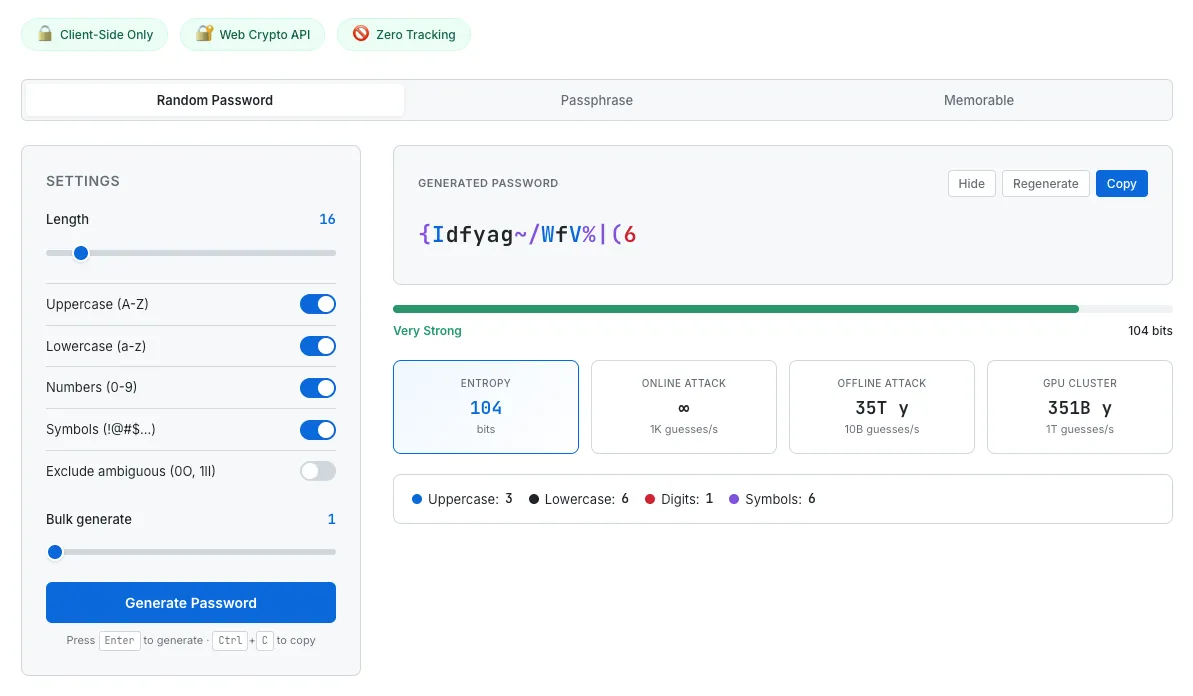
SudoTool’s Password Generator runs entirely in your browser — nothing the generator produces leaves your device. Use it for the unlock password that gates every E2EE backup you turn on.
Strong passwords are the last line of defense for end-to-end encrypted systems. ADP can’t help recover an account with a weak Apple ID password; an E2E WhatsApp backup is only as strong as the 64-digit key or password you set. Generate a different one for each — in your browser, not on someone else’s server.
This guide is general privacy and security education, not legal or operational-security advice. The cryptographic standards, app implementations, and policy positions described here change quickly — verify current behaviour against the linked primary sources before relying on any specific control for sensitive situations. For high-risk threat models (journalists, activists, lawyers handling privileged communications), consult a qualified operational-security professional rather than depending on a general guide.
- NIST CSRC — End-to-end encryption (glossary) (CNSSI 4009-2015; NIST SP 800-12 Rev. 1)
- Signal — The X3DH Key Agreement Protocol
- Signal — The Double Ratchet Algorithm
- WhatsApp — Encryption Overview Technical White Paper (April 4, 2016)
- WhatsApp Help Center — About end-to-end encryption
- WhatsApp Help Center — End-to-end encrypted backup
- Apple Support — iMessage security overview
- Apple Security Research — iMessage with PQ3 (February 21, 2024)
- Apple Newsroom — Advanced Data Protection (December 7, 2022)
- Apple Support — iCloud data security overview
- Telegram — FAQ (Cloud Chats vs Secret Chats)
- Google Messages Help — End-to-end encryption
- IETF — RFC 9420: The Messaging Layer Security Protocol
- IETF — RFC 9325 §7.3 Forward secrecy (November 2022)
- Wikipedia — Forward secrecy
- Wikipedia — Pegasus (spyware)
- Signal Support — Safety numbers
- EFF — End-to-End Encryption issue page
- EFF — Defending Encryption Isn’t an “Absolutist” Position (September 2019)
- EFF — EU Chat Control nears final hurdle (December 2025)
- UK legislation — Online Safety Act 2023 §121
- UK legislation — Online Safety Act 2023 §122
- BBC — Apple slams UK surveillance-enabling law (June 27, 2023)
- FBI — Director Wray Senate Judiciary Committee opening statement (December 5, 2023)