What Your Photos Reveal About You: Understanding EXIF Metadata and Privacy
Every photo you take with your smartphone silently records where you were standing, what device you used, and exactly when you pressed the shutter button. That data travels with the image file wherever you share it — unless you strip it out first.
Picture this: you send a friend a photo of a sunrise from your apartment balcony. Just a nice picture, nothing remarkable. They reply: "Nice view from [your exact street address]." They had opened the file's properties and read the GPS coordinates embedded in the JPEG. Most people have no idea that data is there. Every photo your phone takes records your precise latitude and longitude, camera model, lens settings, the exact date and time down to the second, and sometimes even the direction you were facing. This is EXIF metadata, and understanding what it is and how it works is one of the most practical things you can learn about digital privacy.
This is not a theoretical concern. EXIF data has exposed fugitives to law enforcement, revealed the locations of military installations, and enabled stalkers to track their victims. The information embedded in a single photograph can be more revealing than you would ever guess from looking at the image itself. If you share photos online — by email, text message, cloud storage, or on platforms that do not strip metadata — you may be broadcasting your location, daily patterns, and personal device information to anyone who downloads the file.
This guide covers what EXIF metadata is, exactly what information it contains, the real-world privacy risks it creates, which platforms strip it and which do not, and how to check and remove it from your photos before sharing. Whether you are a photographer who wants to preserve metadata for archival purposes or someone who just wants to text a photo without broadcasting your home address, this guide will give you everything you need to know.
What Is EXIF Metadata?
EXIF stands for Exchangeable Image File Format. It is a standard created in 1995 by the Japan Electronic Industries Development Association (JEIDA, now JEITA) that defines how cameras and image-processing software embed technical information directly inside image files. When you take a photo with your phone or digital camera, the device writes a block of structured data into the file alongside the actual pixel data. This data block is the EXIF metadata.
The original purpose of EXIF was entirely practical. Professional photographers needed a way to record their camera settings — shutter speed, aperture, ISO, focal length — so they could review what worked and what did not after a shoot. Before EXIF, photographers carried notebooks to log their exposure settings for each frame. EXIF automated that process by having the camera write the settings directly into the file. It was a genuine improvement to the photography workflow.
But EXIF expanded far beyond camera settings. When GPS chips became standard in smartphones, manufacturers started embedding location coordinates in every photo. When devices gained internet connectivity, software version strings and unique device identifiers found their way into the metadata. Today, a single JPEG file from an iPhone can contain over 100 distinct metadata fields, many of which the photographer never consciously chose to include and may not even know exist.
EXIF data is stored in a standardized format within the file header, before the actual image data begins. It is supported by JPEG, TIFF, and several RAW formats. PNG files do not support EXIF natively (they use a different metadata structure), and most image editing software preserves EXIF data by default unless you explicitly choose to strip it. The data is not encrypted or protected in any way — anyone who can access the file can read the EXIF data using free software or even just right-clicking the file and viewing its properties.
EXIF vs. IPTC vs. XMP: What Is the Difference?
EXIF is not the only metadata standard used in image files. You will sometimes encounter two others: IPTC and XMP.
IPTC-IIM (International Press Telecommunications Council — Information Interchange Model) was developed in the 1990s for the news and publishing industry. It stores editorial information like captions, credits, copyright notices, and keywords. When a news agency sends a photo to a newspaper, the IPTC data tells the editor who took the photo, where it was taken, and what rights are attached. IPTC data is focused on editorial workflow rather than camera settings.
XMP (Extensible Metadata Platform) was created by Adobe in 2001 as a more flexible, XML-based metadata format. XMP can store everything that EXIF and IPTC can, plus custom fields defined by any software vendor. Lightroom, Photoshop, and other Adobe products use XMP extensively to record editing history, lens correction profiles, and color grading settings. XMP can be embedded inside the image file or stored as a separate sidecar file (a .xmp file next to the image).
In practice, most photos from smartphones contain primarily EXIF data. Photos processed through professional editing software may contain all three types. From a privacy perspective, EXIF is the biggest concern because it is the one that contains GPS coordinates and device-identifying information, and it is written automatically by the camera hardware before you ever touch the file.
What Information Does EXIF Data Contain?
The amount of data embedded in a typical smartphone photo is staggering. Here is a breakdown of the major categories and what they reveal about you.
GPS Location. This is the most privacy-sensitive EXIF field. When location services are enabled for your camera app (and they are by default on most smartphones), every photo records the latitude and longitude where it was taken, typically accurate to within 3–5 meters. Some devices also record altitude, the direction you were facing (GPS image direction), and the speed at which you were moving. A photo taken in your bedroom will record your home address. A photo taken at a restaurant will record where you eat. A series of photos with GPS data tells a complete story about your movements, habits, and routines.
Date and Time. EXIF records three timestamps: DateTimeOriginal (when the shutter was pressed), DateTimeDigitized (when the image was processed by the sensor), and DateTime (when the file was last modified). These are typically accurate to the second. Combined with GPS data, timestamps create a precise log of where you were and when.
Camera and Device Information. The Make and Model fields identify your device — "Apple" and "iPhone 15 Pro Max," for example, or "Samsung" and "SM-S928B" (the Galaxy S25 Ultra). The Software field records the operating system version (e.g., "17.4.1" for iOS). Some manufacturers also record the lens model, the camera serial number, and a unique image identifier. This information can be used to identify or correlate photos taken by the same device.
Exposure Settings. For photographers, this is the useful part: shutter speed (ExposureTime), aperture (FNumber), ISO sensitivity (ISOSpeedRatings), focal length (FocalLength), metering mode, flash status, white balance, and exposure compensation. These settings are harmless from a privacy perspective, but they are part of the metadata block that travels with the file.
Thumbnail Image. Many EXIF implementations include a small thumbnail preview image embedded in the metadata. This thumbnail is generated from the original image before any cropping you may apply. In 2003, the television personality Catherine Schwartz posted a cropped photo on her blog, but the EXIF thumbnail still contained the full uncropped image. Similar incidents have occurred with photos that were cropped to remove sensitive information — the original, uncropped version survived inside the EXIF thumbnail.
Other Fields. Depending on the device and software, EXIF data can also include the scene type (landscape, portrait, night), color space, image dimensions, compression ratio, digital zoom ratio, and custom manufacturer-specific fields. Apple devices, for example, embed lens information for each camera module (wide, ultrawide, telephoto) in proprietary EXIF extensions.
| EXIF Field | Example Value | Privacy Risk |
|---|---|---|
| GPSLatitude / GPSLongitude | 37.7749° N, 122.4194° W | High — reveals exact location |
| DateTimeOriginal | 2026:03:15 08:42:17 | Medium — reveals your schedule |
| Make / Model | Apple iPhone 15 Pro Max | Medium — identifies your device |
| Software | 17.4.1 | Low — reveals OS version |
| SerialNumber | C02XG1... | High — uniquely identifies your camera |
| GPSImgDirection | 247.3° | Medium — reveals which way you faced |
| FocalLength / FNumber | 6.86mm f/1.78 | Low — camera settings only |
| Thumbnail | (embedded JPEG) | High — may contain uncropped original |
The Privacy Risks of EXIF Data
EXIF metadata has been at the center of several high-profile privacy incidents. These are not hypothetical risks — they are documented cases where hidden photo data exposed real people to real consequences.
The John McAfee Incident (2012). In December 2012, antivirus software founder John McAfee was on the run from Belizean authorities who wanted to question him about the murder of his neighbor. While hiding as a fugitive, McAfee invited two journalists from Vice magazine to interview him at his undisclosed location. Vice published an article on their website with photos from the interview, without stripping the metadata. One of the photos had been taken with an iPhone 4S, and the EXIF data contained the precise GPS coordinates of where the picture was taken. Within hours, internet users extracted the coordinates and determined that McAfee was hiding in Guatemala, near the border with Belize. The EXIF data pinpointed his location to a specific property. Guatemalan authorities subsequently arrested him. A single photograph, shared without stripping its metadata, ended a fugitive's international flight.
Military and Intelligence Exposures. EXIF metadata has posed serious security risks in military contexts. In 2007, U.S. soldiers in Iraq posted photos online that included GPS coordinates embedded in the EXIF data. The coordinates revealed the exact locations of AH-64 Apache helicopters at a forward operating base. Insurgents used this information to conduct a mortar attack on the base, destroying four Apache helicopters. The incident led the U.S. military to issue guidance prohibiting geotagged photos in operational areas. Similar incidents have occurred in other conflicts — geotagged photos have revealed the positions of troops, equipment, and sensitive facilities. In the Russia-Ukraine conflict, both sides have used geotagged social media posts to identify military positions and verify troop movements. The open-source intelligence community (OSINT) routinely uses EXIF data and geolocation analysis from photos to verify or debunk claims about military operations.
Stalking and Harassment. EXIF-enabled stalking is a well-documented threat. If someone posts a photo taken at their home, the GPS coordinates in the EXIF data can reveal their home address to anyone who downloads the file. This risk is especially acute on platforms and services that do not strip metadata — including email, iMessage, many cloud storage services, and smaller forums or websites. Domestic violence organizations like the National Network to End Domestic Violence have specifically warned about EXIF metadata as a tool that abusers use to track victims. A victim who has relocated to escape an abuser can inadvertently reveal their new address by sending a single photo.
Corporate Espionage and Leaks. EXIF metadata has been used to identify anonymous leakers and whistleblowers. Because EXIF records the camera serial number and device model, a photo taken with a company-issued phone can be traced back to the specific employee who took it. If an employee anonymously leaks a photo of a confidential document, the EXIF data in the image file may identify their specific device. Some organizations have even used the unique image identifier and thumbnail data to trace leaked photos back to their source. This has a chilling effect on whistleblowing and journalism — sources who share photographic evidence risk identification through data they did not know was embedded in their files.
Real Estate and Location Profiling. Photos posted on real estate listing sites, vacation rental platforms, and social media can reveal precise home locations. While this may seem obvious for a real estate listing, the GPS data embedded in interior photos can be accurate enough to identify the exact unit in an apartment building. People who post vacation photos in real-time are advertising that their home is currently empty — and the EXIF data from their home photos has already told anyone interested exactly where that home is.
Which Platforms Strip EXIF Data?
One of the most important things you can know about EXIF metadata privacy is which platforms automatically remove it from uploaded photos and which do not. The difference determines whether your location and device information travel with your image when someone downloads it.
| Platform / Service | Strips EXIF on Upload? | Notes |
|---|---|---|
| Yes | All EXIF data removed from uploaded photos | |
| Yes | EXIF stripped, but Facebook reads and stores location data server-side before removing it | |
| Twitter / X | Mostly yes | Strips GPS and most EXIF from uploaded images; some non-identifying fields may remain |
| Yes | EXIF stripped from sent photos (not from "send as document") | |
| Signal | Yes | Strips all EXIF metadata by default |
| iMessage | No | Full EXIF data including GPS is preserved in sent photos |
| Email (Gmail, Outlook, etc.) | No | Attachments are sent as-is; all metadata preserved |
| Google Drive | No | Files stored with full metadata intact |
| Dropbox | No | Files stored as-is; metadata preserved |
| iCloud Photo Sharing | Partially | Strips some data when sharing via links; retains EXIF in shared albums |
| Flickr | No | EXIF data preserved and publicly visible by default (can be changed in settings) |
| Discord | Yes | Strips EXIF from uploaded images |
| Yes | Strips EXIF from images uploaded to Reddit's image host | |
| Craigslist / Forums | Varies | Many smaller sites do not strip metadata at all |
The critical takeaway here is that social media platforms generally strip EXIF data, but private communication channels generally do not. If you upload a photo to Instagram, the GPS coordinates are removed before anyone else can download it. But if you send the same photo via email or iMessage, every byte of metadata travels with the file. Cloud storage services like Google Drive and Dropbox store files exactly as you upload them — metadata and all. If you share a Google Drive link to a photo, anyone with access can download the file and read every EXIF field.
There is an important nuance with Facebook and similar platforms: they strip EXIF data from the publicly-viewable image, but they read and store the metadata on their servers first. Facebook uses GPS data from your photos for ad targeting and location features, even though that data is removed from the image file other users see. Stripping EXIF from the download does not mean the platform is not using that data — it just means other users cannot access it.
If you are not sure whether a platform strips metadata, the safest approach is to strip it yourself before uploading. That way, you never have to rely on someone else's privacy policy.
How to Check and Remove EXIF Data From Your Photos
Whether you want to inspect what data your photos contain or strip that data before sharing, you have several options depending on your platform and technical comfort level.
Check EXIF Data
On your phone. On iPhone, open a photo in the Photos app, swipe up, and you will see a map showing where the photo was taken along with the camera model and lens information. Tap the info button (the circled "i") for more details. On Android, open a photo in Google Photos, tap the three-dot menu, and select "Details" to see location, camera, and file information. Both platforms show a subset of the EXIF data — not the full set of fields.
On your computer. On Windows, right-click the image file, select Properties, then the Details tab. On Mac, open the file in Preview, then go to Tools > Show Inspector and click the EXIF tab. Both methods show a limited view of the metadata. For a complete view of every field, use a dedicated tool.
With a browser-based tool. Our EXIF Metadata Viewer lets you drag and drop any photo and instantly see every EXIF, IPTC, and XMP field in the file — GPS coordinates (with a map preview), camera settings, timestamps, device identifiers, and all custom fields. Everything runs in your browser, so the image is never uploaded to any server. This matters because if you are checking a photo for sensitive metadata, you probably do not want to upload it to a random website in the process.
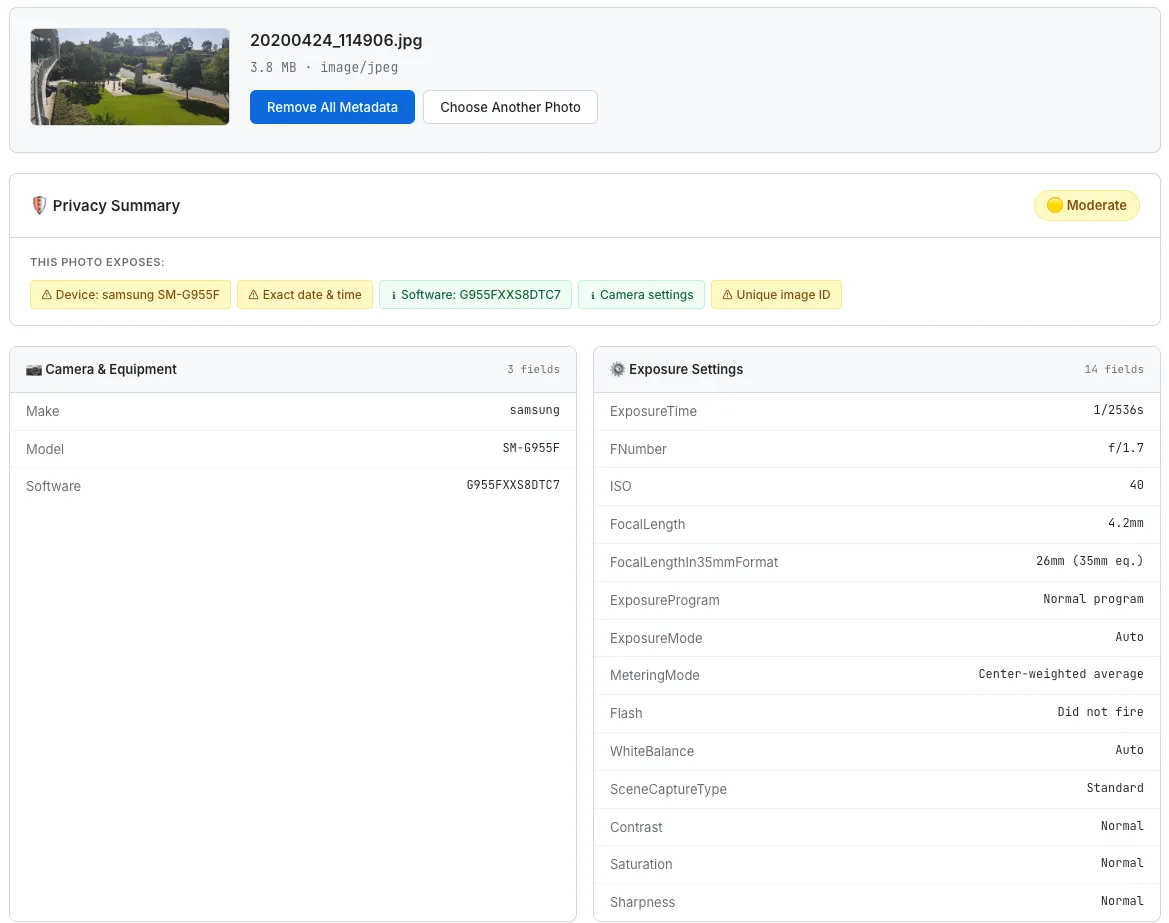
SudoTool's EXIF Metadata Viewer displays all hidden metadata fields from a photo, including GPS location, camera details, and timestamps.
Remove EXIF Data
On iPhone. Starting with iOS 13, you can remove location data before sharing. When you select a photo and tap the share button, tap "Options" at the top of the share sheet and toggle off "Location." This strips GPS coordinates but leaves other EXIF data intact. For complete EXIF removal, you need a third-party app or workflow.
On Android. Google Photos allows you to remove location data from individual photos. Open the photo, tap the three-dot menu, select "Details," then tap the location and choose "Remove location." Like iOS, this only removes GPS data, not the full EXIF block.
On Windows. Right-click the image file, select Properties, go to the Details tab, and click "Remove Properties and Personal Information." You can choose to remove all properties or create a copy with all metadata stripped. This is the most thorough built-in option on any major operating system.
On Mac. macOS does not have a built-in one-click metadata removal tool. The Preview app can show EXIF data but cannot remove it. You can use the command-line tool exiftool (installable via Homebrew with brew install exiftool) to strip all metadata: exiftool -all= photo.jpg. The -all= flag removes every metadata tag from the file.
Using ExifTool (command line). ExifTool by Phil Harvey is the gold standard for metadata manipulation. It is free, open-source, and available on Windows, Mac, and Linux. Some common commands:
exiftool photo.jpg— View all metadataexiftool -gps:all= photo.jpg— Remove only GPS dataexiftool -all= photo.jpg— Remove all metadataexiftool -all= *.jpg— Strip metadata from all JPEGs in a folderexiftool -all= -overwrite_original photo.jpg— Strip without creating a backup file
Using SudoTool (browser-based). If you do not want to install anything, our EXIF Metadata Viewer & Remover lets you view all metadata and then strip it with a single click, downloading a clean copy of your image. Since the processing happens entirely in your browser using JavaScript, the photo never leaves your device. This is the most practical approach for most people — you can visually inspect what data is in the file, understand what you are removing, and then download a clean version without touching the command line.
Prevent EXIF Data at the Source
The most reliable way to avoid sharing EXIF data is to stop recording it in the first place — at least the most sensitive fields.
Disable geotagging on iPhone: Go to Settings > Privacy & Security > Location Services > Camera, and set it to "Never." This prevents GPS coordinates from being embedded in future photos.
Disable geotagging on Android: Open the Camera app, go to Settings, and toggle off "Save location" or "Location tags" (the exact label varies by manufacturer).
Disabling geotagging removes the single most privacy-sensitive EXIF field without affecting your ability to take photos. Your camera settings, timestamps, and device information will still be recorded, but the precise GPS coordinates — the field that reveals your physical location — will no longer be embedded. This setting is worth enabling for anyone who does not specifically need geotagged photos for travel logging or location-based photo organization.
EXIF Metadata and Digital Forensics
Beyond individual privacy, EXIF metadata plays a significant role in digital forensics and fact-checking. Investigators, journalists, and the OSINT (open-source intelligence) community routinely analyze photo metadata to verify the authenticity and origin of images.
When a photo claims to show an event at a specific place and time, EXIF data can confirm or contradict that claim. If the GPS coordinates point to a different location than claimed, or if the timestamp does not match the reported timeline, the photo may be staged or misattributed. Conversely, consistent EXIF data can help establish that a photo is genuine. Tools like FotoForensics and ExifTool are standard in the fact-checker's toolkit.
Law enforcement uses EXIF data extensively in investigations. GPS coordinates can place a suspect at a crime scene. Timestamps can establish timelines. Device serial numbers can link photos to a specific camera or phone. In court cases, EXIF data has been used as evidence to establish that a defendant was present at a specific location at a specific time — or to prove that an alibi photo was taken somewhere other than where the defendant claimed.
This dual nature of EXIF data — a privacy risk for individuals, a powerful tool for investigators — is what makes the topic so nuanced. The same metadata that enables a stalker to locate a victim also enables a journalist to verify atrocities or a detective to solve a crime. The answer is not to abolish EXIF metadata, but to give individuals control over when and how it is shared. That means awareness (knowing the data exists), tools (being able to view and remove it), and platform accountability (services should strip metadata by default or clearly inform users when they do not).
If you are interested in how other types of hidden data expose your identity online, our guide on browser fingerprinting and digital privacy covers a parallel problem: the invisible data your web browser shares with every website you visit.
Frequently Asked Questions About EXIF Metadata
What is EXIF data in a photo?
EXIF (Exchangeable Image File Format) data is hidden technical information that your camera or smartphone automatically embeds in every photo you take. It includes GPS coordinates, the date and time the photo was taken, camera make and model, exposure settings (shutter speed, aperture, ISO), and sometimes a device serial number. This data is invisible when you view the photo but can be read by anyone who accesses the file using EXIF viewing software or even basic operating system tools.
Can someone find my location from a photo I shared?
Yes, if the photo contains GPS coordinates in its EXIF data and the platform you shared it on does not strip metadata. Photos sent via email, iMessage, or shared through cloud storage (Google Drive, Dropbox) retain their full EXIF data, including GPS. Anyone who downloads the file can extract the coordinates and see exactly where the photo was taken, often accurate to within a few meters. Photos uploaded to major social media platforms (Instagram, Facebook, Twitter) have their EXIF data stripped before other users can download them.
Does taking a screenshot remove EXIF data?
Yes. A screenshot is a new image created by your operating system, not a copy of the original file. Screenshots do not carry the EXIF data of the original photo. However, screenshots do have their own, minimal metadata — typically the date, time, and device on which the screenshot was taken. If the original photo was displayed on screen with visible location information (like a map pin), that information would be visible in the screenshot image itself, even though it would not be in the metadata.
Does WhatsApp strip EXIF data from photos?
Yes, when you send a photo through WhatsApp as a normal image message, the EXIF data (including GPS coordinates) is stripped. However, if you send the photo as a "document" (by choosing the document attachment option instead of the photo option), the file is sent as-is with all metadata intact. This distinction is important — the same file can be shared with or without metadata depending on how you send it.
Do all phones add GPS data to photos?
All modern smartphones (iPhone and Android) can add GPS data to photos, and most have this feature enabled by default. However, you can disable it. On iPhone, go to Settings > Privacy & Security > Location Services > Camera and set it to "Never." On Android, open the Camera app settings and toggle off "Save location." Once disabled, future photos will not contain GPS coordinates, though other EXIF data (camera settings, timestamps, device model) will still be recorded.
Can EXIF data be faked or edited?
Yes, EXIF data can be easily edited or fabricated using tools like ExifTool. You can change GPS coordinates, alter timestamps, modify the camera model field, or remove specific fields. This is why EXIF data alone is not considered conclusive evidence in legal proceedings — it must typically be corroborated by other evidence. For digital forensics, analysts look at the consistency of all EXIF fields, check for signs of tampering (inconsistent field formats, missing mandatory fields), and compare metadata across multiple related images to assess authenticity.
How do I view EXIF data on my phone?
On iPhone, open a photo in the Photos app and swipe up to see location and camera information. Tap the info button (circled "i") for more details. On Android, open a photo in Google Photos, tap the three-dot menu, and select "Details." Both platforms show a limited subset of EXIF fields. For a complete view of every metadata field, use a browser-based tool like SudoTool's EXIF Metadata Viewer — just open it on your phone's browser and select a photo from your library.
Take Control of Your Photo Metadata
EXIF metadata was designed to help photographers, and for that purpose it works well. But the same data that helps you remember your camera settings can reveal your home address, daily routine, and personal device to anyone who downloads your photos. The fix is not to panic — it is to be aware of what your photos contain and to make deliberate choices about what you share.
Disable geotagging on your phone unless you specifically need it. Strip metadata before sending photos by email or text. Use platforms that remove EXIF data when sharing publicly. And when you are not sure what a photo contains, check it before you share it. That five-second check is the difference between sharing a picture and sharing your precise location along with it.
For step-by-step instructions on removing location and EXIF metadata on every major device — iPhone, Android, Windows, and macOS — including the hidden traps in native OS tools (iPhone's "Adjust Location" doesn't actually erase the original GPS, Windows' "Remove Properties" leaves most EXIF intact), see our companion guide: how to remove location data from photos.