Why I Built a Unit Converter When Google Already Has One
The problem wasn't converting units. It was having to convert the same value over and over, one unit at a time.
"5 kg to lbs" — type it into Google and you get an answer in half a second. 11.0231 pounds. Clean, accurate, fast. Honestly, what more could you want?
The problem is what comes next. "What about ounces?" Search again. "Stones?" Search again. "Grams?" Search again. To see one value in multiple units, you have to repeat the same search over and over. It's worse when you're cooking. A recipe says 200 mL, but your measuring cup is in cups. You search for 200 mL to cups. Then you need tablespoons — search again. Teaspoons — search again. Every time, back to Google, typing it all out fresh.
One input, every result at once. That's all it would take. Why had nobody built it that way?
The Problem With Every Unit Converter I Tried
Google's built-in converter is the best there is for a single conversion. But that's all it does. It shows one result at a time. You can find out that 5 kg equals 11.02 lbs instantly, but you can't simultaneously see the value in ounces, grams, stones, and metric tons. Each one requires a separate search.
So I tried the dedicated converter sites. UnitConverters.net, ConvertUnits.com, RapidTables — they all share the same structure. A "from" dropdown on the left, a "to" dropdown on the right, a convert button in the middle. The same 1:1 paradigm as Google. The only difference is that the dropdowns contain dozens of units per category — up to 90 for length alone — with no search function, so finding Nautical Mile means scrolling through the entire list.
And the ads. Banner ads above the input field, sidebar ads next to it, more ads below the result. Converting a single number means navigating through an obstacle course of advertisements. On mobile it's worse — half the screen is ads, and you have to scroll just to see your result.
The vast majority of online unit converters are stuck in the same paradigm. From, to, one result. It's been this way since the first online converters appeared in the mid-1990s — over 25 years — and nothing has fundamentally changed.
The Insight — Show Everything at Once
Before building this tool, I asked myself a simple question: "Would I actually use this?" The honest answer was — if I built another from/to converter with two dropdowns, no. I wouldn't use it. Google is faster for that.
So I flipped the approach entirely. Instead of two dropdowns (from and to), there's just one input field and one unit selector. When you enter a value, every other unit in the category appears as a card grid — all at once.
Type 100, select Centimeter, and you instantly see Kilometer, Meter, Millimeter, Micrometer, Mile, Yard, Foot, Inch, and Nautical Mile — nine results displayed simultaneously. No scrolling. No extra clicks. One glance.
This does something Google can't. To get the same information from Google, you'd need nine separate searches. Here, you need one.
The Multi-Result Grid
Results are displayed in a three-column card grid. On mobile, it collapses to two columns. Each card shows the converted value as a large blue number, the unit name, and the unit code.
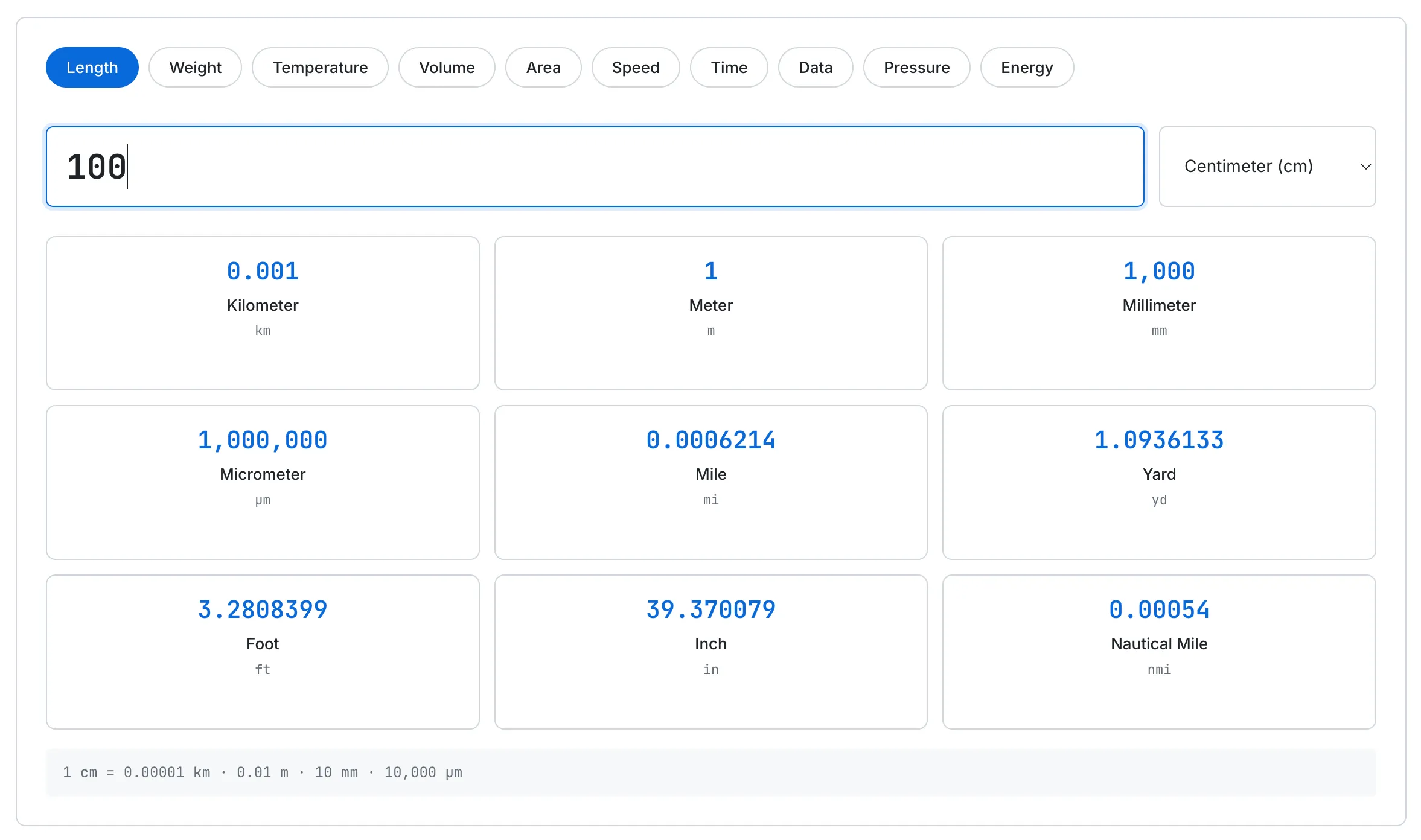
Enter 100 cm and see all nine length conversions at a glance — no repeated searches needed.
Click any card, and the value is copied to your clipboard. The card border briefly turns green, and a toast notification appears at the bottom: "Copied 39.370079 in." After 1.5 seconds, everything reverts to normal.
The card for the currently selected unit is excluded from the grid. If you've selected Centimeter, there's no need to show a "100 cm" card — it's already in your input field. This keeps the grid clean and focused on the conversions you actually want to see.
Below the grid, a formula bar shows the conversion factors for the selected unit: "1 cm = 0.00001 km · 0.01 m · 10 mm · 10,000 μm." This is useful for students verifying their math or anyone who wants to understand the relationship between units rather than just seeing a number.
Ten Categories in One Object
The tool supports ten categories: Length, Weight, Temperature, Volume, Area, Speed, Time, Digital Storage, Pressure, and Energy. Combined, that's about 75 individual units.
The core conversion logic is surprisingly simple. Each category has a single base unit, and every unit is defined by a factor relative to that base. For Length, the base unit is the meter. One kilometer equals 1,000 meters, so its factor is 1,000. One inch equals 0.0254 meters, so its factor is 0.0254.
The entire conversion is a single line:
result = (value × fromUnit.factor) / toUnit.factorConverting centimeters to inches: value × 0.01 / 0.0254. That's it. This one line handles every combination across all 75 units — as long as the units share a proportional relationship through a base unit.
The only exception is Temperature. Temperature scales have different zero points — 0°C is 32°F, not 0°F — so you can't convert between them with simple multiplication. Temperature uses a dedicated formula-based function instead: every input is first converted to Celsius, then from Celsius to the target unit. It's a two-step approach that handles the offset correctly.
Adding a new category requires nothing more than appending a key to the data object. The UI generates category tabs, dropdown options, and result cards from the same data source automatically. No manual HTML changes, no new conversion functions — just data.
The Small Things That Matter
There are details that don't stand out visually but define the experience.
localStorage memory. The tool remembers your last selected category, unit, and entered value. When you come back, everything is restored exactly as you left it. For someone who checks the same conversion daily — a gym-goer converting kilograms to pounds, for example — saving one click is reason enough to come back.
Smart number formatting. The range of conversion results is extreme. Converting 1 cm to micrometers gives 10,000. Converting it to kilometers gives 0.00001. A single format can't handle both cleanly. Large numbers get thousand separators. Mid-range values use significant figures. Very small or very large numbers switch to scientific notation. A surprising amount of conditional logic went into one formatting function.
Mobile numeric keyboard. The input field uses type="text" with inputmode="decimal" instead of type="number". This combination brings up the numeric keyboard on mobile without the tiny spinner arrows that type="number" adds — arrows that are effectively unusable on touch devices. It's a small HTML attribute choice, but it makes the mobile experience noticeably smoother.
Horizontally scrollable category bar. Ten categories in a single row is a space problem. Wrapping them to two lines would push the tool UI further down the page. Instead, the pill buttons scroll horizontally. The scrollbar is hidden, and selecting a tab automatically scrolls it into view. On desktop, all ten fit comfortably. On mobile, you swipe to reveal more — the interaction feels natural.
What I'd Improve
There are features I haven't built yet but want to.
Favorites. If you convert kg to lbs every day, you shouldn't have to select the Weight category and choose Kilogram every time. Pinning your most-used conversion pair for one-tap access would make the tool significantly faster for repeat users.
Cooking mode. The Volume category converts cups to milliliters using a standard ratio. But in cooking, volume-to-weight conversions depend on the ingredient. One cup of all-purpose flour weighs about 120 grams, while one cup of granulated sugar weighs about 198 grams — a 65% difference for the same volume. An ingredient-aware cooking mode would make this tool genuinely useful for anyone adapting recipes between metric and imperial measurements.
Shareable URLs. Encoding the current conversion state in the URL — something like ?v=100&from=cm — would let you send a specific conversion result to someone as a link. It's not implemented yet, but it would be a useful addition.
If you're interested in the broader context of why metric and imperial systems exist and how they differ, check out the Exchange Rates Guide — currency conversion shares the same fundamental challenge of translating between different systems of measurement. And for another take on building a conversion tool, see Why I Built a Travel Currency Converter, which tackles a similar "Google already does this" problem from a different angle.
The Takeaway
Unit converters are one of the oldest types of online tools. Search for one and you'll find dozens. But for over 25 years, the fundamental paradigm hasn't changed — one input, one output, one result at a time.
This tool flips that. One input, every result at once. It's not faster than Google for a single conversion. It does what Google can't — show you the full picture in a single glance.
If that makes unit conversion even slightly less tedious, that's enough.