Why I Built a Travel Currency Converter When Google Already Has One
The problem wasn't converting currencies. It was keeping track of what I was actually spending.
It happened in a market in Thailand. I picked up a shirt, saw the price — 250 on the tag — and spent about five seconds trying to remember the exchange rate before giving up and buying it anyway. That evening, back at the hotel, I sat down to figure out how much I'd spent that day. Turns out it was a lot more than I'd expected. Not because anything was expensive. Just because I had no idea what I was spending in real terms, across a dozen small purchases, all day long.
That's when I started thinking about building something. Not a better currency converter — there are plenty of those. Something that worked more like a running tab. It wasn't about finding a better travel currency converter — it was about building one that worked the way travel actually works.
The Problem With Every Currency Converter I Tried
Pull up Google's currency converter and it does exactly one thing: you type a number, it tells you what that number is in another currency. That's genuinely useful. But then you close it, or switch apps, and the result is gone. There's no memory, no accumulation, no way to look back at the end of the day and see what everything added up to in your home currency.
XE is the same. So are most of the dedicated currency apps. They're all built around a single conversion, one number in, one number out. Which makes sense for a lot of use cases — checking a rate before exchanging cash, for instance. But it doesn't match how you actually experience spending money in another country, which is a series of small decisions made quickly in physical spaces, often without reliable mobile service and definitely without the mental bandwidth to do running totals in your head.
What I actually wanted was something closer to a shopping list. Type a price, see what it is in my home currency. If I buy it, tap a button to log it. At the end of the day, see the total. Know how much budget I have left without doing any math.
The First Decision: How to Get Exchange Rate Data
Before writing any UI, I had to figure out where the exchange rate data would come from. The obvious answer is an API — there are several good ones. But the first approach I considered, proxying the API through a backend server or a Lambda function, created a problem I wasn't willing to accept: cost.
SudoTool is built to be free. Not "free with limits" or "free tier while we figure out monetization" — actually free, in a way that's sustainable without server expenses eating into the budget. Once you introduce a backend, even a lightweight one, you introduce ongoing cost. Lambda functions are cheap until they're not. And I didn't want to be in a position where usage of a simple currency tool meant paying AWS bills every month.
The solution was simpler than I expected: Exchange Rate API offers a free endpoint that requires no API key and updates daily. The browser fetches rates directly — no server in the middle, no authentication, no cost. It covers 160+ currencies, which is more than enough for any realistic travel scenario. And for the purpose of knowing whether a souvenir is $10 or $40 in your home currency, daily rates are plenty accurate.
Keeping Settings Without a Login
One thing that always bothered me about existing tools: you have to reconfigure everything every time you open them. Select your currencies, maybe set a rate — and then if you close the tab and come back later, it's all reset.
When you're traveling, you're using the same currency pair for days at a time. Having to re-select it every session is friction that adds up. So I stored everything in localStorage. Your home currency, your destination currency, your budget — all of it persists between sessions automatically, with no account required and no data leaving your device.
The spending list works the same way. Add items throughout the morning at a market, close the browser, reopen it after lunch — the list is still there. This was one of those small decisions that didn't take long to implement but makes the tool feel noticeably more considered than a basic converter. It also means you never lose your data if you accidentally close the tab or your phone restarts — something that happens more often than you'd think when you're navigating a foreign city with spotty service and a dozen apps competing for memory.
Designing for One-Handed Use in a Market
The design brief I gave myself was essentially: this needs to work when you're holding a bag in one hand and your phone in the other, standing in front of a vendor, needing to make a quick decision.
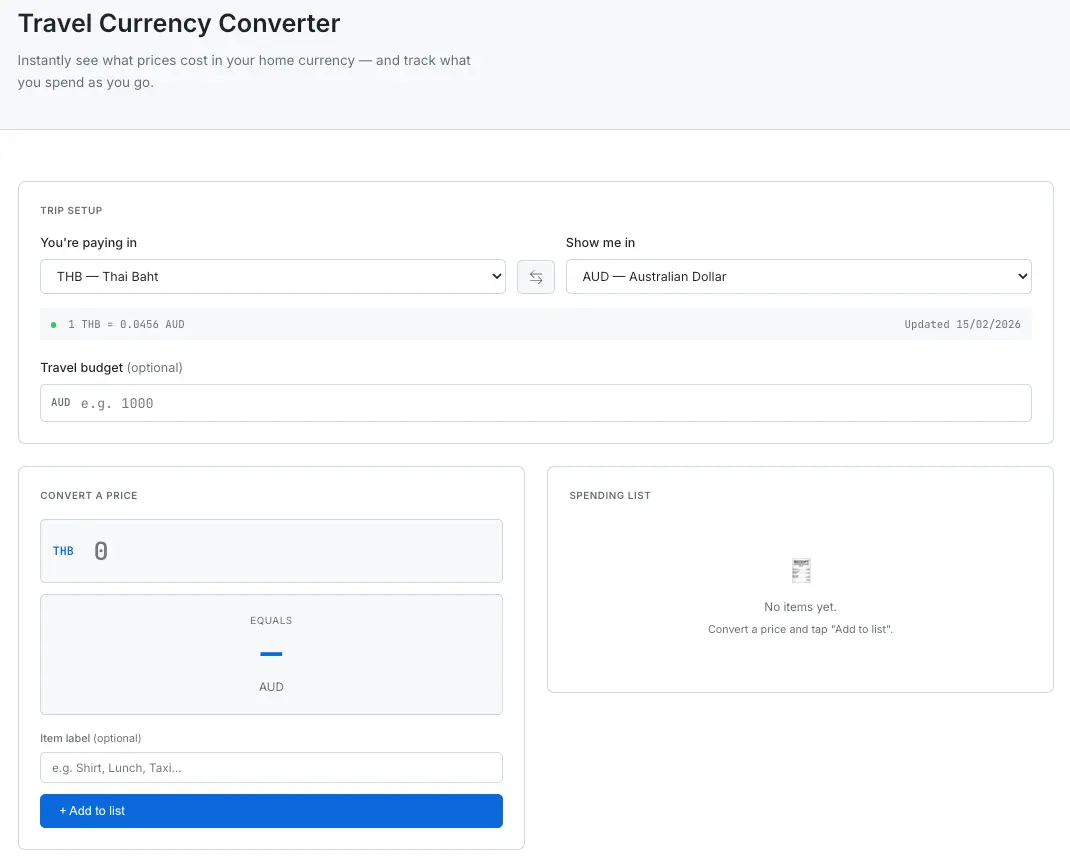
The full tool interface — Trip Setup, converter panel, and Spending List side by side.
That meant a large number input that's easy to tap. Instant conversion with no submit button — the result updates as you type. An "Add to list" button that only appears once you've entered a number, so you're not accidentally logging prices you're just checking. And a budget tracker that uses color to communicate status at a glance: green when you're fine, yellow when you're getting close, red when you've gone over.
The rest of the design follows the same system used across SudoTool — clean white background, monospace for numbers, the same border and spacing conventions. No new design elements. Consistency across the site matters more than any one page looking unique.
What I'd Do Differently
If I'm honest, the one thing I'd revisit is the spending list persistence. Right now, items stay until you manually clear them. That's intentional — you might want to look back at yesterday's spending — but it also means the list can get cluttered if you're on a long trip. A simple "new day" reset, or per-day grouping, would probably be more useful in practice. That's something I want to add in a future update.
I'd also consider adding a quick way to note the category of a purchase — food, transport, shopping — so you can see where the money actually went. Not a full budgeting app, but just a bit more context. For now, the item label field handles that manually, which is fine. Another thing worth exploring is multi-currency trips. Right now the tool handles one currency pair at a time, which covers most travel situations. But if you're doing a trip through Southeast Asia — say, Thailand into Vietnam into Cambodia — you're dealing with three different local currencies against the same home currency. Supporting that without making the interface more complicated would take some careful design work, but it would make the tool significantly more useful for longer trips.
Try It
The tool is live and free to use. No sign-up, no install. Works on desktop and mobile.
If you run into something that doesn't work the way you'd expect, or have an idea for how it could be more useful, the contact page is always open. This tool came from a real travel frustration — I'd be surprised if there aren't others I haven't thought of yet.