Why I Built a Running Weather Scheduler When Weather Apps Already Exist
Weather apps show you the day. They don't tell you whether Monday at 6 AM is actually a good time to run.
I've been running for nearly six years. For most of that time I've run in the morning — alarm set the night before, shoes by the door. The problem with morning runs is that you commit to them before you know what the weather will be. You make the decision at night and find out in the morning whether it was the right one.
Some mornings I wake up, look outside, and it's raining. The alarm already went off. I'm awake, but I'm not going anywhere. No sleep and no run — the worst possible outcome. It happened often enough that I started checking the weather before bed, which helped, but created a different kind of friction.
I run on Mondays, Wednesdays, and Fridays. That's three separate daily forecasts I had to look up, one by one, every week. Then when I travel — for work or otherwise — I'm doing the same thing for an unfamiliar city, guessing at what counts as a normal morning there. It added up to more time spent fiddling with weather apps than I really wanted. That's the gap a running weather scheduler is meant to fill.
What Weather Apps Get Wrong — and Why a Running Weather Scheduler Helps
The problem isn't that weather apps are bad. It's that they're built for general use, not for people who run at a specific time on specific days. A typical weather app shows you the full day at a glance, or an hourly breakdown you have to scroll through to find your window. Neither format answers the question a runner actually has: which days this week are good for a morning run?
There's also no interpretation. You see a 28% rain probability and a temperature of 24°C and you have to decide what that means for a run. Add humidity, wind, and air quality into the mix and it becomes a small mental exercise every time you check. That's fine once in a while, but not as a daily habit before you've even had coffee.
What I wanted was a single screen that showed me my usual running time across the whole week, with a straightforward signal for each day: worth it or not. That's what the Running Weather Scheduler does.
What Actually Makes Good Running Weather
Before building anything, I had to decide what "good" means in weather terms. Running comfort is affected by more variables than most people think about consciously — you just notice when something is off.
Temperature is the most obvious factor. A range of 10–25°C (50–77°F) tends to be where most runners feel comfortable. Below that, it takes longer to warm up and extremities get cold fast. Above it, heat builds up faster than the body can manage, especially on longer runs.
Rain probability is pretty self-explanatory — but the threshold matters. Under 20% is low enough that rain is unlikely. Once it crosses 40%, the chance is high enough to plan around.
Wind affects how the temperature actually feels. A headwind makes a cold morning feel significantly colder, and it adds resistance that changes the effort level of the run. Under 3 m/s feels calm; above 5 m/s starts to make itself known.
Humidity works together with temperature. High humidity slows down how fast sweat evaporates, which makes it harder for the body to cool itself. Under 80% is manageable; above 90% and the air starts to feel heavy.
Air quality (AQI) matters most in cities, and especially in parts of Asia where pollution levels can shift significantly day to day. Breathing hard during a run means taking in a lot more air than normal — on a high-AQI day, that's not ideal. An AQI under 50 is good; above 100, outdoor exercise starts to carry real health trade-offs.
These five factors are what the tool uses to calculate the Run Score for each day. Green means all five conditions are within comfortable ranges. Yellow means at least one is borderline. Red means at least one is clearly outside the range where running makes sense. Each card has a "Why?" button that breaks down exactly which factor triggered the rating, so the score is never a black box.
Planning a Full Week of Runs in Advance
The most useful way to use this tool is to open it once — on a Sunday evening, say — and look at the whole week ahead rather than checking day by day.
Type your city, pick your usual running time (or use one of the presets for early morning, morning, or evening), and you get a seven-day grid with a Run Score for each day. The best days that week are summarized at the top so you don't have to scan the whole grid.
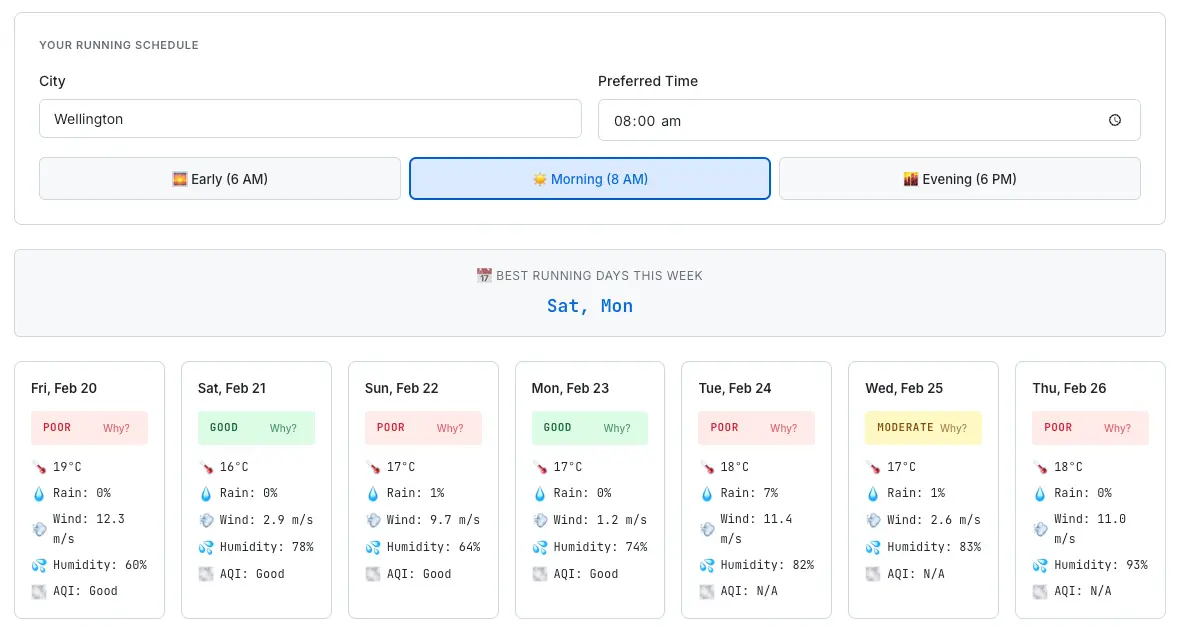
The 7-day view for Wellington at 8 AM — best days are highlighted at the top, with full weather details per card.
If I see that Wednesday is red, I can move that run to Thursday without losing the rhythm of the week. If two out of three planned days look poor, I can adjust the whole week rather than discovering it one morning at a time. It turns weather-checking from a daily habit into a once-a-week planning step.
For travel, the city search makes it easy to check conditions somewhere unfamiliar. The settings — city and preferred time — are saved automatically, so if you reopen the tool the next day, everything is still there without having to set it up again.
How It's Built
The weather data comes from Open-Meteo, a free and open-source weather API that requires no API key. It aggregates data from multiple national meteorological services and covers temperature, precipitation probability, wind speed, and humidity across an 8-day forecast window. Air quality data — AQI, PM2.5, PM10 — comes from Open-Meteo's separate air quality API.
City search uses Open-Meteo's geocoding API. As you type, the tool sends a debounced request after 300ms and returns up to five matching cities in a dropdown. Selecting one stores the coordinates, which are then passed to the weather and air quality APIs. There's no backend server anywhere in this stack — every request goes directly from the browser to the API. That keeps infrastructure costs at zero, which matters because SudoTool is built to stay free without any monetization pressure driving it.
User preferences (city and run time) are stored in localStorage. No account, no login, no data leaving the device. It's the same pattern used across every tool on SudoTool — settings that persist quietly between sessions without requiring anything from the user. The Travel Currency Converter works the same way, for the same reason.
One Thing That Still Needs Fixing
The air quality API only provides five days of forecast data. For a seven-day scheduler, that means the last two days have no AQI information. The tool currently shows "N/A" for those days and excludes AQI from the Run Score calculation when the data isn't available.
It's not a perfect solution. The score is still useful — temperature, rain, wind, and humidity are all still factored in — but it's worth knowing that AQI won't appear for days six and seven. If Open-Meteo extends the forecast range on their air quality API, or if a better alternative comes up, that's the first thing I'd update.
Try It
The tool is free to use, no sign-up required. Works on desktop and mobile. If you run at a consistent time and want to stop making weather decisions one morning at a time, it should be useful.
If the scoring thresholds don't match your preferences — maybe you're fine running in rain, or you live somewhere that's regularly 28°C — the "Why?" breakdown on each card gives you enough detail to make your own call. The score is a starting point, not a verdict.