Why I Built a Pomodoro Timer When Hundreds Already Exist
The problem wasn't the 25-minute countdown. It was the lack of a focus space I actually wanted to keep open all day.
Search "Pomodoro timer" and you'll find hundreds of results. Pomofocus, Toggl Track, Forest — there's no shortage of well-made tools. Building a 25-minute countdown is practically a beginner coding exercise. So why build another one?
If you've ever spent eight or more hours at a desk using a Pomodoro timer, you know the real issue. The problem isn't the timer itself. It's whether you actually want to keep that timer open all day. Most of the time, the answer is no.
The Two Extremes of Pomodoro Timers
Looking at the market, I found a clear pattern. Pomodoro apps fall into two camps.
On one side, there are minimal timers like Pomofocus. White background, big numbers, a start button. Clean and functional. But after five minutes, it feels sterile. No background sounds, no sense of immersion. A single browser tab with a ticking number doesn't feel like a "focus environment" — it feels like a clock.
On the other side, there are all-in-one productivity apps like Focus To-Do. Task lists, project management, tag systems, reports, sync across devices — the feature set is enormous. But to start a single Pomodoro, you first need to create a project and add a task. You came for a timer and ended up configuring a project manager.
Nothing combined beautiful immersion with a powerful timer. I wanted a tool I could leave in fullscreen all day and feel like I was sitting in my own personal focus room. That's what I set out to build.
What I Actually Wanted
After using existing tools for months, the frustrations boiled down to four things.
First, no immersion. Even the ones with a fullscreen mode just showed big numbers on a white background. There's a reason so many people open a lo-fi music YouTube stream next to their timer — the timer app itself can't create the right atmosphere.
Second, Pomodoro or nothing. What happens when your 25 minutes are up but you're deep in flow? You hit skip and start another 25-minute block. The timer structure itself breaks the concentration it's supposed to protect. Almost no tool offered an alternative like Flowtime mode.
Third, sounds require a separate app. Want rain sounds? Open Noisli. Want cafe ambiance? Open Coffitivity. If the timer had ambient sounds built in, you wouldn't need two or three extra tabs.
Fourth, weak tracking. How many sessions did I complete today? How much did I focus this week? Few timers show this at a glance. Some lock their analytics behind a paid plan.
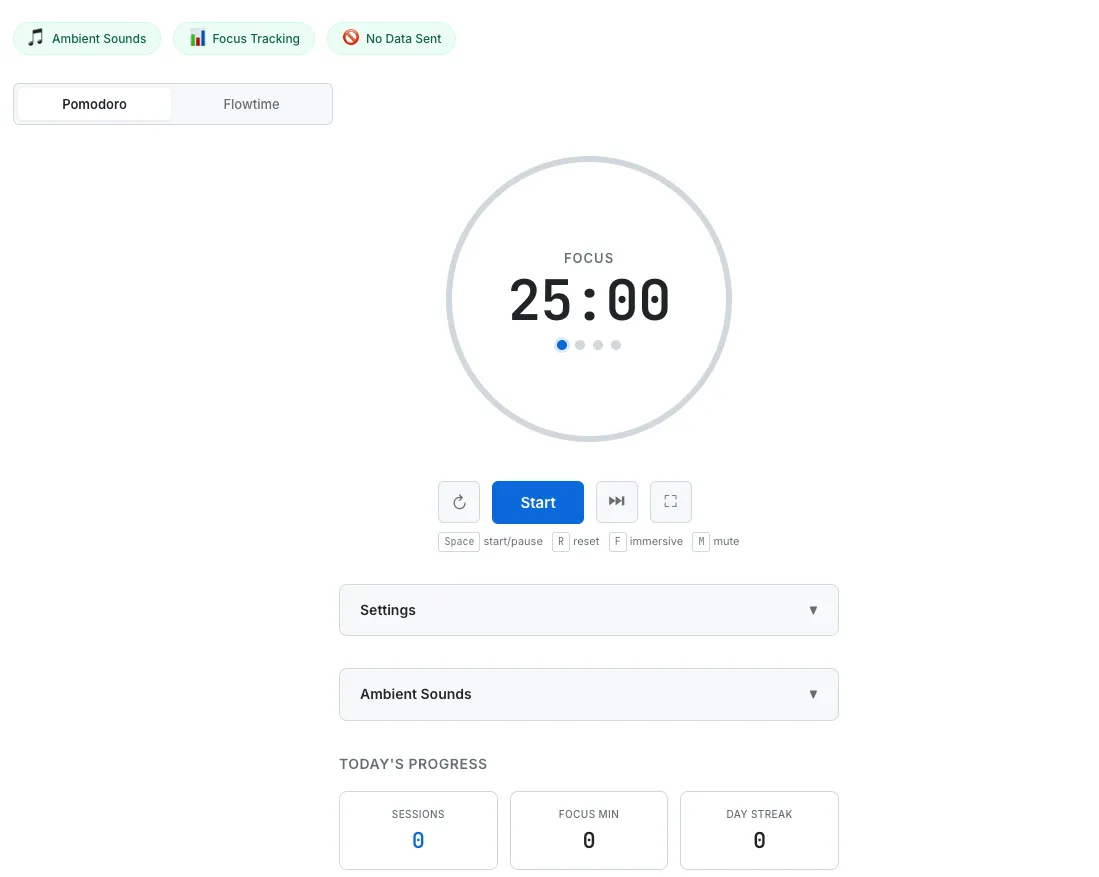
The Pomodoro Timer in its default state — SVG progress ring, dual-mode tabs, ambient sounds panel, and daily stats with heatmap.
Immersive Mode: Six Backgrounds Made With CSS Only
This was the feature I spent the most time on. Press F and the nav, footer, and settings panels all disappear. The entire screen fills with a background, and the timer floats inside a glassmorphism card.
The key constraint was no image files. Every tool on SudoTool should work with minimal external resources. So all six backgrounds are built entirely with CSS gradients, pseudo-elements, and keyframe animations.
Night Sky uses a deep purple gradient with radial-gradient dots for stars and a twinkle animation. Ocean places a radial-gradient ellipse at the bottom and shifts it with translateX to simulate a gentle wave motion. Warm Cafe lays an amber radial-gradient glow over a brown gradient to create the feeling of warm lighting. The other three — Sunset, Forest, and Minimal Dark — each use their own combination of gradients and subtle patterns.
The glassmorphism card uses backdrop-filter: blur(20px) with a rgba(255,255,255,0.1) background and a rgba(255,255,255,0.15) border. When entering immersive mode, the timer DOM elements are physically moved into the glass card — not cloned. This means the timer state is always in sync, and there's zero duplication logic. When you exit, the elements move back to their original position.
Flowtime: An Alternative to the 25-Minute Box
The Pomodoro Technique is effective, but it doesn't suit every type of work. When you're writing code and hit a flow state at the 40-minute mark, the last thing you want is a timer interrupting you.
Flowtime mode solves this. Instead of counting down, the timer counts up like a stopwatch. You work for as long as you want. When you stop, the timer recommends a break proportional to your focus time — roughly one-fifth. Focused for 50 minutes? Take a 10-minute break. The ratio-based approach works naturally whether you focus for 15 minutes or two hours.
Both modes record sessions and feed into the same stats dashboard. Switching between Pomodoro and Flowtime is a single click on the tabs at the top.
Ambient Sounds: One Tab Is Enough
My first approach was generating all sounds procedurally with the Web Audio API. Brown noise used a cumulative random filter. Rain was bandpass-filtered white noise. Wind used LFO frequency modulation. All code, no audio files.
Brown noise worked well this way. But cafe and fireplace sounds were hard to make convincing through procedural generation alone. The cafe sounded more like a broken radio than a coffee shop. So I replaced cafe, fireplace, rain, and wind with MP3 loops, and added two new sounds — ocean waves and a babbling stream. Brown noise remains the only one generated in real time via the Web Audio API.
You can play up to two sounds simultaneously, each with an individual volume slider. Toggling a sound applies a 1.5-second fade-in and a 1-second fade-out to prevent pops and clicks. The notification chime and all ambient sounds share a single AudioContext, keeping browser resource usage low.
Stats: A Heatmap Inspired by GitHub Contributions
If you're a developer, you know the motivational power of GitHub's contribution heatmap. Seeing green squares fill up makes you think, "I should commit something tomorrow too."
I applied the same idea. A 7-day heatmap sits below the timer, coloring each day across four intensity levels based on the number of completed focus sessions. Above it, three stat cards show today's session count, total focus minutes, and the current day streak.
All data lives in the browser's localStorage. Nothing is sent to a server. Session data older than 30 days is automatically cleaned up, so storage never becomes a problem. This approach matches the philosophy behind every tool on SudoTool — the same local-first design used by the Password Generator and the Investment Growth Simulator.
Technical Decisions
A few implementation choices worth mentioning.
Timer accuracy. Using setInterval alone causes timers to drift when a browser tab is inactive. To handle this, every tick compares Date.now() timestamps and calculates the actual elapsed time. Even if you hide the tab and come back minutes later, the timer is accurate.
SVG progress ring. The circular progress indicator is an SVG circle element whose stroke-dashoffset changes with the remaining time. The full circumference is 2 * π * 140 = 879.6, and the offset is reduced proportionally as time passes. A CSS transition on the offset makes the animation smooth.
Keyboard shortcuts. Space starts and pauses. R resets. F toggles immersive mode. M mutes all audio. 1 and 2 switch between Pomodoro and Flowtime modes. All shortcuts are disabled when an input field has focus, so adjusting sliders doesn't accidentally trigger timer actions.
Accessibility. The timer element has role="timer" and aria-live="polite", so screen readers announce time changes. The settings and sound panels use aria-expanded to communicate their open/closed state. A prefers-reduced-motion media query disables all animations for users who need it.
What's Still Missing
There are a few features I'd like to add in future updates.
Browser notifications. Right now, session completion is signaled through a tab title change and an audio chime. Adding the Notification API would ensure you don't miss it when you're working in a different tab.
Custom backgrounds. The six CSS backgrounds cover a good range of moods, but letting users set their own gradient colors or choose from a broader palette would make the immersive experience more personal.
Weekly and monthly reports. Currently, only today's stats and a 7-day heatmap are shown. Adding weekly total focus time trends and monthly reports would help users build long-term habits.
PWA support. Adding a Service Worker to make the timer work offline is a natural next step for a tool that should feel like a native app.
Try It
Pomodoro timers are everywhere. But a focus space you actually want to keep open all day is hard to find. Fill your screen with immersive mode, turn on some rain sounds, and start a 25-minute session. A single browser tab becomes your personal workspace.
No sign-up. No server. No ads. Just open your browser.
I'd suggest starting with the Night Sky background and turning on brown noise. Start a 25-minute session. If, when the chime rings, your first thought is "already?" — then this tool did its job.