Building an AI Token Counter That Shows What Your Prompts Actually Cost
Most token counters show you a number. I built one that loads OpenAI’s actual tokenizer in the browser, compares costs across 13 models from three providers, and highlights the cheapest option — all without sending a single character to any server.
Why I Built an AI Token Counter
I use GPT-4o and Claude every day. And every day I wonder the same thing: “How much is this prompt going to cost me?”
OpenAI’s dashboard shows usage after the fact. Anthropic’s console does not show real-time costs either. There was no way to predict the price of an API call before making it. I wanted to paste a prompt, see the token count, and know exactly how much it would cost across every model I might use.
When I searched for “token counter,” I found plenty of tools. But most were OpenAI-only, or missing cost calculations, or unable to compare multiple models side by side. The question I kept asking — “How much on GPT-4o, how much on Claude Sonnet, how much on Gemini Flash?” — had no single-screen answer.
The Competition Gap
I tested every major token counter I could find.
OpenAI Platform Tokenizer is the official tool, and it is accurate. But it only supports OpenAI models. No cost calculation. Claude and Gemini simply do not exist in its world.
GPT for Work Tokenizer supports multiple models, but has no cost estimation. It tells you the token count and stops there. “So how much is that?” remains unanswered.
Price Per Token has pricing data for over 300 models, but its token counting is minimal. It is more of a reference site than a tool you actually use.
Token Calculator offers cost estimation, but the UI feels dated and there is no token visualization.
The pattern was clear. Every tool did one thing well — counting, or pricing, or visualization. But none of them combined all three in a polished, single-screen experience. That was the gap I wanted to fill: paste your text once, see 13 models’ token counts and costs in one table, with the cheapest option highlighted automatically.
The Hybrid Tokenizer — Exact Meets Estimated
The hardest decision was how to implement the tokenizer itself.
SudoTool is a pure HTML/CSS/JS project. No build tools. No npm. No webpack. But OpenAI’s BPE tokenizer (gpt-tokenizer) needs a 2MB vocabulary file containing 200,000 token entries to produce exact counts.
I had two options:
- Heuristic only — estimate tokens using the rule of thumb that one token is roughly 4 English characters. Fast and lightweight, but imprecise. “Approximately 1,300 tokens” does not inspire the same confidence as “exactly 1,347 tokens.”
- Load the real tokenizer from a CDN — dynamically import
gpt-tokenizerfrom esm.sh as an ES module. No build step required. Exact BPE token counts, right in the browser.
I chose both.
For OpenAI models (GPT-4o, GPT-4.1, o3, and their variants), the tool lazy-loads the o200k_base encoding from the CDN the moment the user starts typing. Before it finishes loading, a heuristic estimate fills the gap. Once loaded, exact counts replace the estimates seamlessly. The user never waits on a blank screen.
For Claude and Gemini, there is no public client-side tokenizer. Anthropic only offers server-side token counting via their API. Google is the same. For these models, I use the industry-standard ratio of approximately 4 characters per token — the same figure Anthropic recommends in their official documentation.
The key was transparency. Exact counts get a green “Exact” badge. Estimates get a yellow “Est.” badge. The user always knows which numbers to trust fully and which are approximations. No hidden assumptions.
The Model Comparison Table — The Killer Feature
The comparison table is why this tool exists.
Thirteen models from three providers, all in one table:
- OpenAI: GPT-4o, GPT-4o-mini, GPT-4.1, GPT-4.1-mini, GPT-4.1-nano, o3, o3-mini
- Anthropic: Claude Sonnet 4.6, Claude Haiku 4.5, Claude Opus 4.6
- Google: Gemini 2.5 Pro, Gemini 2.5 Flash, Gemini 2.5 Flash-Lite
Each row shows the model name, provider, accuracy badge, input token count, input cost, output cost, total cost, and context window usage. “This text costs $0.0012 on GPT-4o, $0.0001 on Gemini Flash-Lite” — that comparison is immediately visible.
The cheapest model’s row is highlighted in light green. A sort button lets you reorder by total cost. At a glance, you know which model gives you the best deal for this specific text.
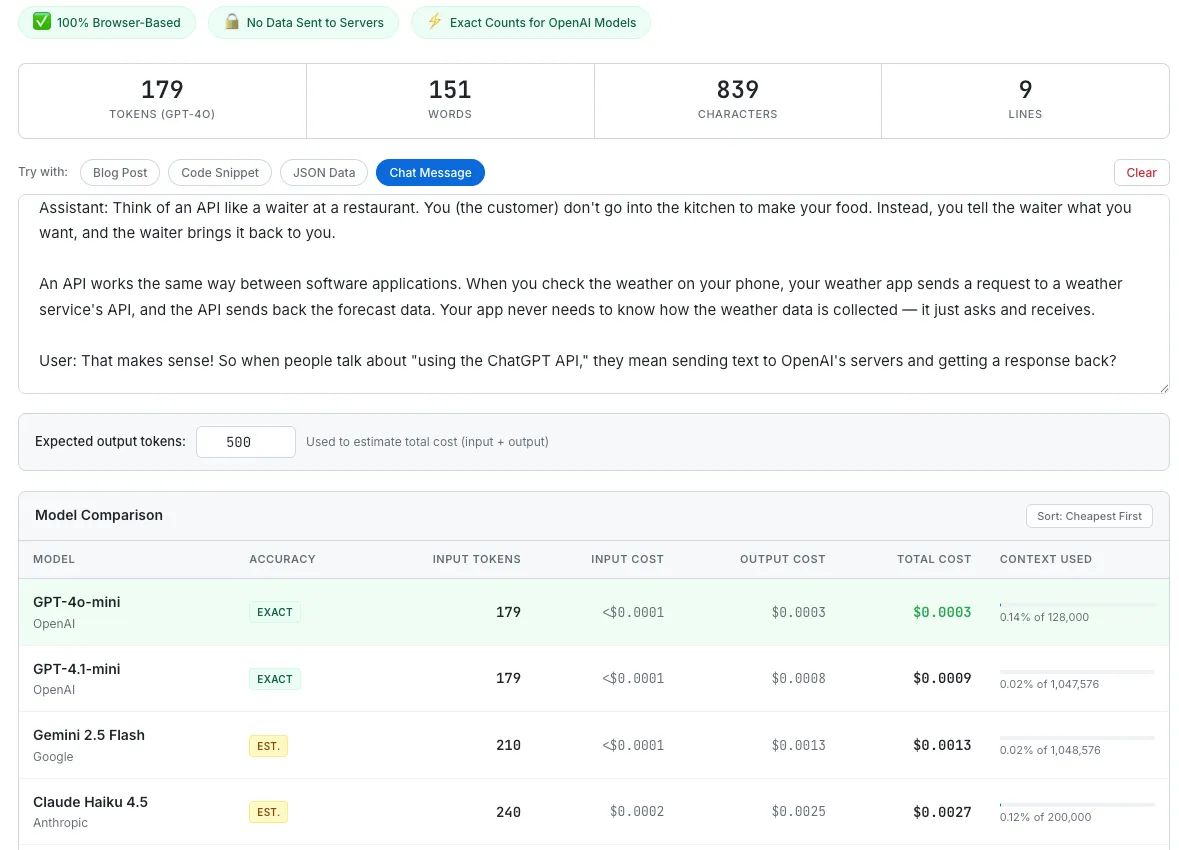
The model comparison table with the Chat Message preset loaded. GPT-4o-mini wins this round at $0.0003 total.
Output Tokens — The Cost Most People Forget
Most token counters only count input tokens. That is a problem, because the real expense is often on the output side.
GPT-4o charges $2.50 per million input tokens but $10.00 per million output tokens — four times more. Claude Opus 4.6 charges $5.00 input versus $25.00 output — five times more. If you only count input tokens, you are seeing a fraction of your actual cost.
I added an “Expected output tokens” field. Enter how many tokens you expect the model to generate in response, and the table recalculates total cost (input + output) for every model simultaneously. This turns the tool from a token counter into a genuine cost calculator.
Context Window Indicator — Making Limits Visible
Each model has a different context window, and the range is enormous.
GPT-4o supports 128,000 tokens. Claude Sonnet 4.6 and Opus 4.6 now support 1,000,000 tokens — Anthropic made this generally available on March 13, 2026, with no beta header required and no long-context surcharge. GPT-4.1 and Gemini 2.5 Pro each support roughly 1 million tokens as well.
The same text that uses 2.3% of GPT-4o’s capacity only uses 0.28% of GPT-4.1’s. A thin progress bar and percentage label beneath each row makes this instantly visible. When you are building a RAG system or processing long documents, this is the number that determines which model you can even use.
Preset Examples — Instant Gratification
A user who arrives at a blank text area does nothing. They do not know what to type.
I added four preset buttons:
- Blog Post — two paragraphs of AI-related prose. Shows the typical token ratio for English writing.
- Code Snippet — a QuickSort implementation. Lets you see firsthand whether code consumes more tokens per character than prose.
- JSON Data — nested user objects. Demonstrates how structured data performs in terms of token efficiency.
- Chat Message — a system prompt plus a user/assistant exchange. Simulates a real API call scenario, which is what most users actually care about.
Press one button, and the entire table fills with 13 rows of token counts and costs. “This code snippet is 157 tokens on GPT-4o and costs $0.0004” — that instant feedback proves the tool’s value within three seconds. The same pattern I validated in the Meeting Cost Calculator: give people something to react to immediately, do not make them work for it.
Pricing Data as a Separate Object
Model prices change frequently. OpenAI adjusted pricing three times in 2024 alone.
So I structured the pricing data as a flat JavaScript array of objects. Each model is one object containing its name, provider, input price per million tokens, output price per million tokens, context window size, and encoding type. When a price changes, I update one number. When a new model launches, I add one line. No HTML restructuring, no logic changes.
This matters more than it sounds. GPT-4.1 launched with a new pricing tier. Claude Opus 4.6 and Sonnet 4.6 expanded their context windows from 200K to 1M tokens. Gemini 2.5 Flash-Lite appeared as a new budget option. Each of these updates took less than five minutes to reflect in the tool, because the data layer is completely separated from the presentation layer.
What I Would Build Next
- Token visualization — color-coding the text to show where each token boundary falls. OpenAI’s official tokenizer does this, but it cannot compare across models. Showing “GPT-4o splits this word into 2 tokens while Claude treats it as 1” would be a genuine differentiator.
- File upload — drag-and-drop .txt, .md, or .json files instead of pasting. Long documents are painful to copy into a text area.
- Cost comparison chart — a bar chart visualizing per-model costs. Tables are precise; charts are intuitive. Both have their place.
- Shareable result card — generating an image that reads “This prompt costs $0.003 on GPT-4o vs. $0.0001 on Gemini Flash-Lite.” The Canvas API pattern I validated in the Salary Visualizer and Browser Privacy Checker would work perfectly here.
- Batch cost estimator — enter “1,000 calls per day” and see projected monthly costs. Turns a single-prompt calculator into a capacity planning tool.
The Takeaway
A token counter is, at its core, a tool that counts characters. Not technically complex.
But “500 tokens” is a meaningless number on its own. It only becomes useful when that number turns into “$0.0012” and the alternative right next to it says “$0.0001.” Comparison gives numbers context.
The lesson I keep relearning from every tool I build — from the Salary Visualizer to the Meeting Cost Calculator to this one — is that people do not respond to absolute values. They respond to relative values. “$0.003” means nothing. “GPT-4o costs 30x more than Gemini Flash-Lite for this prompt” changes behavior.
The most useful moment for this tool is when a developer is choosing a model. “Which model is most cost-effective for this prompt?” Answer that in three seconds, on one screen, with no server round-trip. That is the entire tool, and it is enough.