How Fancy Text Generators Work (Unicode Explained)
They look like different fonts. They paste everywhere. But they aren't fonts at all — they're entirely different characters.
Instagram has 3 billion monthly active users. Many of them use what appears to be a different font in their bio — bold, italic, cursive, or gothic text that somehow survives the paste. The same styled text shows up on Twitter/X, Discord, TikTok, and gaming usernames everywhere.
But none of these are fonts. Not a single letter has had its font changed. Instead, every character has been replaced with an entirely different character from the Unicode standard that happens to look styled. This guide explains how fancy text generators actually work, why the result pastes anywhere, and the accessibility and security trade-offs most people never think about.
What Is Unicode?
For a computer to display text, every character needs a unique number. ASCII, approved in 1963, defined just 128 characters — the English alphabet, digits, and basic punctuation. Other languages were not supported at all.
The result was chaos. Every country and company created its own encoding system. Japan alone had three incompatible encodings — Shift-JIS, EUC-JP, and ISO-2022-JP. Korean had EUC-KR. Chinese had Big5 and GB2312. Before Unicode, there were over 60 different character encoding systems competing worldwide.
The consequence was mojibake (文字化け, literally "character transformation" in Japanese) — garbled text caused by encoding mismatches. "they're" saved as UTF-8 and read as Windows-1252 becomes "they’re." Japanese "日本語" saved as UTF-8 and read as Shift-JIS becomes "讉 蟾怜喧綺."
In 1987, Joe Becker at Xerox and Lee Collins and Mark Davis at Apple started the Unicode project to unify all writing systems into one numbering standard. The Unicode Consortium was incorporated on January 3, 1991, and the first version launched with about 7,000 characters.
Today, Unicode 17.0 (September 2025) defines 159,801 characters covering 172 scripts — Korean, Japanese, Arabic, emoji, and everything in between. 98.9% of all websites use UTF-8, Unicode's encoding format (W3Techs, March 2026). It is the de facto standard.
Why Fancy Text Isn't Really a "Font"
This is the most important concept in this article.
A regular font (Arial, Times New Roman, Helvetica) changes the visual style of the same character. The "A" in Arial and the "A" in Times New Roman are both U+0041 — the same character, rendered differently. Fonts are applied through CSS or operating system settings.
Fancy text works on a completely different principle. It replaces the character itself.
| Regular Font | Fancy Text (Unicode) | |
|---|---|---|
| Mechanism | Same character, different visual style | Entirely different character |
| "A" code point | U+0041 (in any font) | U+1D400 (Bold), U+1D434 (Italic) |
| How it's applied | CSS font-family or OS settings | Character replacement |
| Platform dependency | Font must be installed | Works anywhere Unicode is supported |
| Searchable? | Yes (Ctrl+F works) | No (different character entirely) |
From a computer's perspective, regular "A" (U+0041) and bold "𝐀" (U+1D400) are as different as "A" and "$." Different code points, different byte values, different names. One is "LATIN CAPITAL LETTER A." The other is "MATHEMATICAL BOLD CAPITAL A."
This is why fancy text pastes anywhere. You aren't changing the font — you're changing the characters. Since every modern platform supports Unicode, the characters display as-is.
How the Conversion Actually Works
The Unicode standard includes a block called Mathematical Alphanumeric Symbols (U+1D400 to U+1D7FF). It was added in Unicode 3.1 (March 2001), originally for mathematical typesetting. In mathematics, italic A means something semantically different from roman A, so each style needed its own code point.
This block contains Bold, Italic, Bold Italic, Script, Fraktur, Double-struck, Sans-serif, and Monospace variants of the Latin alphabet. Fancy text generators leverage this block.
The conversion logic is simple offset arithmetic:
- Input: "A" → code point U+0041 (decimal 65)
- Output: "𝐀" → code point U+1D400 (decimal 119,808)
- Offset: 119,808 − 65 = 119,743
Add the same offset to every uppercase letter. B (66) maps to U+1D401, C (67) to U+1D402, and so on through Z. Lowercase letters use a different starting offset within the same block.
Styles like Strikethrough (H̶e̶l̶l̶o̶) and Underline (H̲e̲l̲l̲o̲) use a different mechanism: Combining Characters. These are zero-width characters that attach to the preceding character and add a visual decoration. Append U+0336 (Combining Long Stroke Overlay) after "H" and you get "H̶." Apply it to every character and the entire text appears struck through.
Circled text (ⓗⓔⓛⓛⓞ) comes from the Enclosed Alphanumerics block. Fullwidth text (Hello) uses the Halfwidth and Fullwidth Forms block designed for East Asian compatibility. Each style references a different Unicode block, but the principle is the same — replace each standard character with a visually similar character that has a different code point.
Where It Works — And Where It Doesn't
The common claim is that fancy text "works everywhere Unicode is supported." The reality is more nuanced.
| Platform | Bio / Profile | Posts / Comments | Username | Limitations |
|---|---|---|---|---|
| ✅ | ✅ | ❌ ASCII only | Excessive Zalgo filtered | |
| Twitter/X | ✅ | ✅ | ❌ ASCII only | Special chars count as 2 |
| Discord | ✅ | ✅ | ❌ lowercase + _ . | ~5% of symbols filtered |
| TikTok | ✅ | ✅ | ❌ _ . only | Bio limit 80–120 chars |
| ⚠️ Headline banned | ✅ | — | Blocked in headlines since 2024 | |
| ✅ | ✅ | — | AI detects filter-bypass text | |
| SMS | — | ⚠️ | — | Capacity drops 160 → 70 chars |
| — | ✅ | — | Client-dependent rendering |
Two cases are worth highlighting.
LinkedIn banned fancy text in headlines (2024). Since mid-2024, LinkedIn returns an error — "Saving failed... there are invalid characters" — when you try to save a headline with Unicode styled text. The reason: LinkedIn's search algorithm interprets bold "𝐒𝐄𝐎" as mathematical symbols, not the word "SEO." Profiles with styled headlines were invisible to recruiter searches.
SMS encoding doubles the cost. Including even one Unicode character in an SMS switches the encoding from GSM-7 to UCS-2, which reduces the segment size from 160 characters to 70 — effectively cutting capacity in half. Some carriers drop messages with unsupported characters entirely.
Non-Latin scripts cannot be converted. The Mathematical Alphanumeric Symbols block only contains Latin and Greek letters. Korean, Chinese, Japanese, Arabic, and Hindi characters have no styled Unicode equivalents. This is a fundamental limitation of every fancy text generator.
The Accessibility Problem Nobody Talks About
This is the most underestimated issue with fancy text.
Screen readers — software used by people with visual impairments — read each character by its official Unicode name. Bold "𝐇𝐞𝐥𝐥𝐨" isn't read as "Hello." It's read as:
"mathematical bold capital H, mathematical bold capital e, mathematical bold capital l, mathematical bold capital l, mathematical bold capital o"
Fraktur text is even worse. The word "garbage" in Fraktur is read aloud as:
"mathematical fraktur small g, mathematical fraktur small a, mathematical fraktur small r, mathematical fraktur small b, mathematical fraktur small a, mathematical fraktur small g, mathematical fraktur small e"
A five-letter word becomes a 50-syllable ordeal. Accessibility advocate Per Axbom has documented cases where screen readers skip Unicode styled text entirely — producing complete silence where text should be.
There is progress. NVDA (a free Windows screen reader) enabled Unicode normalization by default in version 2025.1. This feature converts Mathematical Bold/Italic characters to their standard equivalents before reading aloud — so "mathematical bold capital A" becomes just "A." However, the same feature has not yet been documented for Apple's VoiceOver or Android's TalkBack.
The guideline: Use fancy text for short, decorative purposes — a name, a one-line bio. Never write full sentences or important information in fancy text. Texas Tech University's accessibility guidelines explicitly recommend against using Unicode "fancy" fonts on social media.
The Security Side of Lookalike Characters
The very principle that makes fancy text work — characters that look identical but are technically different — is also the foundation of a class of cyberattack called a Homograph Attack.
In 2017, security researcher Xudong Zheng registered the domain xn--80ak6aa92e.com. Browsers rendered it as "apple.com" — because every character was Cyrillic, not Latin, but visually identical. Chrome, Firefox, and Opera were all fooled. Zheng reported it to Chrome and received a $2,000 bug bounty. Chrome shipped a fix in version 58.
That was a proof of concept. Real attacks followed. In September 2017, attackers registered a visually identical variant of adobe.com to distribute the Betabot trojan.
The scale is not trivial. An Akamai study (November 2022) found 6,670 homograph domains over a 32-day period, with an average of 67 new spoofed domains created daily. During that period, 29,071 devices accessed at least one homograph domain.
A fancy text generator itself isn't dangerous. But it's worth knowing that the exact principle behind it — characters that look the same but aren't — is also the basis for phishing attacks that trick millions of devices.
When to Use Fancy Text — And When Not To
Fancy text is a tool. Used in the right context, it's effective. Used in the wrong context, it creates problems.
Good uses:
- Short decorative text in Instagram or TikTok bios
- Discord server names and channel descriptions
- Gaming usernames (Steam, Fortnite, Roblox)
- Emphasizing a word or two in a social media post
Avoid:
- Full sentences or long paragraphs — hurts readability and breaks screen readers
- LinkedIn headlines — blocked since 2024
- SEO-important web content — search engines don't index it as regular text
- Hashtags and @mentions — they won't function (different characters)
- SMS messages — encoding switch cuts capacity in half
- Professional emails — may render as boxes in some clients
Try It Yourself
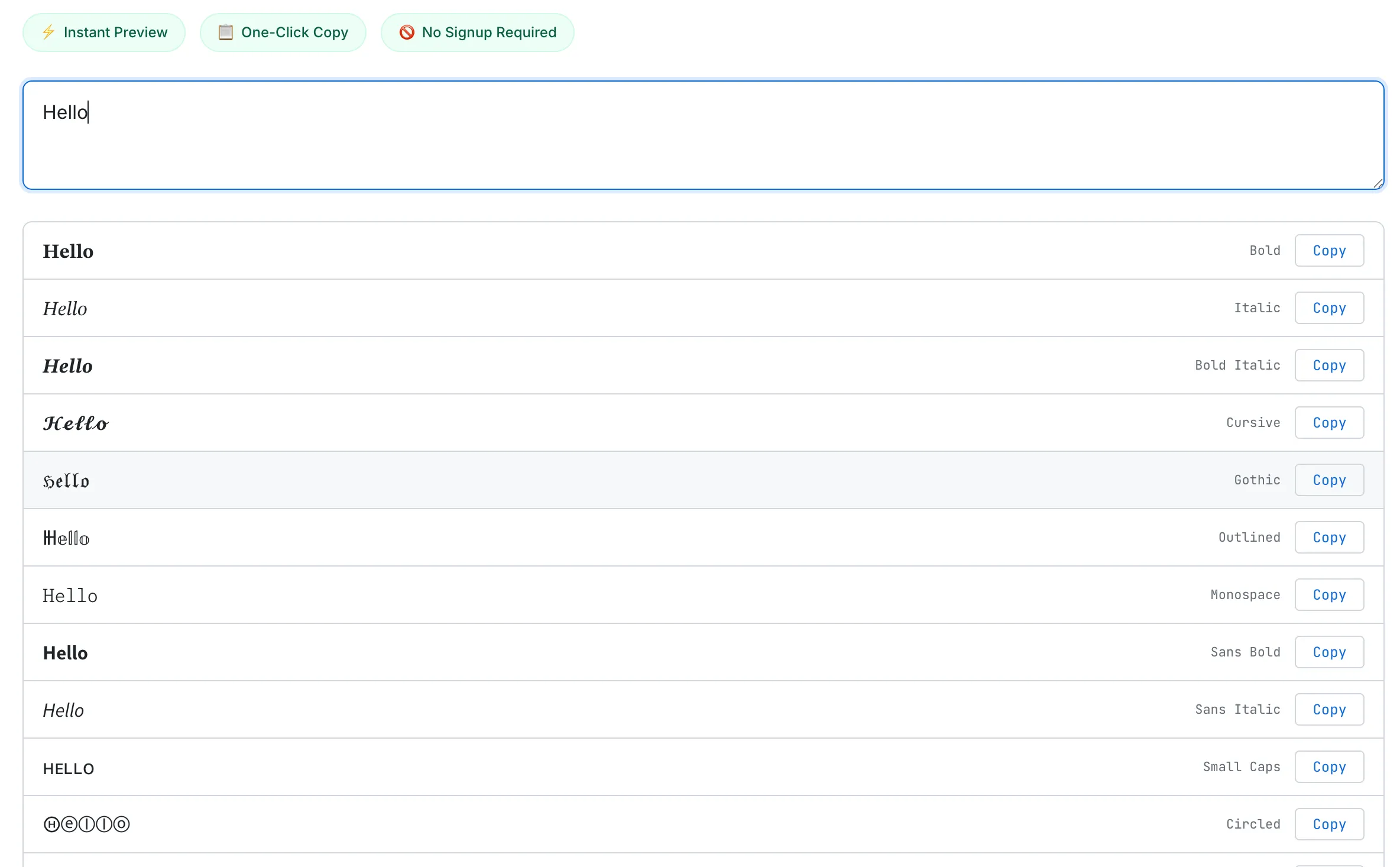
Type your text once, see 40 styles at a glance, and copy any one with a single click.
SudoTool's Fancy Text Generator converts your text into 40 curated styles — Unicode text styles, decorative symbols, and wrapping frames — in a compact list with one-click copy. Everything runs in your browser. No data is sent to any server.
Curious about how this tool was built and why we chose 40 styles instead of 80? Read the dev log: Why I Built a Fancy Text Generator When Dozens Already Exist.
Frequently Asked Questions
Are fancy text fonts real fonts?
No. A font is a set of visual styling instructions applied to the same characters. Fancy text replaces each character with a different Unicode character that looks styled. To a computer, regular "A" (U+0041) and bold "A" (U+1D400) are entirely different characters.
Why does fancy text work on Instagram but not in some apps?
It works on any platform that supports Unicode — which is most modern apps. Some platforms filter specific decorative characters (like excessive diacritics) to prevent spam. LinkedIn blocked Unicode styled text from headlines entirely in 2024.
Can screen readers read fancy text?
Poorly. Most screen readers announce each character by its full Unicode name — so "Hello" in bold becomes "mathematical bold capital H, mathematical bold capital e..." NVDA 2025.1 and later normalizes these characters, but VoiceOver and TalkBack have not yet documented similar support.
Is fancy text bad for SEO?
Yes, if used in page content. Search engines interpret Mathematical Alphanumeric Symbols as different characters from standard Latin letters. Content written in Unicode bold will not rank for the standard-text version of that keyword. Browser Ctrl+F also cannot find it.
How many Unicode characters exist?
Unicode 17.0 (September 2025) defines 159,801 characters covering 172 scripts — including Korean, Japanese, Chinese, Arabic, and emoji.
Can Korean, Chinese, or Japanese text be converted to fancy text?
No. The Mathematical Alphanumeric Symbols block only contains styled variants of Latin and Greek letters. There are no styled Unicode equivalents for Korean (Hangul), Chinese (CJK), Japanese (Kana/Kanji), Arabic, or Hindi characters. This is a fundamental limitation of the Unicode standard.