JSON Explained: What It Is, Why It Matters, and How to Use It
JSON is the invisible language that powers the modern internet. Here's everything you need to know — from syntax rules to real-world use cases to common mistakes.
Every time you check the weather on your phone, scroll through an Instagram feed, or add an item to an online shopping cart, data is being exchanged behind the screen — and chances are, it's in JSON. So what is JSON? JSON (JavaScript Object Notation) is a lightweight text format for storing and exchanging data, and it has become the dominant format for web APIs. According to the Postman State of the API Report (surveying over 5,700 developers and API professionals in 2025), JSON remains the overwhelmingly preferred data format for API communication.
But JSON isn't just for developers. If you've ever edited a configuration file, or noticed star ratings and recipe details appearing directly in Google search results, you've already encountered JSON. The problem is that most people use JSON without truly understanding what it is, how it works, or why it became so dominant.
This guide covers everything from JSON's definition and syntax rules to its comparison with XML, real-world use cases, the most common mistakes beginners make, and how to work with JSON efficiently. Whether you're a developer, a data analyst, or just someone curious about how the web works — this is your starting point.
What Is JSON? A Simple Explanation
JSON stands for JavaScript Object Notation. Despite the name, JSON is not a programming language. It's a text-based data format designed to store and transmit structured data. The key feature that made JSON successful is that it's easy for humans to read and easy for machines to parse.
Here's what JSON looks like:
"name": "Jane",
"age": 28,
"active": true,
"skills": ["JavaScript", "Python", "SQL"],
"address": null
}
That's all there is to it. Curly braces ({}) create objects, keys are always double-quoted strings, values follow a colon, and arrays use square brackets ([]). Indentation is optional but improves readability.
The Origin of JSON — A Revolution That Started in a Garage
JSON's history goes back to April 2001. Software developer Douglas Crockford was working at a company called State Software with his colleague Chip Morningstar. At the time, the standard way to exchange data between servers and browsers was XML — which was powerful but heavy and complex. Crockford wanted something lighter.
He borrowed JavaScript's object literal syntax to design a data format so simple that its entire grammar could fit on a business card. The very first JSON message was sent from a garage in the Bay Area. In 2002, the json.org domain was registered. In 2006, the first RFC (RFC 4627) was published. And in October 2013, JSON was officially standardized by ECMA International as ECMA-404.
Crockford himself has said: "I do not claim to have invented JSON. I claim only that I discovered it. It existed in nature." He simply identified a pattern already present in JavaScript and showed how it could be useful for data exchange. That simplicity is exactly why JSON took over the world.
JSON Syntax: Rules Every Beginner Should Know
JSON is simple, but its rules are strict. A single misplaced character can make an entire document invalid. Here are the fundamentals you need to know.
The Six Data Types
JSON supports exactly six types of values:
| Type | Example | Notes |
|---|---|---|
| String | "hello" |
Must use double quotes (""). Single quotes are invalid. |
| Number | 42, 3.14, -7 |
Integers and decimals. No leading zeros (007 is invalid). |
| Boolean | true, false |
Must be lowercase. True and FALSE are invalid. |
| Null | null |
Represents an empty value. Must be lowercase. |
| Object | {"key": "value"} |
Key-value pairs inside curly braces. |
| Array | [1, 2, 3] |
Ordered list of values inside square brackets. |
Key Rules
1. Keys must be double-quoted strings. No single quotes, no unquoted keys.
✗ { name: "Jane" }
✗ { 'name': 'Jane' }
2. No trailing commas. JavaScript allows them, but JSON does not.
✗ { "a": 1, "b": 2, }
3. No comments. JSON does not support // or /* */ comments. If you need comments in configuration files, consider JSONC or JSON5.
4. Special characters must be escaped. Line breaks become \n, tabs become \t, quotes become \", and backslashes become \\.
5. undefined, NaN, and Infinity are not valid values. Use null to represent missing data.
These rules may feel restrictive, but that strictness is what makes JSON reliable. Because there's zero ambiguity, every programming language can parse JSON identically. No edge cases, no surprises.
Why JSON Won: From XML to the Modern Web
Before JSON, the standard format for data exchange on the web was XML (Extensible Markup Language). XML was powerful and flexible, but it had one fatal flaw — it was verbose.
Here's the same data in both formats:
<name>Jane</name>
<age>28</age>
<active>true</active>
</person>
"name": "Jane",
"age": 28,
"active": true
}
JSON is shorter, easier to read, and doesn't require repetitive closing tags. When this difference is multiplied across thousands of API responses, the savings in bandwidth and parsing time add up significantly.
| Feature | JSON | XML |
|---|---|---|
| Readability | High — concise and intuitive | Moderate — repetitive tags add clutter |
| File size | Smaller — no opening/closing tags | Larger — every element needs both tags |
| Parsing speed | Fast — native JavaScript support | Slower — requires a separate parser |
| Data types | String, number, boolean, null, array, object | Everything is a string (no type distinction) |
| Comments | Not supported | Supported (<!-- -->) |
| Namespaces | Not supported | Supported (useful for complex documents) |
| API dominance | Overwhelmingly dominant | Declining, still used in legacy/enterprise systems |
JSON is the dominant API format according to the Postman State of the API Report (2024, 2025), which surveyed over 5,600+ developers each year.
Several factors drove JSON's rise. First, JavaScript became the world's most popular programming language — used by 66% of developers according to the 2025 Stack Overflow Developer Survey — and JSON is its native data format. Second, the explosion of REST APIs naturally favored JSON's lightweight structure over XML's verbosity. Third, the rise of mobile applications demanded compact data formats that could work efficiently over limited bandwidth.
XML still has its place — SOAP protocols, banking systems, and complex document structures where namespaces and schemas are essential. But for web APIs, mobile apps, and microservices, JSON is the clear standard.
10 Real-World Uses of JSON You Already Encounter
JSON doesn't live only inside a developer's code editor. It's working behind nearly every digital service you use daily.
1. Web APIs and social media. When you refresh your Twitter (X) timeline, load a Spotify playlist, or check Google Maps directions, the server sends data back in JSON. Google Maps, GitHub, LinkedIn, Stripe — virtually every modern web service API uses JSON.
2. Configuration files. Developers interact with JSON config files every day. package.json (Node.js project settings), tsconfig.json (TypeScript configuration), VS Code's settings.json, and .eslintrc.json are all JSON.
3. NoSQL databases. MongoDB stores data in BSON (Binary JSON). Apache CouchDB uses JSON natively. Unlike rigid table structures, JSON documents let each record have different fields — one user profile can have extra data that another doesn't.
4. Google Search and SEO (JSON-LD). When you search for a recipe on Google and see star ratings, cooking time, and calories right in the search results, that's powered by JSON-LD (JSON for Linking Data). Google officially recommends JSON-LD as the preferred format for structured data markup on websites.
5. E-commerce. When you add a product to your cart or check stock availability, product catalogs, pricing, and inventory data flow back and forth as JSON between servers and your browser.
6. Game save files. Many games store progress and settings as JSON files. Since JSON is text-based, save files are human-readable — and sometimes editable, depending on the game.
7. Real-time chat and messaging. Apps like Slack and Discord use WebSocket connections to transmit messages, and JSON is a primary serialization format for that communication. Text, image URLs, timestamps, and user metadata all fit inside a single JSON object.
8. AI and machine learning. JSONL (JSON Lines) — one JSON object per line — is the standard format for fine-tuning data. OpenAI's fine-tuning API and Google Vertex AI both require datasets in JSONL format.
9. Logging and monitoring. Modern logging systems (ELK stack, AWS CloudWatch, Google Cloud Logging) use structured JSON logs. Unlike plain text logs, JSON logs are easy to filter, search, and analyze programmatically.
10. IoT and smart home devices. Smart thermostats, fitness trackers, and connected appliances exchange data in JSON. The format's lightweight nature makes it efficient even on resource-constrained IoT devices.
Common JSON Mistakes and How to Fix Them
JSON's rules are simple, but that simplicity can be a trap. Code that works perfectly in JavaScript or Python can fail as JSON because the formats have different rules. Here are the ten most common mistakes developers make.
1. Trailing commas. The single most frequent JSON error. JavaScript allows {"a": 1, "b": 2,} — JSON does not. Always remove the comma after the last item.
2. Single quotes. A common mistake for Python developers. JSON requires double quotes for all strings and keys. {'name': 'Jane'} is valid Python but invalid JSON.
3. Unquoted keys. In JavaScript objects, { name: "Jane" } works fine. In JSON, every key must be a double-quoted string: { "name": "Jane" }.
4. Comments. You may want to annotate your configuration file, but standard JSON has no comment syntax. Neither // nor /* */ is valid. If you need comments, use JSONC (JSON with Comments) or YAML instead.
5. Using undefined. undefined is common in JavaScript but is not a valid JSON value. Use null to represent missing or empty data.
6. Wrong casing for booleans and null. True, False, NULL, None — all invalid. JSON requires lowercase: true, false, null.
7. Leading zeros in numbers. 007 might work for James Bond, but not for JSON. Numbers with leading zeros are invalid. Write 7 instead.
8. Unescaped special characters. Putting raw quotes, newlines, or tabs inside a string causes a parse error. You must escape them: \", \n, \t.
9. Mismatched brackets and braces. In deeply nested JSON, it's easy to lose track of opening and closing brackets. A missing } or ] anywhere makes the entire document invalid. Code editors with bracket matching — or a dedicated JSON formatter — make these easy to spot.
10. Large integer precision loss. JavaScript cannot safely represent integers larger than 253 − 1 (9,007,199,254,740,991 — exposed as Number.MAX_SAFE_INTEGER). When exchanging large numeric IDs (like Twitter's tweet IDs) via JSON, the last digits can silently change to zeros. The safe workaround is to send large numbers as strings instead.
These mistakes are hard to catch by eye, especially in JSON files that are hundreds or thousands of lines long. Hunting for a single misplaced comma in a wall of minified JSON is the kind of task that makes developers question their career choices. This is exactly why JSON validation and formatting tools exist.
How to Format, Validate, and Debug JSON
Imagine receiving this API response:
This is minified JSON — compressed to a single line with no whitespace. Reading it is painful. Finding a missing key or a misplaced bracket is nearly impossible. A JSON formatter adds proper indentation and line breaks so you can see the structure at a glance. A validator identifies syntax errors and tells you exactly which line the problem is on.
A Word of Caution About Online Tools
Most developers search for an online JSON formatter when they need one. But there's a risk that's easy to overlook. In November 2025, security researchers at watchTowr Labs discovered that two popular online formatting sites — jsonformatter.org and codebeautify.org — had been exposing user data for years. Over 80,000 files that users had saved through the sites' share and save features were publicly accessible via predictable URLs. The exposed data included API keys, authentication tokens, database credentials, and other sensitive information spanning more than five years.
Developers routinely paste sensitive data into online tools — API responses, config files, authentication tokens. When those tools store data server-side, the consequences of a data exposure can be severe.
SudoTool JSON Formatter
The SudoTool JSON Formatter eliminates this risk by design. All processing happens entirely in your browser. Your data is never sent to a server, never stored in a database, and never shared with a third-party service.
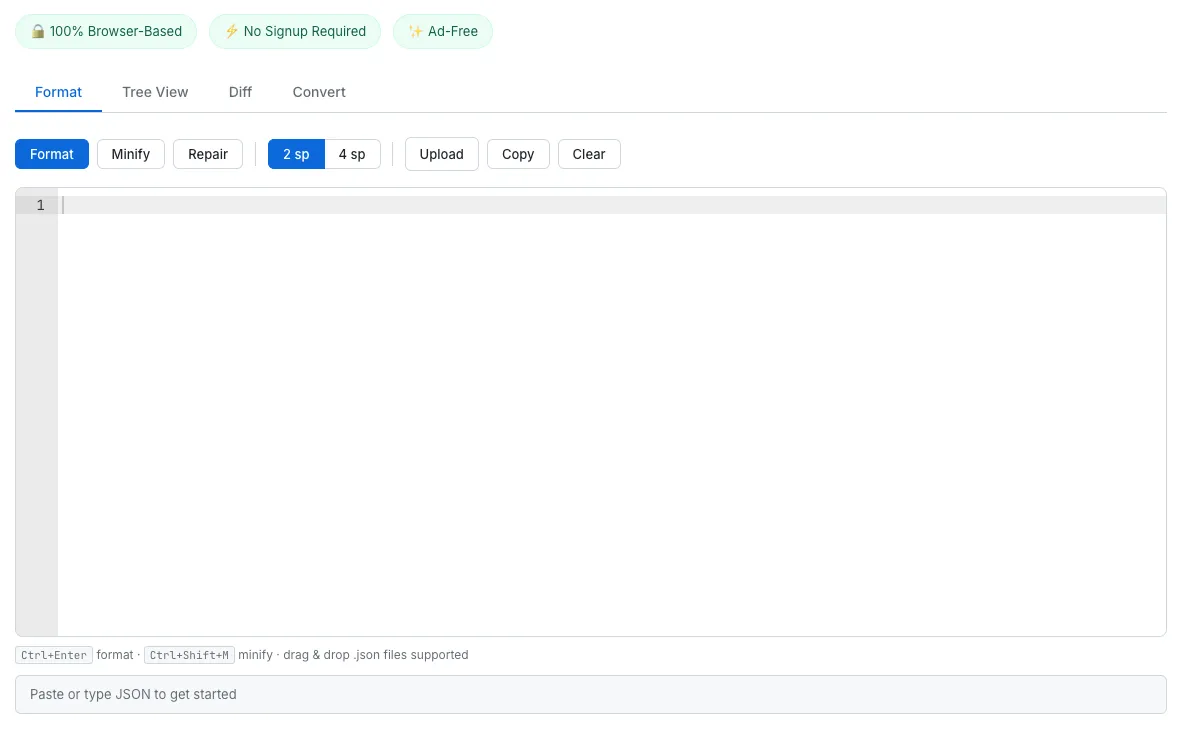
The SudoTool JSON Formatter — paste JSON and get instant formatting, validation, and repair. Ad-free, and your data never leaves the browser.
Here's what it offers:
- Format & Minify — Beautify JSON with customizable indentation (2 or 4 spaces), or compress it to a single line
- Validate — Instantly detect syntax errors with clear, human-readable messages and line numbers
- Repair — Automatically fix trailing commas, single quotes, unquoted keys, and JavaScript comments
- Tree View — Explore JSON as a collapsible, color-coded tree with type indicators and item counts
- Diff — Compare two JSON documents side by side and see additions, deletions, and changes at every level
- Convert — Transform JSON into YAML or CSV instantly
No signup, no installation, no cost. Just open it in your browser and paste.
JSON Beyond the Basics: JSON-LD, JSON Schema, and JSONL
JSON's success has spawned a family of related formats. Each extends JSON's simplicity to serve a specific purpose.
JSON-LD — JSON for Google Search
JSON-LD (JSON for Linking Data) is the format for representing structured data on web pages. Google officially recommends it as the easiest way to implement structured data, enabling rich results in search — star ratings, recipe details, FAQ dropdowns, event information, and more.
For example, adding this JSON-LD to a recipe page:
"@context": "https://schema.org",
"@type": "Recipe",
"name": "Classic Chocolate Chip Cookies",
"prepTime": "PT15M",
"cookTime": "PT12M",
"recipeYield": "24 cookies"
}
...can make cooking time and yield appear directly in Google search results. If you want to improve your website's SEO, JSON-LD is essential knowledge.
JSON Schema — The Blueprint for APIs
JSON Schema defines the structure and constraints of JSON data. Rules like "this field must be a string," "this field is required," and "this number must be greater than zero" are expressed in JSON itself. It's used to design APIs, validate form inputs, and establish data contracts between teams.
JSONL (JSON Lines) — The Standard for AI Training Data
JSONL places one JSON object per line, making it ideal for streaming large datasets. Unlike a regular JSON array, a JSONL file can be processed line by line without loading the entire file into memory.
{"prompt": "Summarize this:", "completion": "Résumez ceci:"}
JSONL is widely adopted as the required format for fine-tuning language models — both by OpenAI and by Google's Vertex AI platform.
Frequently Asked Questions
What does JSON stand for?
JSON stands for JavaScript Object Notation. It was inspired by JavaScript's object syntax, but it's a language-independent data format. Python, Java, C#, Go, and virtually every modern programming language can parse and generate JSON.
Is JSON a programming language?
No. JSON is a data format. It doesn't contain logic — no conditionals, no loops, no functions. Its sole purpose is to structure and transport data.
Can JSON have comments?
Standard JSON does not support comments. If you need comments in config files, consider JSONC (the format VS Code uses for its settings), JSON5, or YAML.
What is the difference between JSON and JavaScript?
JSON borrows JavaScript's object syntax, but it is not a subset of JavaScript. JSON doesn't allow functions, undefined, or comments, and all keys must be double-quoted strings. JavaScript objects have none of these restrictions.
Why can't JSON use single quotes?
The JSON specification requires double quotes as the only string delimiter. This strict rule eliminates ambiguity and ensures that every parser in every language interprets JSON identically. No edge cases, no inconsistencies.
What is JSON-LD and why does Google use it?
JSON-LD is a format for embedding structured data in web pages. Google uses it to display rich results in search — star ratings, recipes, FAQs, and more. It's implemented by dropping a <script> tag into your HTML, so there's no need to modify the page's visible content.
Is JSON better than XML?
It depends on the use case. For web APIs, mobile apps, and microservices, JSON is more concise and faster to parse. For complex document structures, SOAP protocols, and legacy enterprise systems, XML still has advantages like namespace support and rich schema validation. For modern web development, JSON is the standard choice.
What happens if my JSON has a trailing comma?
The JSON parser will throw a syntax error and refuse to parse the entire document. Trailing commas are one of the most common JSON errors. The SudoTool JSON Formatter's Repair feature can automatically remove trailing commas for you.
Start Working with JSON Today
JSON is the lingua franca of the internet. A format so simple that its grammar fits on a business card has come to power web APIs, NoSQL databases, AI training data, and even Google search results. Its success comes from an almost paradoxical source: it does less than the alternatives, and that's exactly why it works.
If this guide helped you understand JSON, the next step is to work with it directly. Whether you need to format a minified API response, validate a configuration file, or compare two JSON documents — the SudoTool JSON Formatter handles it all, right in your browser.
Curious about the technical decisions behind this tool? Read how and why we built a JSON Formatter that keeps your data private — from the security breach that inspired it to the structural diff algorithm under the hood.