Why I Built a Fake Data Generator When Mockaroo Already Exists
The problem wasn't generating fake data. It was hitting a row limit at the worst possible moment.
If you've ever needed test data, you've probably used Mockaroo. Define a schema, generate 1,000 rows, download a CSV. It takes a minute. It's a good tool. So why would anyone build another fake data generator?
Because on a Friday afternoon, I needed 100,000 rows for a performance test, and Mockaroo's free plan caps you at 1,000. The paid plan is $50 a month. Paying $50 for something that's essentially Math.random() in a loop felt wrong. So I built my own.
What's Wrong With Existing Fake Data Generators
Mockaroo isn't the only option. There's generatedata.com, json-generator.com, and dozens of others. I tried them all, and they share the same frustrations.
Row limits. Most free tools cap you at 100 or 1,000 rows. That's enough for a quick demo, but not for real development work. Pagination testing, bulk import validation, performance benchmarks — these require thousands or tens of thousands of records. Hit the limit, and you're either paying or writing a script from scratch.
Server dependency. Most generators send your schema to a server, process it there, and return the result. That means your field definitions — which often mirror your actual database schema — are being transmitted to someone else's infrastructure. If you're working on anything remotely sensitive, that's uncomfortable at best and a compliance issue at worst.
Slow interfaces. Some tools reload the page every time you add a field. Others have so many options crammed into each row that the form becomes a wall of dropdowns. When you're iterating on a schema — adding a column, removing another, changing a type — even small delays compound into real friction.
Limited export formats. JSON works, but you also need CSV for spreadsheets, SQL for databases, and sometimes TSV for quick terminal work. Most tools support one or two formats and leave you to convert the rest yourself using yet another tool.
What I Built Instead
A browser-based fake data generator that runs entirely on the client. No server receives your schema. No account is required. No row limit beyond what your browser can handle — up to 50,000 rows in a single generation.
The interface is split into two panels. The left panel is a schema builder where you define fields — name, data type, and null percentage. The right panel shows the generated data instantly, with tabs for switching between Table, JSON, CSV, SQL, and TSV output. Copy to clipboard or download as a file with one click.
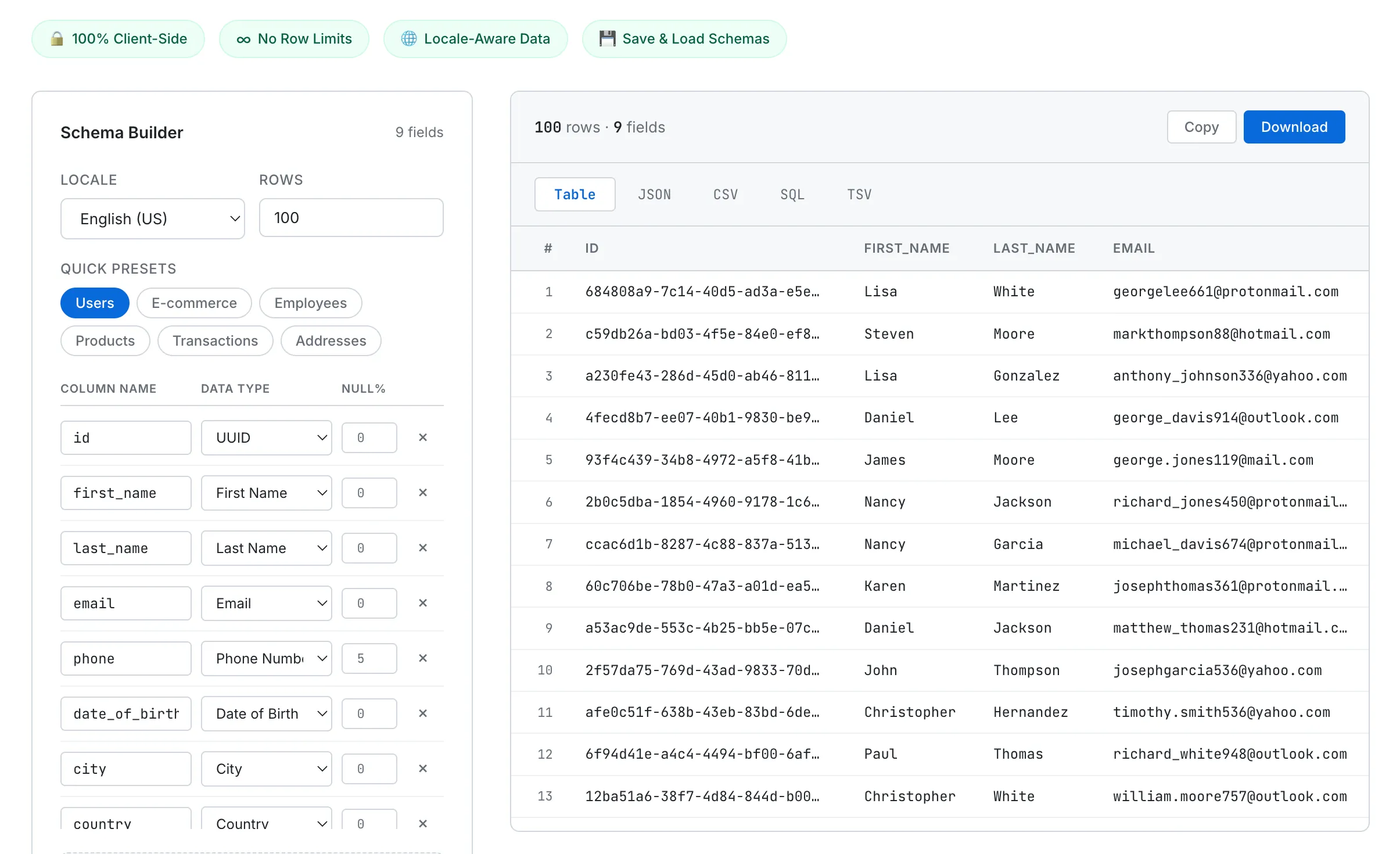
The Schema Builder on the left defines your fields. Generated data appears instantly on the right in your chosen format.
34 Data Types That Actually Matter
I didn't want a tool that just spits out random strings. I wanted data types that mirror what developers actually use in production schemas. The generator supports 34 types across six categories:
Person — first name, last name, full name, email, phone number, username, gender, and date of birth. Names are locale-aware, so selecting Korean gives you Korean names, not anglicized placeholders.
Address — street, city, state, ZIP code, country, latitude, and longitude. These also change with locale. Select English (US) and you get US cities and five-digit ZIP codes. Select English (UK) and you get British cities and postal codes like SW1A 1AA.
Business — company name, job title, and department.
Technical — UUID, IPv4, IPv6, MAC address, URL, and User Agent string. UUIDs follow the RFC 4122 v4 specification. IP addresses and MAC addresses use proper formatting with valid ranges.
Finance — credit card number, currency code, and IBAN. Credit card numbers are generated with valid Luhn checksums, which means they pass format validation in test environments without being real card numbers.
Other — number, boolean, date, datetime, hex color, paragraph, sentence, and custom regex. The custom regex type deserves its own section.
Quick Presets for Common Schemas
Adding fields one by one is tedious when you just need "a users table" or "an orders table." So I built six presets that populate the schema builder with a single click: Users, E-commerce, Employees, Products, Transactions, and Addresses.
Click "Users" and you instantly get nine fields: id (UUID), first_name, last_name, email, phone, date_of_birth, city, country, and created_at. From there, add or remove fields as needed. Starting from a preset and tweaking is always faster than starting from scratch.
The E-commerce preset gives you order_id, customer_name, email, phone, address, city, zip, amount, credit_card, and order_date — everything you'd need to test an order management system. Each preset was designed around schemas I've actually needed in real projects.
Technical Choices
A few decisions shaped how this tool was built.
No external libraries. Like every tool on SudoTool, this is built with plain HTML, CSS, and JavaScript. I could have used Faker.js for data generation, but I wanted zero dependencies. Every generator function is hand-written. Names come from curated arrays per locale. Emails are composed from name combinations, random numbers, and domain names. UUIDs follow the spec character by character. The entire tool is a single HTML file with no build step.
Custom regex engine. The "custom regex" data type lets you define a pattern like [A-Z]{3}-[0-9]{4}, and the generator produces strings matching that pattern. I wrote a lightweight parser that supports character classes, repetition with {n} syntax, alternation with (option1|option2), and literal text. This is useful for generating order numbers, product codes, license plates, or any domain-specific identifier format that doesn't fit a standard type.
Smart SQL type mapping. When you export as SQL, the tool auto-generates a CREATE TABLE statement with appropriate column types. Number and boolean fields become INTEGER. Currency amounts and coordinates become DECIMAL(12,2). Dates become DATE. UUIDs become UUID. Everything else defaults to TEXT. INSERT statements are batched in groups of 100 rows, so you can import large datasets into a database without hitting statement-length limits.
Async generation for large datasets. Generating 50,000 rows synchronously would freeze the browser. The generation loop yields to the main thread every 50 milliseconds, keeping the UI responsive. The table preview shows up to 500 rows to avoid DOM bloat, while the full dataset is available via download. This approach is similar to how the JSON Formatter handles large files — process in chunks, preview a subset, and offer the complete output as a file.
Null Percentages — A Small Feature That Matters
Real-world data is messy. Phone numbers are missing. City fields are blank. Dates are null. Most fake data generators fill every cell perfectly, which makes them useless for testing how your application handles incomplete data.
Each field in the schema builder has a null percentage slider. Set the phone field to 5% and roughly 5 out of every 100 rows will have a null phone value. Set date_of_birth to 20% and one in five records won't have a birthday.
This is particularly useful for frontend testing — does your table component handle null gracefully, or does it crash? Does your search filter work when half the email addresses are missing? These are the kinds of bugs you only catch with data that has holes in it, and most generators don't give you that option.
Locale-Aware Data
The generator supports five locales: English (US), English (UK), Korean, Japanese, and German. Switching the locale changes more than just names. Phone number formats adapt — US numbers use (###) ###-####, Korean numbers use 010-####-####, UK numbers use +44 7### ######. ZIP codes follow each country's format. Cities and streets are drawn from locale-specific datasets.
This matters when you're building software for international users. Testing with only English data means you'll miss layout issues with longer German names, encoding problems with Korean characters, or formatting bugs with non-US phone numbers. Generating locale-appropriate test data from the start catches these issues early.
What's Next
Five locales isn't enough. Spanish, French, Chinese, and Portuguese are on the list. The locale data is stored as simple arrays, so adding new languages is straightforward — the harder part is researching the correct phone number formats, postal code patterns, and common names for each region.
I also want to add field relationships. Right now, each field is generated independently, so you might get a row where first_name is "Lisa" but the email is "matthew_thomas231@hotmail.com." Generating emails based on the name in the same row would produce more realistic test data. It's not a blocker for most use cases, but it would be a nice improvement.
Try It
Pick a preset or build your schema from scratch. Set the row count, choose your locale, and hit generate. Switch between Table, JSON, CSV, SQL, and TSV to get the format you need. Download the file or copy it to your clipboard. No signup, no row limits, no server.
If you're tired of hitting row limits or writing one-off scripts to generate test data, give it a try. It's what I use every time I need to populate a database, test an import flow, or build a demo with realistic-looking data.